
Implementing GraphQL Authorization: A Practical Guide
Learn how to implement scalable authorization in GraphQL. Simplify RBAC and Permissions management with step-by-step instructions.

- Share:

Loading
2938 Members
 Join Permit's Slack
GraphQL authorization ensures users have the right permissions to access parts of your GraphQL API. It's important for controlling read, write, or update access based on user roles and permissions. Built-in solutions can be complex, especially as your app grows.
To simplify authorization, we’ll use Permit.io, which simplifies managing permissions as your app scales. We will build a simple task management app to demonstrate how to use this tool for authorization in a scalable way.
Let's begin!
The built-in authorization solutions in GraphQL can handle basic scenarios, but they often encounter several issues as your application's complexity increases.
To solve these issues, we will use Permit.io, which addresses these limitations by providing a more comprehensive and flexible solution to managing permissions:
Using Permit allows you to ensure a secure, scalable, and efficient approach to GraphQL authorization, helping your team prioritize delivering exceptional features and experiences to your users rather than spending time developing and maintaining an authorization system from scratch.
This tutorial explains how to build a simple Task management app with different permissions. For example, users can create, delete, and update their posts.
To get started with the Apollo server with Permit.io, first create a Node.js project. To save time, we will use a Node.js starter template with GraphQL.
Make sure you have Node.js and npm installed on your machine. You can download them from the official Node.js website.
Open up your code editor and clone the Node.js starter template by running the following code
git clone <https://github.com/Arindam200/node-apollo-starter.git>
This will create a new Nodejs project with the Apollo server.
After creating the project, navigate to the project directory by running the following command:
cd node-apollo-starter
Next, we'll install the required dependencies by running the following command:
npm install
Create a .env file in the root directory to store the secret keys for our projects.
PERMIT_API_KEY=your_api_key
With that, our Node.js project setup is done.
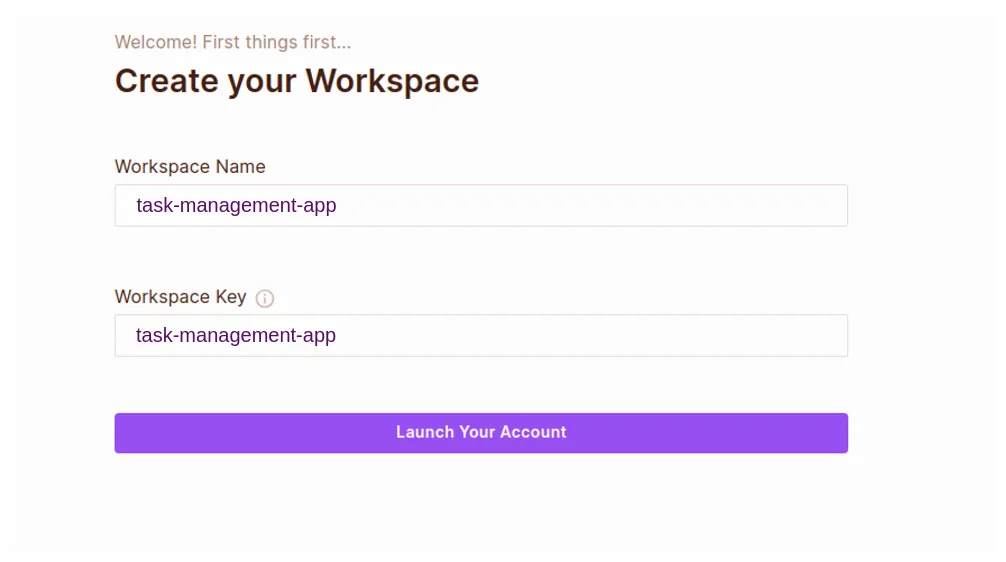
Create a Resource, and add the following details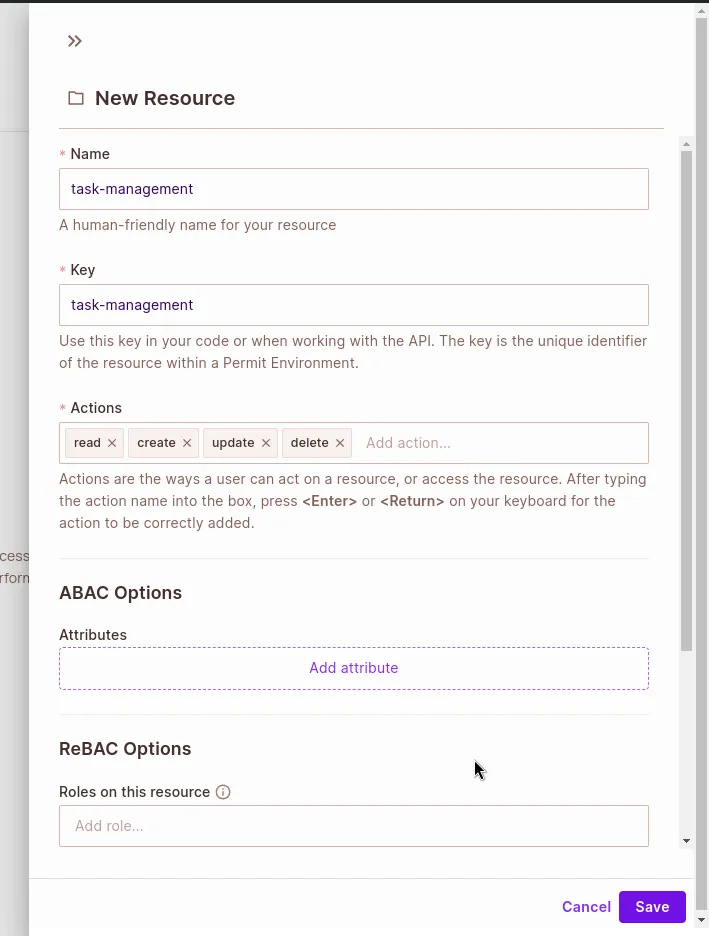
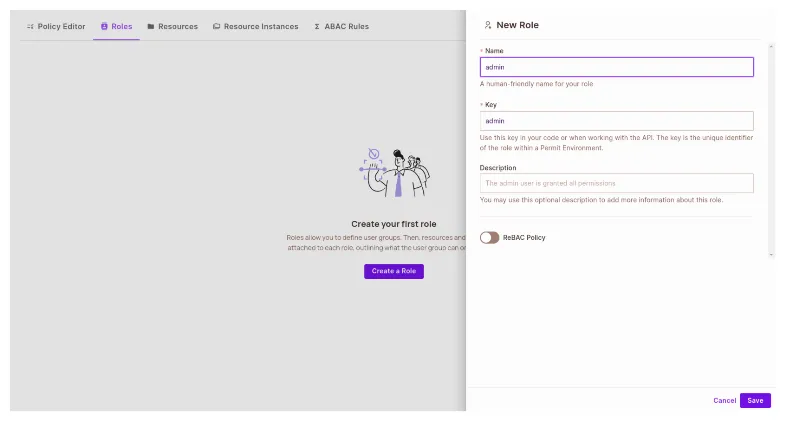
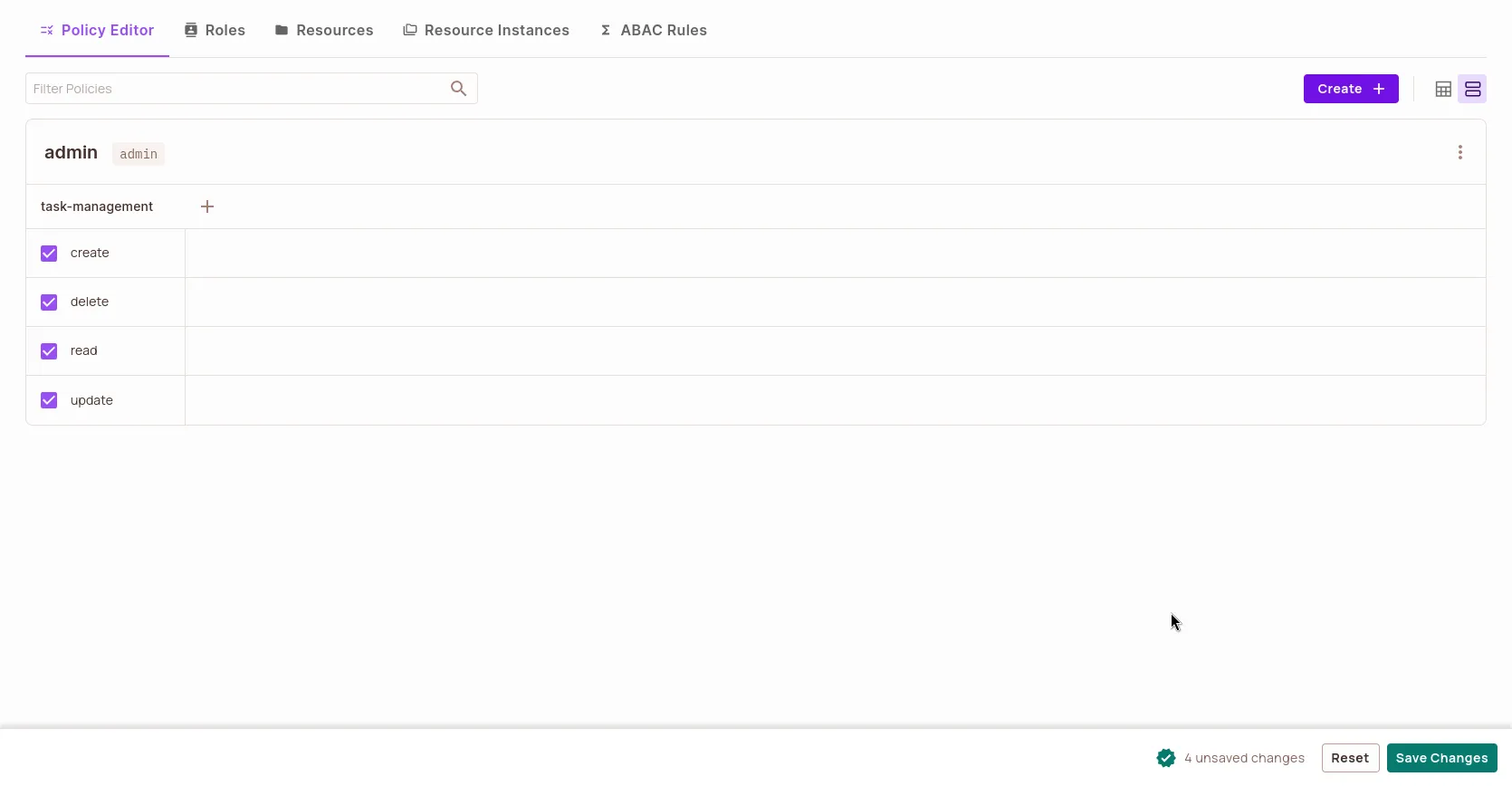
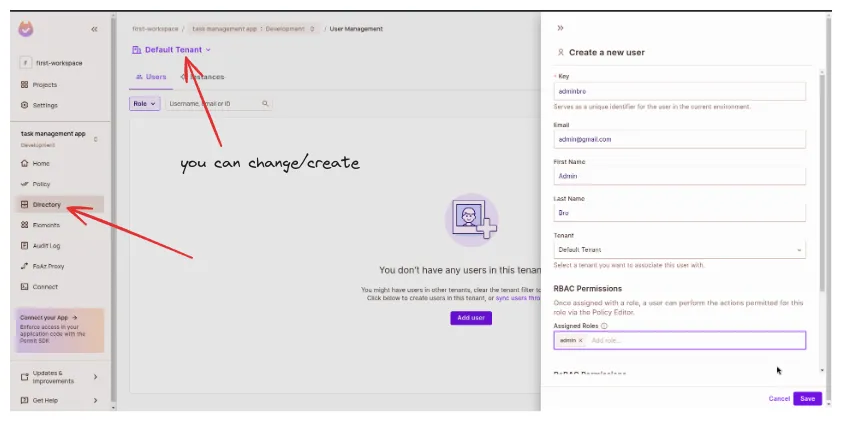
Get your environment API Key and add the environment key to the .env file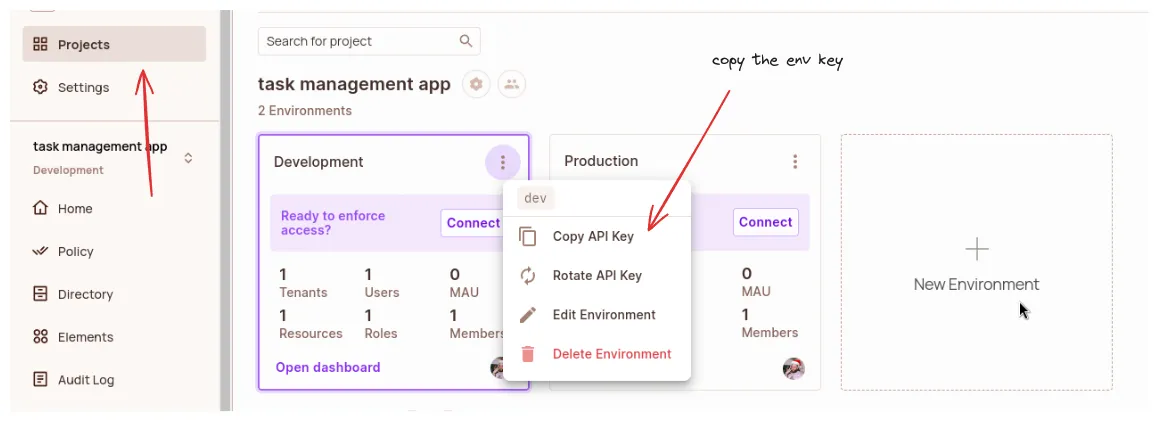
Install permit.io SDK:
npm install permitio
Create Apollo Server Instance:
Create a new file into src/index.js, and set up a basic Apollo Server instance that will run on port 4001 Permit.io Initialization: Initialize Permit.io using your API key stored in the environment variable PERMIT_API_KEY.
Apollo Server Configuration:
typeDefs: The GraphQL schema definitions are imported from schema.js.
resolvers: Resolvers imported from taskResolvers.js to handle GraphQL operations.
context: Async function to set up the context for each GraphQL operation. It retrieves user information from the request using Permit.io and makes it available in the context.
Server Setup: Start the Apollo Server instance on port 4001
import { ApolloServer } from '@apollo/server';
import { startStandaloneServer } from '@apollo/server/standalone';
import Permit from 'permitio';
import taskResolvers from './resolvers/taskResolvers.js';
import typeDefs from './schema.js';

const { Permit: PermitClass }=Permit;

const permit=new PermitClass({
// don't forget to add key to the .env file
		pdp: '<https://cloudpdp.api.permit.io>',
    token: process.env.PERMIT_API_KEY,
});

const server=new ApolloServer({
    typeDefs,
    resolvers: taskResolvers,
    context: async ({ req }) => {
        const user=await permit.getUserFromRequest(req);
        return { user, permit };
    },
});

startStandaloneServer(server, {
    listen: { port: 4001 },
}).then(({ url }) => {
    console.log(`🚀 Server ready at ${url}`);
});
This setup ensures that your Apollo Server is integrated with Permit.io for handling user authentication and authorization, providing a secure and scalable GraphQL API for managing tasks.
4. Create a new file named src/schema.js and define a GraphQL schema that collects tasks with title and description
In this schema:
id, title, and optional description.tasks) and a specific task by its id (task).createTask), updating (updateTask), and deleting (deleteTask) tasks.import gql from 'graphql-tag';
const typeDefs=gql`
type Task {
id: ID!
title: String!
description: String
}
type Query {
tasks: [Task]
task(id: ID!): Task
}
type Mutation {
createTask(title: String!, description: String): Task
updateTask(id: ID!, title: String, description: String): Task
deleteTask(id: ID!): Boolean
}
`;
export default typeDefs;
This schema will serve as the foundation for your GraphQL API to manage tasks, allowing you to perform CRUD operations effectively.
5. Create a file for resolvers src/taskResolvers.js and write logic for the API.
Query Resolvers (Query object):
permit.check(user, 'read', 'task') to verify if the user has permission to read tasks.tasks, it checks permissions before returning the task.Mutation Resolvers (Mutation object):
title and description. Before adding to the tasks array, it verifies if the user is authorized to create tasks.id. It checks permissions (permit.check(user, 'update', 'task')) and modifies the task's title and description if provided.id. It ensures the user has the authorization to delete tasks (permit.check(user, 'delete', 'task')) before removing it from the tasks array.Authorization (permit.check):
permit.check(user, operation, resource) is used to validate if the user (user) has permission (operation) to perform actions on a resource (task).Error Handling:
throw new Error(...)) when tasks are not found (updateTask, deleteTask) or when authorization fails (permit.check).import { tasks } from '../models/task.js';
const taskResolvers = {
Query: {
// Fetch all tasks
tasks: async (_, __, { user, permit }) => {
// Check if user is authorized to read tasks
await permit.check(user, 'read', 'task');
return tasks;
},
// Fetch a specific task by ID
task: async (_, { id }, { user, permit }) => {
// Check if user is authorized to read tasks
await permit.check(user, 'read', 'task');
return tasks.find(task => task.id === id);
},
},
Mutation: {
// Create a new task
createTask: async (_, { title, description }, { user, permit }) => {
// Check if user is authorized to create tasks
await permit.check(user, 'create', 'task');
const newTask = { id: String(tasks.length + 1), title, description };
tasks.push(newTask);
return newTask;
},
// Update an existing task
updateTask: async (_, { id, title, description }, { user, permit }) => {
// Check if user is authorized to update tasks
await permit.check(user, 'update', 'task');
const task = tasks.find(task => task.id === id);
if (!task) throw new Error('Task not found');
if (title !== undefined) task.title = title;
if (description !== undefined) task.description = description;
return task;
},
// Delete a task by ID
deleteTask: async (_, { id }, { user, permit }) => {
// Check if user is authorized to delete tasks
await permit.check(user, 'delete', 'task');
const index = tasks.findIndex(task => task.id === id);
if (index === -1) throw new Error('Task not found');
tasks.splice(index, 1);
return true;
},
},
};
export default taskResolvers;
This setup encapsulates CRUD operations for tasks within GraphQL resolvers, enforcing authorization checks to control data access based on user permissions.
6. Create another file named src/task.js to manage your task data. In this file, you will define a model (tasks) that contains dummy task objects. This will allow you to read and manipulate task data effectively within your application.
The tasks model will serve as a placeholder for task data, providing a simple way to mock task information for development and testing purposes. By defining this model, you can easily create, read, update, and delete (CRUD) task entries in a structured format.
Here is an example of how you might structure the tasks model with some initial dummy data:
export const tasks = [
    { id: '1', title: 'Task 1', description: 'Description for task 1' },
    { id: '2', title: 'Task 2', description: 'Description for task 2' },
];
In this example, each task object contains an ID, title, and description. You can expand or modify this structure based on your application's specific requirements. This setup will facilitate the management of task data as you develop and test your application.
You can also check the complete example in the GitHub repository.
In this tutorial, we have learned how to set up Permit.io & configure Apollo Server in a basic Nodejs app, including schema definitions and resolver implementations. Following these instructions will help you manage permissions effectively and streamline your authorization logic.
Now you can enhance your applications' security by applying it to real use cases.
Implementing both ReBAC and ABAC is always recommended, as they provide more fine-grained authorization for your applications. We suggest that you continue reading our learning materials, which cover topics such as the differences between RBAC and ABAC and how to add ABAC to your application using Permit.io.
Want to learn more about implementing authorization? Have questions? Join our **Slack community to reach out to us**.

DevRel @Pieces, Frontend Developer Technical Writer, Content Creator