
Django Authorization: An Implementation Guide
Learn how to implement advanced Django authorization with Relationship-Based Access Control (ReBAC) and Attribute-Based Access Control (ABAC) in this step-by-step implementation guide.

- Share:

Loading
2938 Members
 Join Permit's Slack
Django is a powerful framework for building web applications, widely used for everything from content management systems to complex data-driven platforms. A key aspect of many Django applications is managing who can access what, ensuring that users only interact with resources they are authorized to use.
By default, Django provides a basic role-based permission system, where users are assigned roles such as admin, editor, or viewer. While this works for simple applications, it’s just not enough for most production-ready applications today.
To handle these challenges, a more fine-grained authorization approach is required. Instead of relying solely on predefined roles, we need to consider both user relationships and dynamic attributes when determining access.
This guide explores how to implement Relationship-Based Access Control (ReBAC) and Attribute-Based Access Control (ABAC) - more advanced and fine-grained authorization models in Django by using Permit.io. We’ll cover how to:
We will do this by building an E-Learning demo application, where access to courses is determined by relationships (like instructor, student, or owner) and different factors such as course level, enrollment status, and progress.
Before we get into it, let’s cover some basic concepts -
ReBAC extends RBAC by considering relationships between identities and resources. The consideration of these relationships allows us to create authorization policies for hierarchical structures.
It is easiest to visualize ReBAC as a graph, with each node on the graph representing a resource or identity and each edge representing a relationship.
Graph-based authorization systems are perfect for mapping hierarchies and nested relationships. Because they can manage high volumes of data while maintaining consistency, these systems also prove effective in large-scale environments.
Think of any file-sharing system. Suppose you create a folder and share it with someone:
This approach provides fine-grained access control, ensuring users have the right level of access based on their role within a specific context rather than a broad, system-wide role assignment.
ABAC extends traditional role-based access control by evaluating attributes—properties of users, resources, and the environment—when making authorization decisions. Instead of relying solely on predefined roles, ABAC allows for more fine-grained control by considering multiple attributes.
Each access request is evaluated based on a set of attributes, which can include:
Because ABAC enforces policies based on multiple attributes rather than static roles, it ensures granular control over access permissions.
With a basic understanding of these two concepts, let’s dive into the implementation.
To get right into the practical part of this tutorial, we have set up a starter project for the demonstrations. First, clone the starter project by running the following command:
git clone <https://github.com/icode247/elearning_platform>
cd elearning_platform
Then create a new virtual environment and install dependencies with the following commands:
python -m venv env
source env/bin/activate  # On Windows: env\\Scripts\\activate
pip install -r requirements.txt
Before writing any application code, let's configure our authorization model in Permit.io. We'll set up both relationship-based (ReBAC) and attribute-based (ABAC) policies using the Permit.io dashboard.
To get started, let's set up a new project and get credentials to connect Permit SDK to our project. To do that, follow the steps:
elearning in the dashboard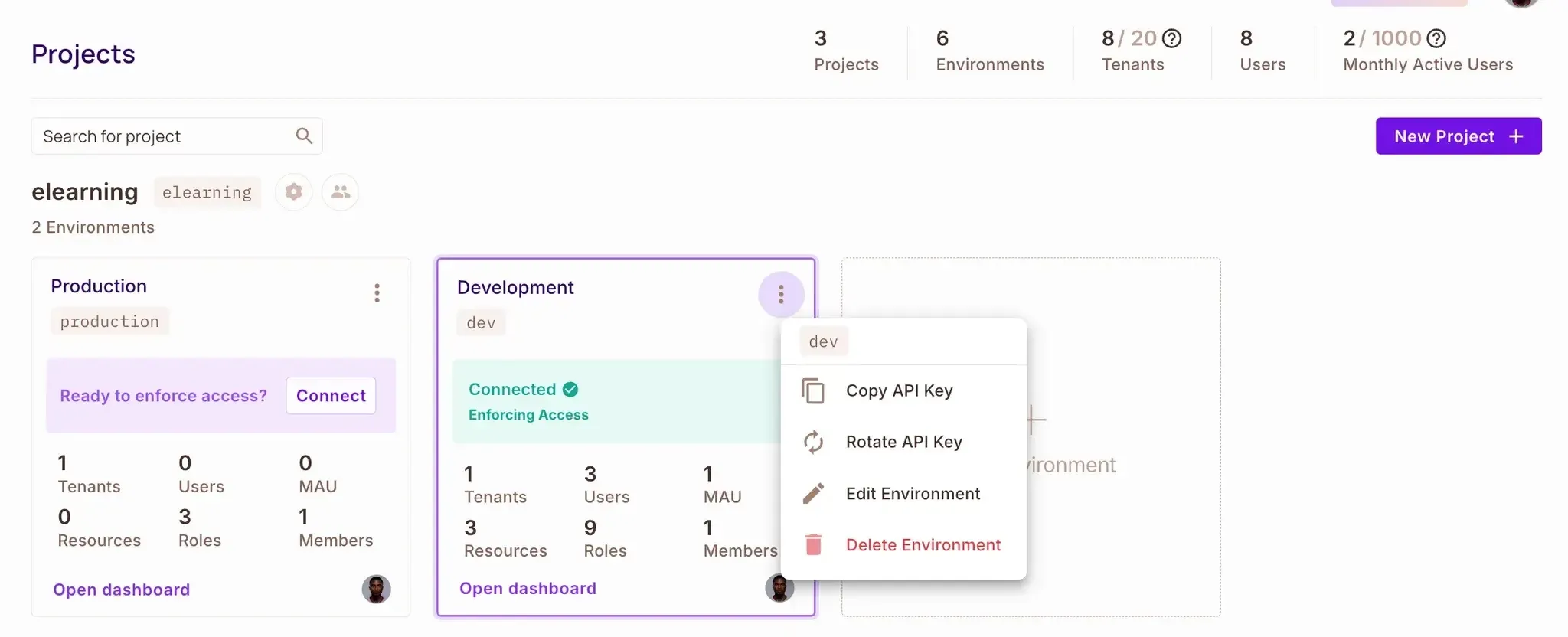
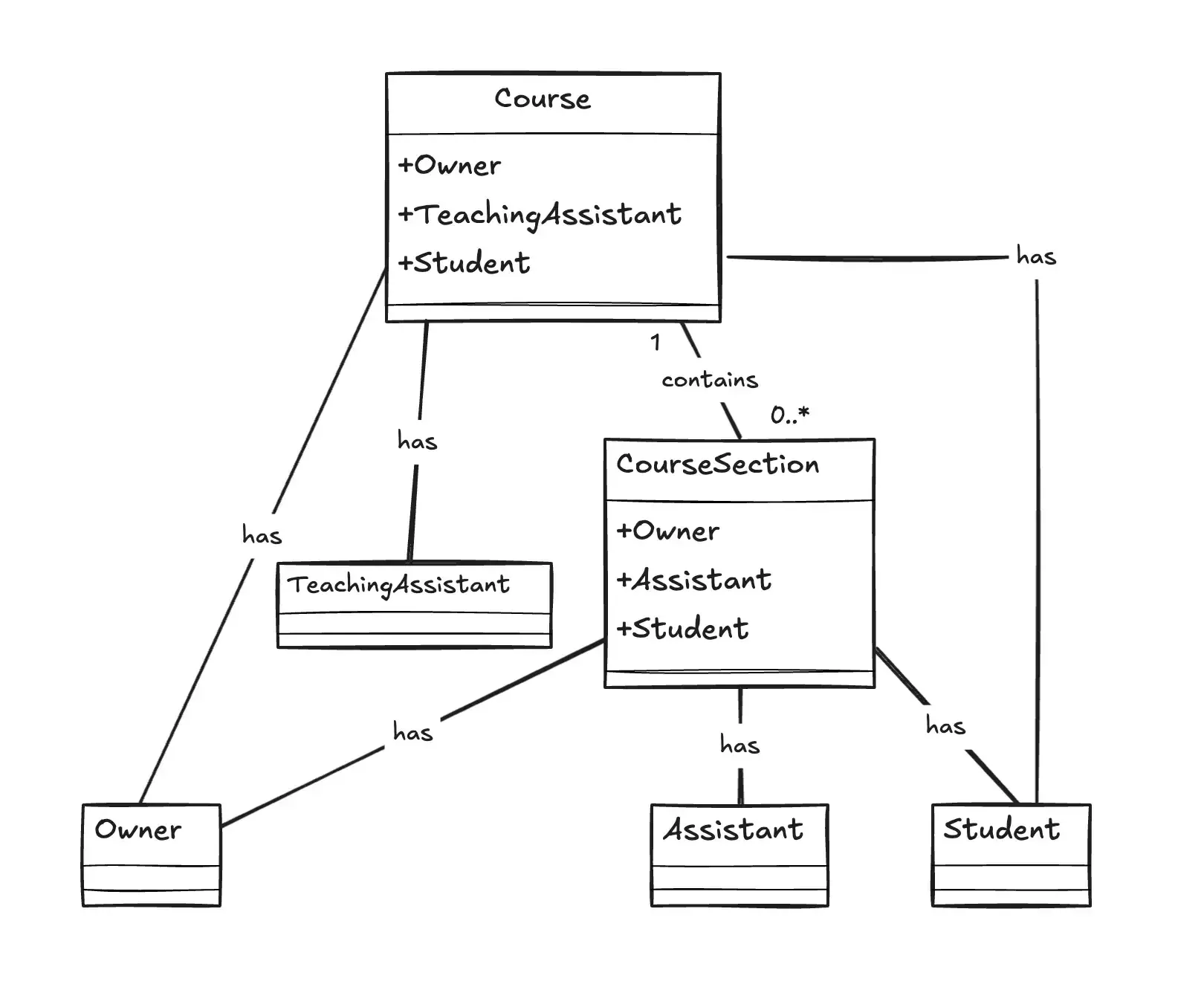
Before we dive into configuring Permit.io, let’s take a moment to understand our ReBAC model structure and how it applies to our e-learning platform.
In our platform, we’ll focus on two main types of resources:
Each resource comes with specific actions that users can perform:
For Course:
view: See course details and content.edit: Modify course information.delete: Remove the course.enroll: Join the course as a student.For CourseSection:
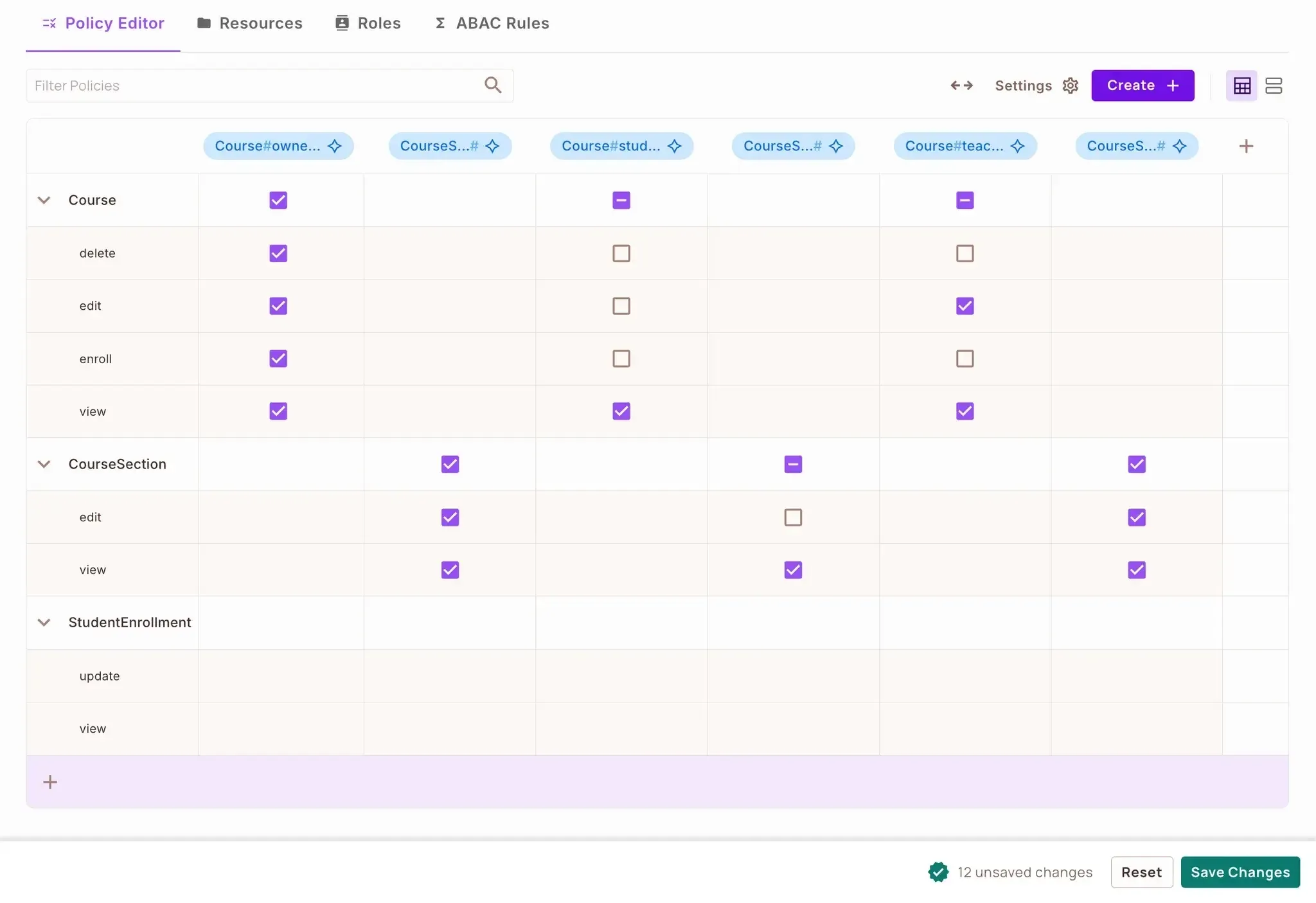
view: Access section content.edit: Modify section information.We’ll define different roles to determine what level of access a user has:
Since our platform follows a hierarchical structure, we’ll define relationships that shape access:
To keep things streamlined, we’ll set up automatic role inheritance:
This ReBAC model creates a graph-like permission structure where access propagates from courses to their sections, mimicking the natural hierarchy of an educational platform.
Let’s proceed to setting our ReBAC rules in Permit.io. We’ll do that using the following steps below:
First, let's define all our resources and their relationships. For ReBAC, we need to create all the necessary resources before we can establish relationships between them. Follow the steps below to create your ReBAC policy:
Navigate to Policy → Resources
Click on Add Resource and create these resources in order:
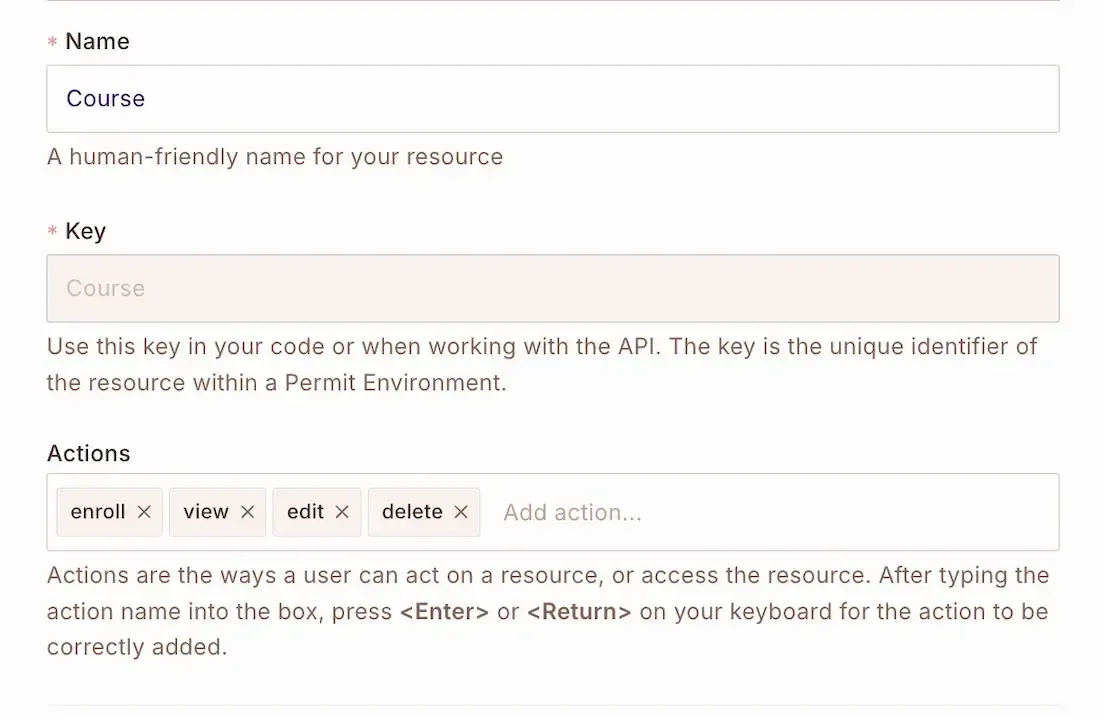
Create a Course resource with view, edit, delete, and enroll actions.
Add a CourseSection resource with view, and edit actions.
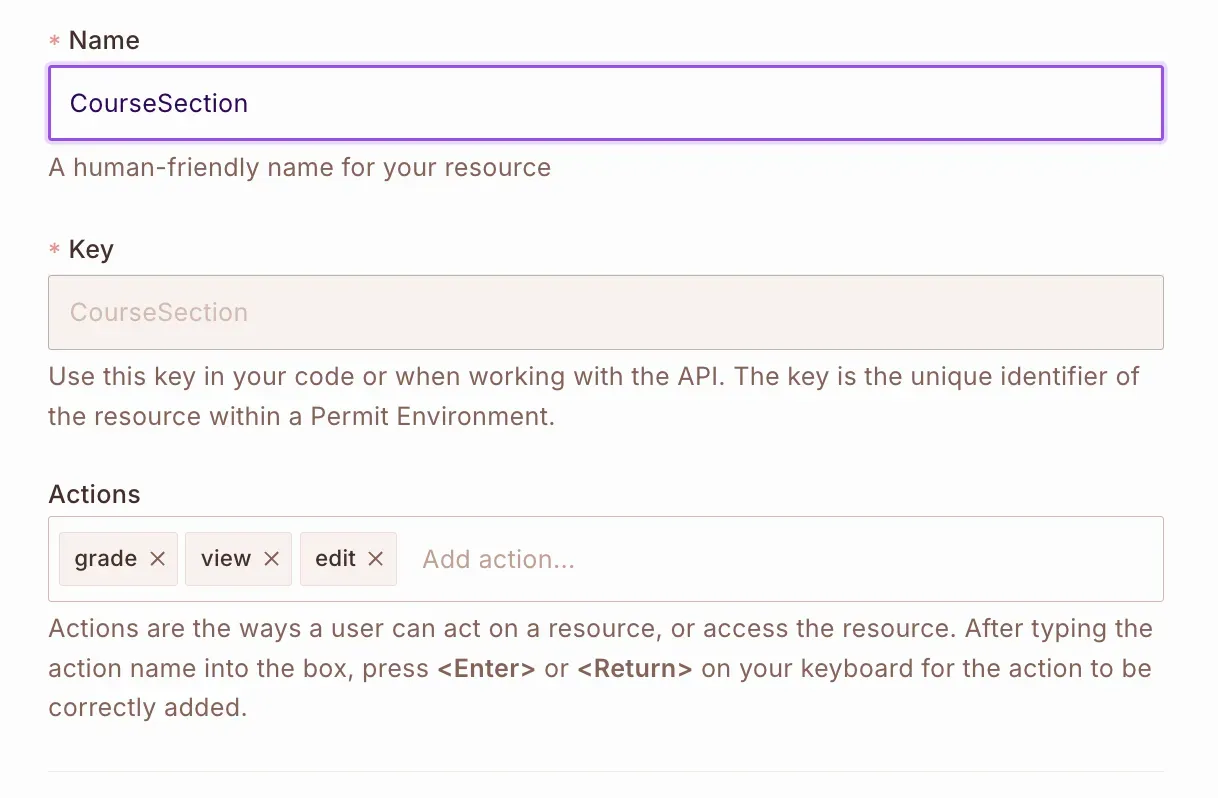
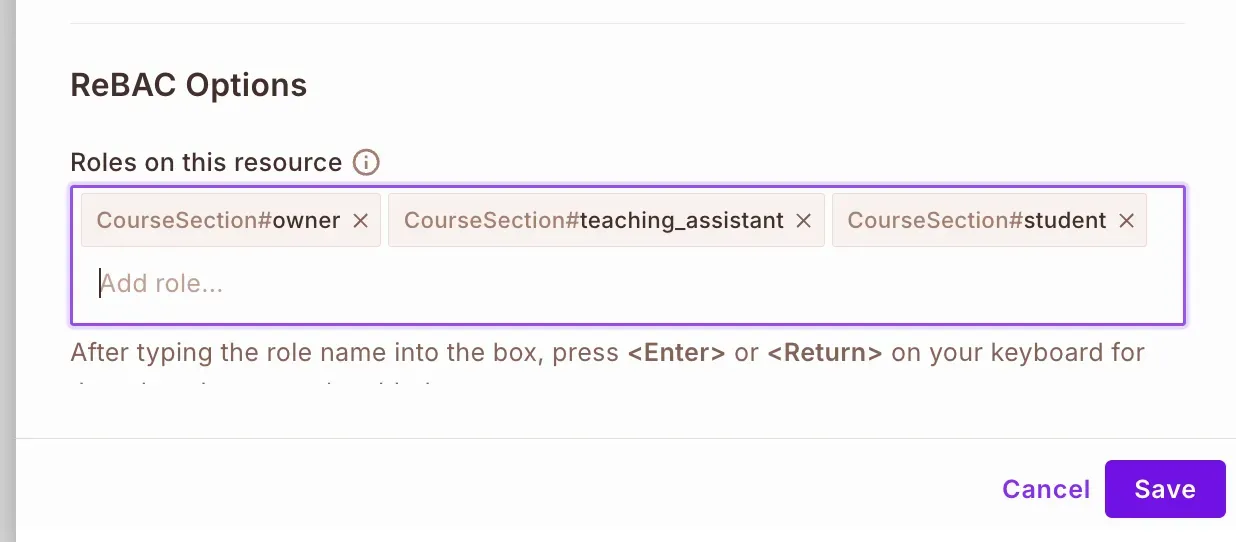
For each resource, we need to set up resource roles specific to that resource, under "ReBAC Options":
owner, teaching_assistant and student resource roles to the Course and CourseSection resources:
Now define the relationships between Course and CourseSection resources. Open the Course resource to edit and under Relations, set up the following relationships:
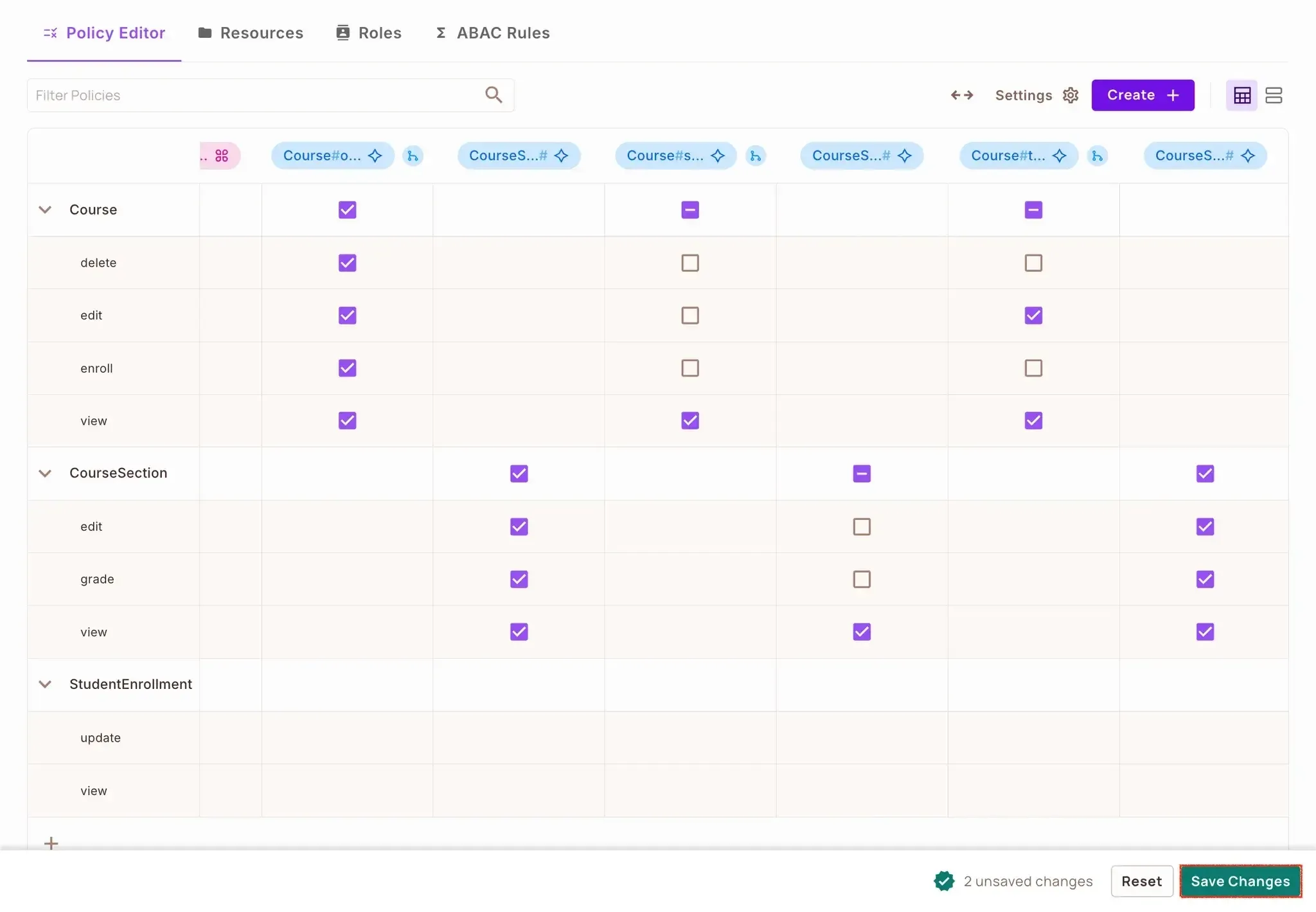
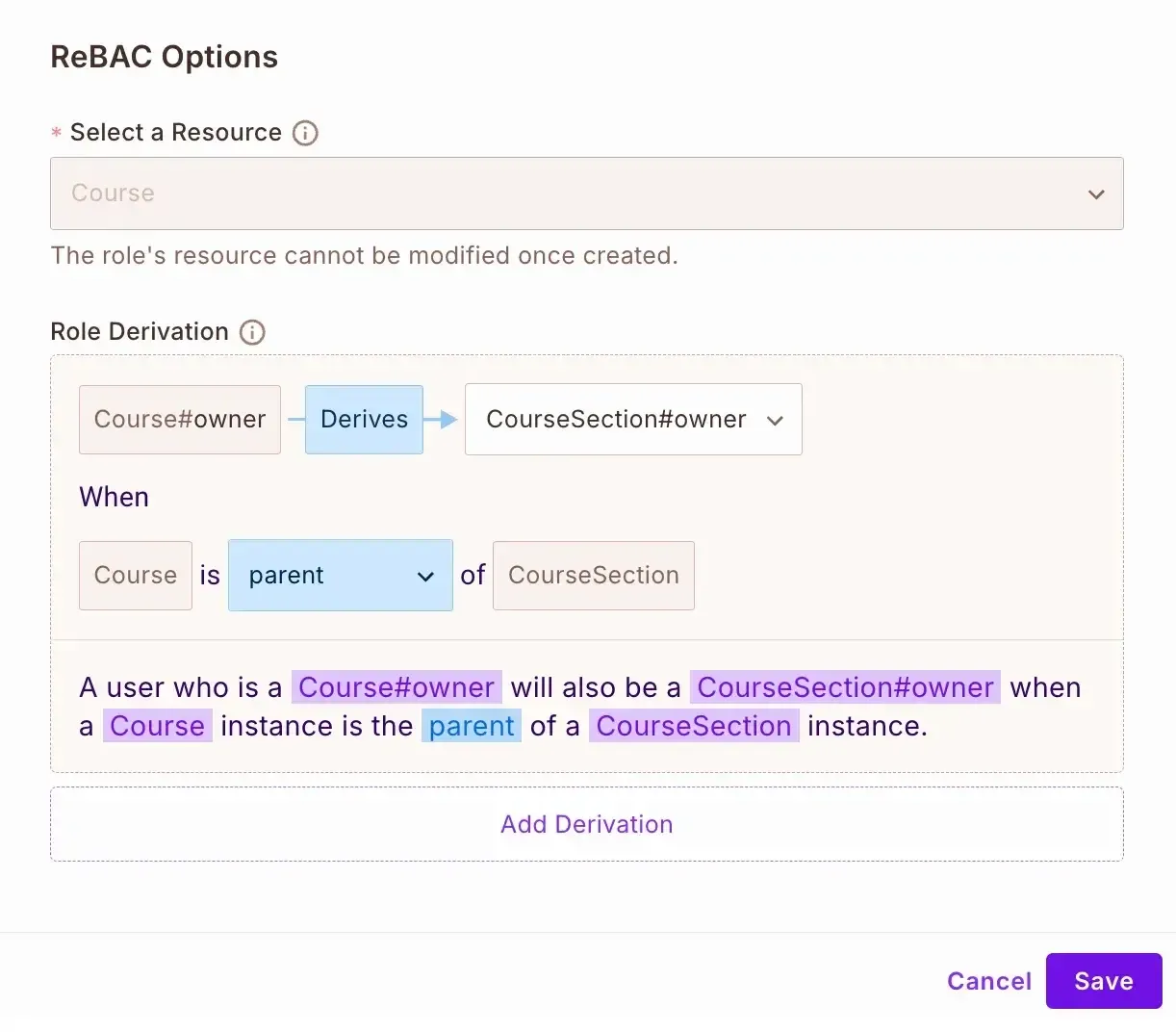
Now we'll configure how roles are derived based on parent-child relationships:
For Course Owner derivation: A user who is a course#owner will also be a coursesection#owner when
a course instance is the parent of a coursesection instance.
For Teaching Assistant derivation: A user who is a course#teaching_assistant will also be a coursesection#assistant when
a course instance is the parent of a coursesection instance.
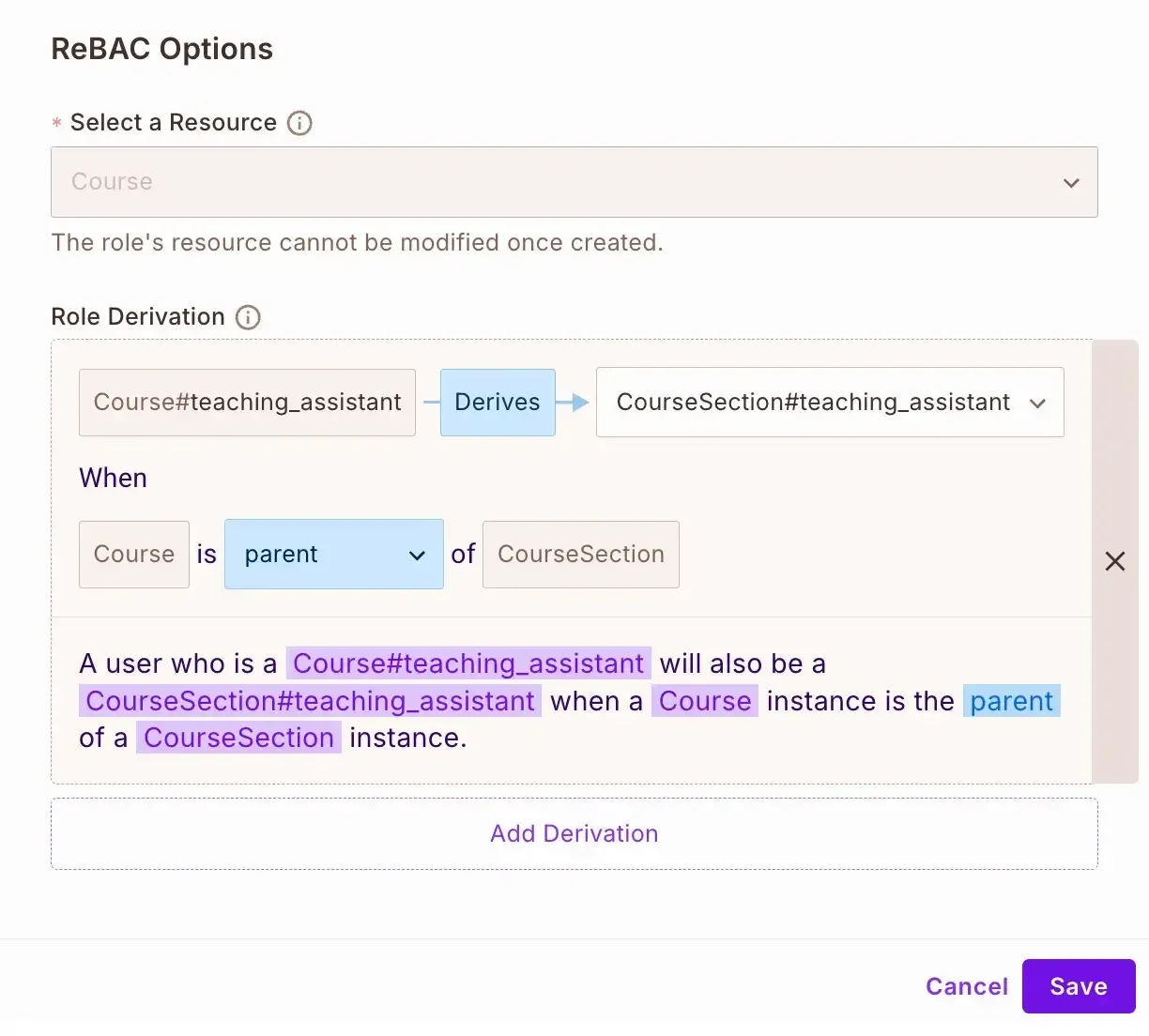
This setup follows the parent-child relationship pattern where permissions flow from the parent resource (Course) to the child resource (CourseSection) based on the user's role on the parent.
Now that we have configured our ReBAC policies in Permit.io, let's implement them in our Django application.
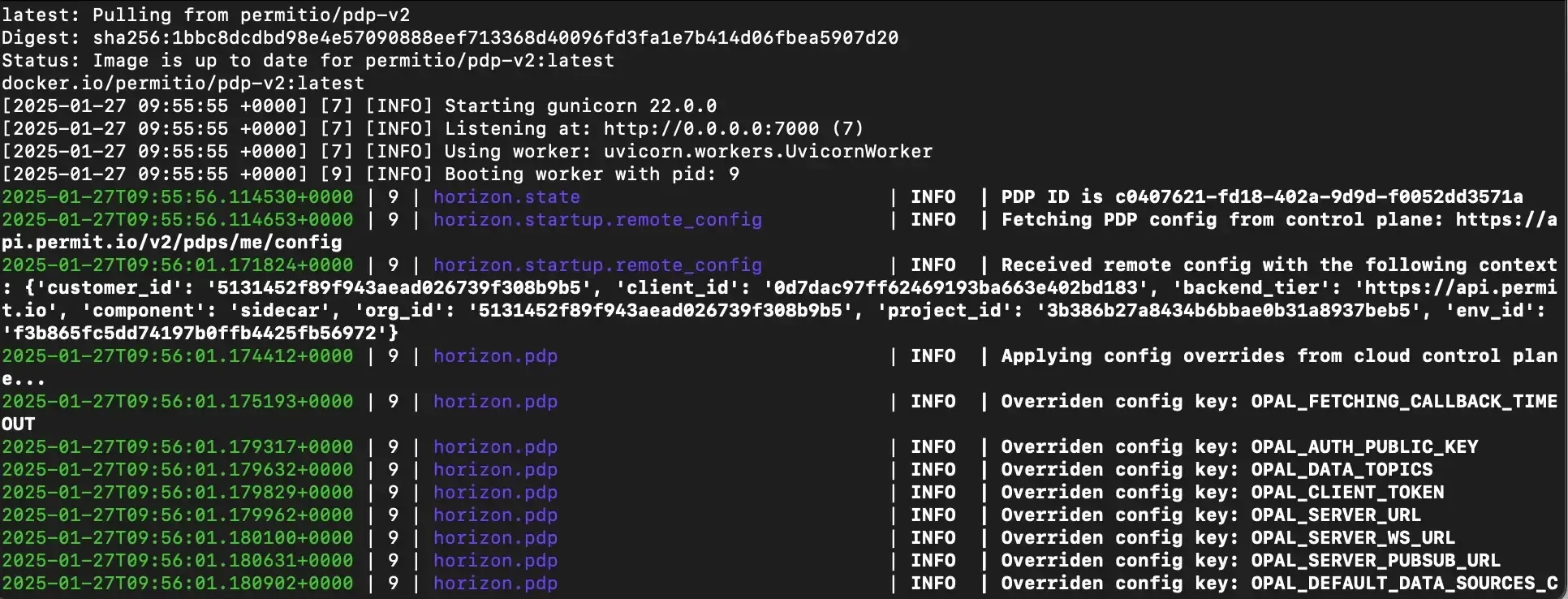
To run the Permit's ReBAC and ABAC policies, you need to set up your own local PDP container. Do that by running the command below:
docker pull permitio/pdp-v2:latest
docker run -it -p 7766:7000 \\
    --env PDP_DEBUG=True \\
    --env PDP_API_KEY=<YOUR_API_KEY> \\
    permitio/pdp-v2:latest
If you do not have Docker installed yet, click here to install Docker. Because you need it for the above command.
Replace <YOUR_API_KEY> in the above command with your Permit API Key.
First, create a new file named permit_client.py in your Django project root:
# elearning/permit_client.py
from permit import Permit
from dotenv import load_dotenv
import os

load_dotenv()

permit = Permit(
    pdp=os.getenv("PERMIT_PDP_URL"),
    token=os.getenv("PERMIT_SDK_KEY")
)
This code initializes the Permit SDK, which is our bridge between Django and Permit.io’s authorization services. We use environment variables for secure credential management, so our PDP URL and API key stay safe.
Then update the .env file in the project root and add your Permit.io credentials:
PERMIT_PDP_URL=your_pdp_url
PERMIT_SDK_KEY=your_sdk_key
Create a middleware.js file in the courses directory to enforce our ReBAC policies:
# courses/middleware.py
from functools import wraps
from django.http import HttpResponseForbidden
from elearning_platform.permit_client import permit
from asgiref.sync import async_to_sync

    def decorator(view_func):
        @wraps(view_func)
        def _wrapped_view(view_instance, request, *args, **kwargs):
            course_id = kwargs.get('pk')
            if course_id:
                try:
                    course = Course.objects.get(id=course_id)
                except Course.DoesNotExist:
                    return HttpResponseForbidden("Course not found")

                permitted = async_to_sync(permit.check)(
                    str(request.user.id),
                    action,
                    {
                        "type": "Course",
                        "instance": f"Course:{course.id}"
                    }
                )
            else:
                permitted = async_to_sync(permit.check)(
                    str(request.user.id),
                    action,
                    {
                        "type": "Course",
                        "instance": "Course"
                    }
                )

            if not permitted:
                return HttpResponseForbidden("Access denied")

            return view_func(view_instance, request, *args, **kwargs)
        return _wrapped_view
    return decorator
Now update the views in the courses/views.py file to use our permission middleware:
# courses/views.py
from rest_framework import viewsets, permissions
from rest_framework.response import Response
from rest_framework.decorators import action
from django.shortcuts import get_object_or_404
from django.db import models
from .models import Course, StudentEnrollment
from .serializers import CourseSerializer, CourseSectionSerializer, StudentEnrollmentSerializer
from .middleware import check_permit_permission

class CourseViewSet(viewsets.ViewSet):
    serializer_class = CourseSerializer
    permission_classes = [permissions.IsAuthenticated]

    def get_queryset(self):
        user = self.request.user
        if user.is_staff:
            return Course.objects.all()
        return Course.objects.filter(
            models.Q(instructor=user) |
            models.Q(studentenrollment__student=user)
        ).distinct()

    @check_permit_permission(action="view")
    def list(self, request):
        queryset = self.get_queryset()
        serializer = self.serializer_class(queryset, many=True)
        return Response(serializer.data)

    @check_permit_permission(action="view")
    def retrieve(self, request, pk=None):
        queryset = self.get_queryset()
        course = get_object_or_404(queryset, pk=pk)
        serializer = self.serializer_class(course)
        return Response(serializer.data)

    @check_permit_permission(action="edit")
    def create(self, request):
        serializer = self.serializer_class(data=request.data)
        if serializer.is_valid():
            serializer.save(instructor=request.user)
            return Response(serializer.data, status=201)
        return Response(serializer.errors, status=400)

    @check_permit_permission(action="edit")
    def update(self, request, pk=None):
        queryset = Course.objects.filter(instructor=request.user)
        course = get_object_or_404(queryset, pk=pk)
        serializer = self.serializer_class(course, data=request.data)
        if serializer.is_valid():
            serializer.save()
            return Response(serializer.data)
        return Response(serializer.errors, status=400)

    @check_permit_permission(action="delete")
    def destroy(self, request, pk=None):
        queryset = Course.objects.filter(instructor=request.user)
        course = get_object_or_404(queryset, pk=pk)
        course.delete()
        return Response(status=204)

    @check_permit_permission(action="enroll")
    @action(detail=True, methods=['post'])
    def enroll(self, request, pk=None):
        course = get_object_or_404(Course, pk=pk)
        enrollment, created = StudentEnrollment.objects.get_or_create(
            student=request.user,
            course=course
        )
        serializer = StudentEnrollmentSerializer(enrollment)
        return Response(serializer.data, status=201 if created else 200)
Create a new signal to sync users and their roles with Permit.io when they're assigned to courses or when a student enrolls in a course:
# courses/signals.py
from django.db.models.signals import post_save
from django.dispatch import receiver
from asgiref.sync import async_to_sync
from .models import Course, StudentEnrollment
from elearning_platform.permit_client import permit

@receiver(post_save, sender=Course)
def sync_course_to_permit(sender, instance, created, **kwargs):
    if created:
        try:
            # First sync the instructor user
            async_to_sync(permit.api.users.sync)({
                "key": str(instance.instructor.id),
                "email": instance.instructor.email,
                "first_name": instance.instructor.first_name,
                "last_name": instance.instructor.last_name
            })

            # Then assign the role
            async_to_sync(permit.api.users.assign_role)({
                "user": str(instance.instructor.id),
                "role": "owner",
                "resource_instance": f"Course:{instance.id}",
                "tenant": "default"
            })

        except Exception as e:
            print(f"Error syncing with Permit.io: {str(e)}")

@receiver(post_save, sender=StudentEnrollment)
def sync_enrollment_to_permit(sender, instance, created, **kwargs):
    if created:
        try:
            # Sync the student user
            async_to_sync(permit.api.users.sync)({
                "key": str(instance.student.id),
                "email": instance.student.email,
                "first_name": instance.student.first_name,
                "last_name": instance.student.last_name
            })

            # Assign student role
            async_to_sync(permit.api.users.assign_role)({
                "user": str(instance.student.id),
                "role": "student",
                "resource_instance": f"Course:{instance.course.id}",
                "tenant": "default"
            })

        except Exception as e:
            print(f"Error syncing student with Permit.io: {str(e)}")
Our signals.py implementation makes sure that our authorization system remains in sync with Django’s database. The signals automatically update Permit.io’s permission graph when new courses are created or relationships change. It defines resource roles for instructors and keeps parent-child relationships between courses and their sections.
Update the apps.py to register the signals:
# courses/apps.py
from django.apps import AppConfig

class CoursesConfig(AppConfig):
    default_auto_field = 'django.db.models.BigAutoField'
    name = 'courses'

    def ready(self):
        from . import signals
To make our authorization system more dynamic, we’re layering ABAC (Attribute-Based Access Control) on top of ReBAC. This means permissions won’t just depend on relationships but also on real-time user and resource attributes.
We’ll track key details about each user to tailor their access:
For each course, we’ll track:
We’ll define two main condition sets to enforce rules:
Our access rules will take all these factors into account. For example, to view a course, a user must meet these conditions:
Similar rules will apply to enrolling in a course.
Now that we have an understanding of what our ABAC rule will do and how it will be implemented, let’s processed by actually configuring our ABAC rules in Permit.io in the following steps:
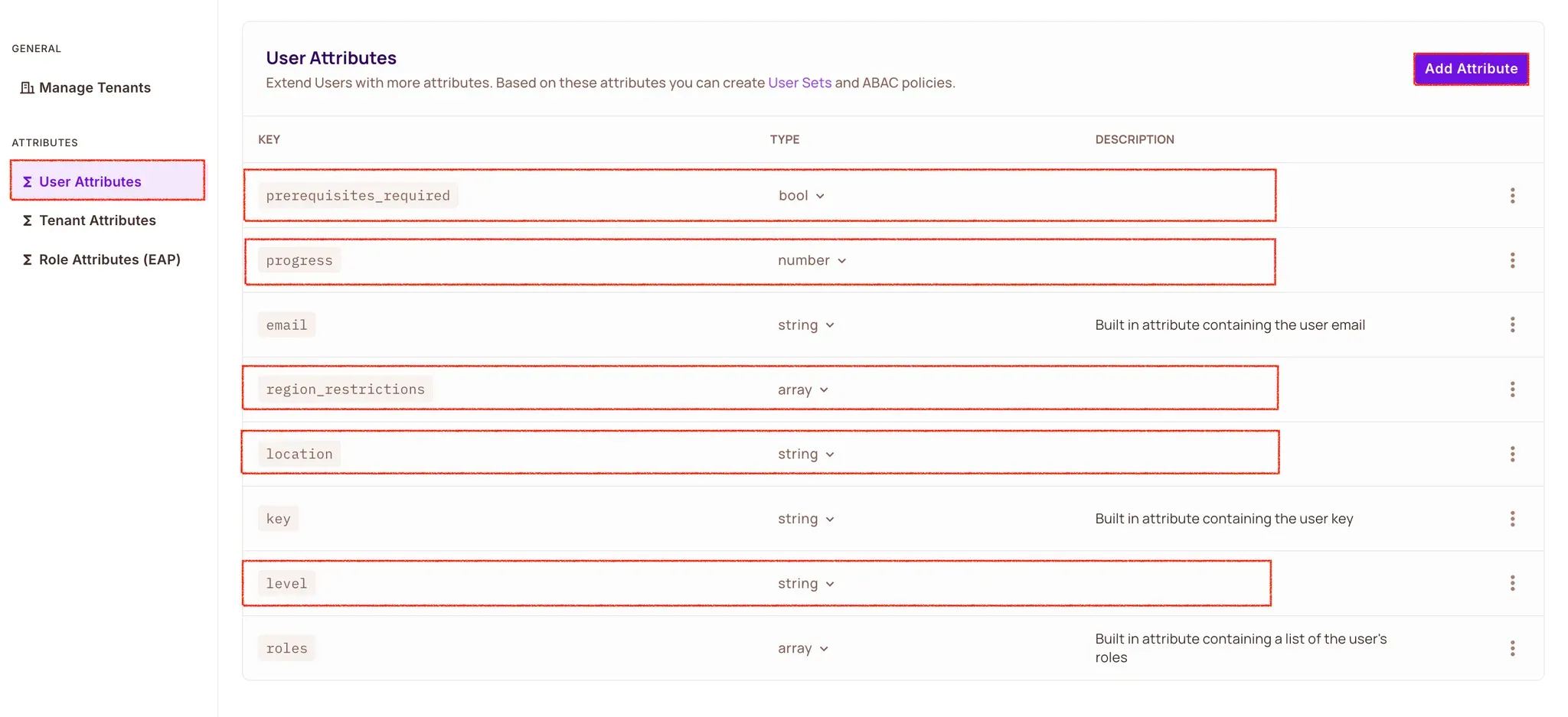
Navigate to Directory → Users → Settings → User Attributes and add the following user attributes:
{
    "level": {
        "type": "string",
    },
    "region_restrictions": {
        "type": "array",
    },
    "prerequisites_required": {
        "type": "boolean"
    },
    "progress": {
        "type": "number",
    },
    "location": {
        "type": "string"
    }
}
Now let's configure the condition sets with the following steps:
Navigate to Policy → ABAC Rules
Click "Create Condition Sets"
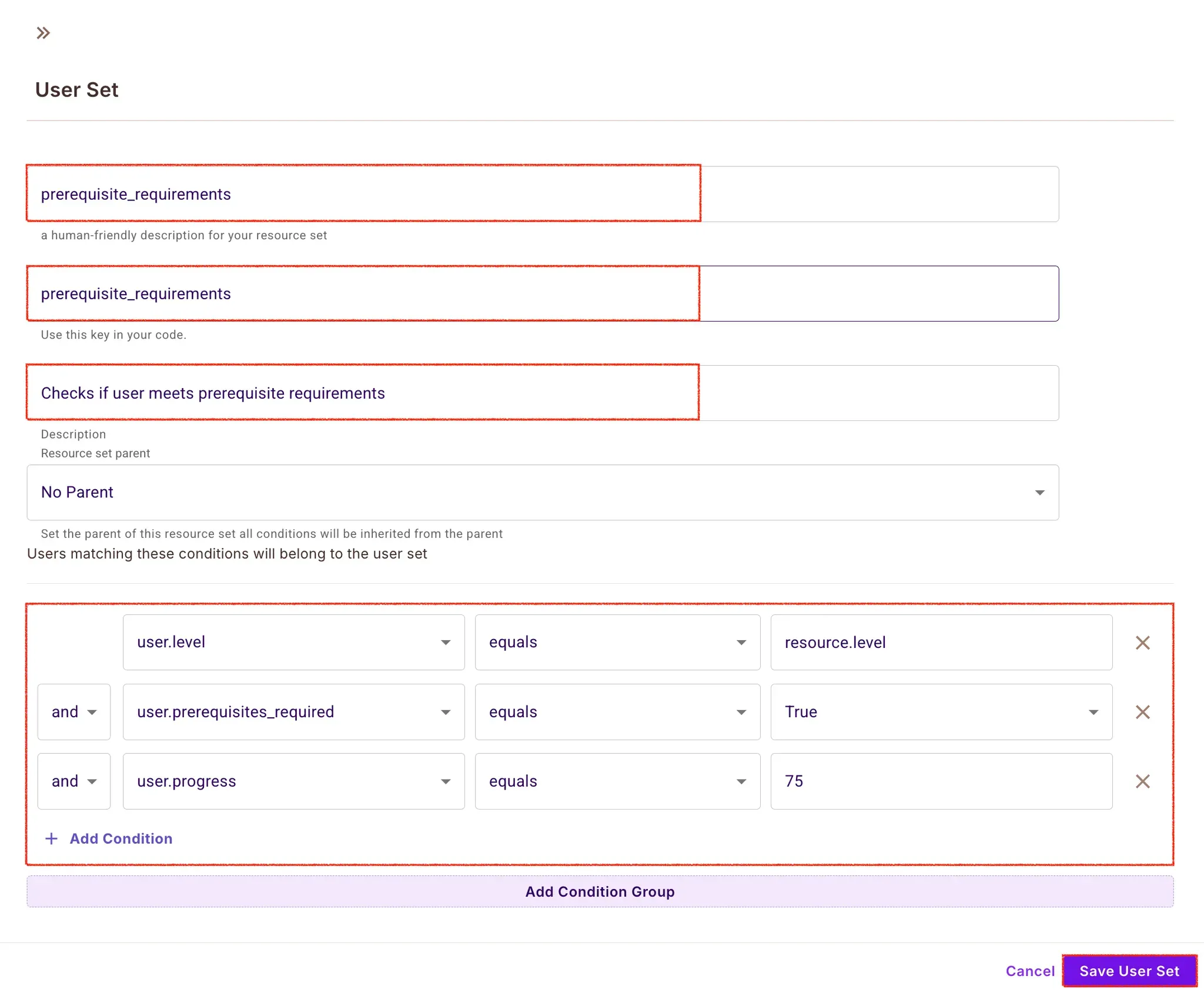
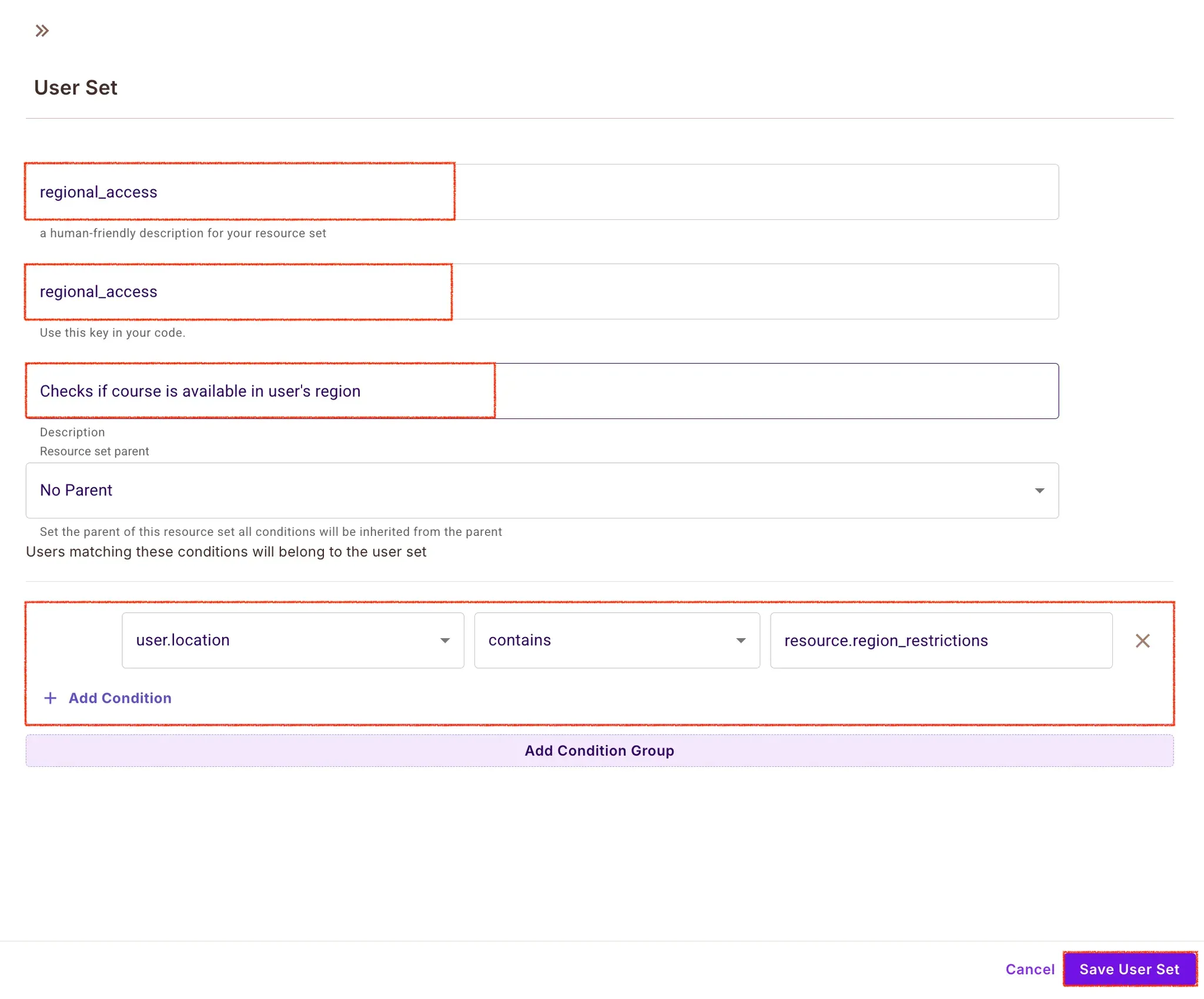
Create the following sets for course access control:
For prerequisite requirements:
For regional access:
Now that we have our resources, user attributes, and ABAC rules defined:
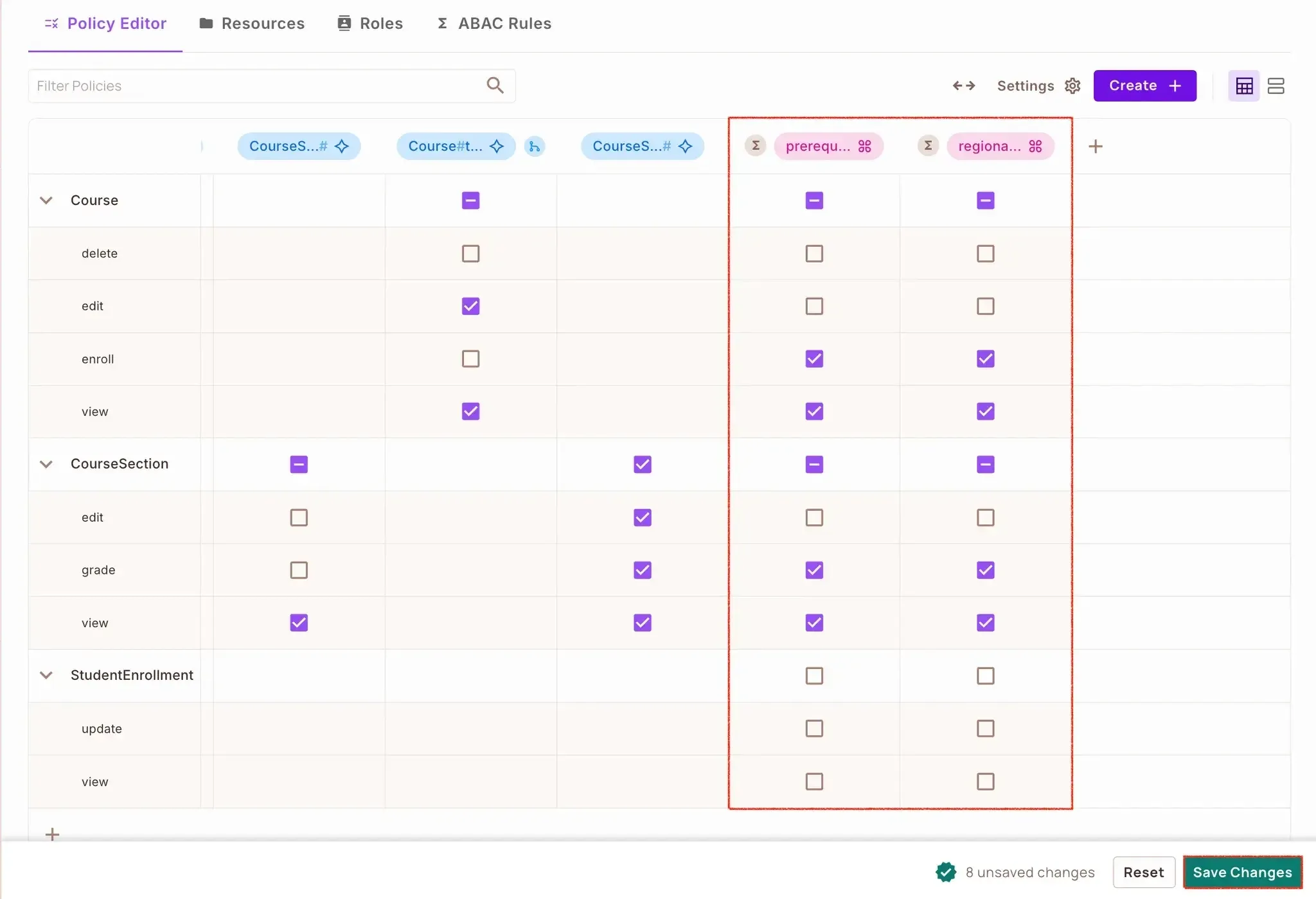
Navigate to the Policy tab
You'll see a policy created for the course resource
Click the dropdown for the course resource
For each action we defined earlier (view, edit, delete, enroll), we can now specify access based on our ABAC rules:
For theviewaction:
For the enroll action enforce the same conditions as view
First, update the courses/middleware.py file to create Permission Middleware:
# courses/middleware.py
def check_course_attributes(action):
    def decorator(view_func):
        @wraps(view_func)
        def _wrapped_view(view_instance, request, *args, **kwargs):
            course_id = kwargs.get('pk')
            course = Course.objects.get(id=course_id)

            enrollment = StudentEnrollment.objects.filter(
                student=request.user,
                course=course
            ).first()

            context = {
                "user": {
                    "key": str(request.user.id),
                    "attributes": {
                        "level": course.level,
                        "progress": enrollment.progress if enrollment else 0,
                        "prerequisites_required": course.prerequisites.exists(),
                        "location": request.headers.get('X-User-Location')
                    }
                },
                "action": action,
                "resource": {
                    "type": "Course",
                    "instance": f"Course:{course.id}",
                    "attributes": {
                        "level": course.level,
                        "region_restrictions": course.region_restrictions
                    }
                }
            }

            permitted = async_to_sync(permit.check)(**context)

            if not permitted:
                return HttpResponseForbidden("Access denied")

            return view_func(view_instance, request, *args, **kwargs)
        return _wrapped_view
    return decorator
Our middleware.py implements two crucial decorators: check_permit_permission and check_course_attributes. The first is Relation Based Access Control (ReBAC) which checks if the users have the right relationship (e.g. instructor or student) with courses. The second verifies dynamic conditions such as course prerequisites and regional restrictions using Attribute Based Access Control (ABAC). Permit.io's asynchronous permission checks are handled using Django's async_to_sync.
Then update the course views in the views.py file to use our ABAC middleware:
#...
    @check_permit_permission(action="view")
    @check_course_attributes(action="view")
    def retrieve(self, request, pk=None):
        course = get_object_or_404(Course, pk=pk)
        serializer = self.serializer_class(course)
        return Response(serializer.data)

    @check_permit_permission(action="enroll")
    @check_course_attributes(action="enroll")
    @action(detail=True, methods=['post'])
    def enroll(self, request, pk=None):
        course = get_object_or_404(Course, pk=pk)
        enrollment, created = StudentEnrollment.objects.get_or_create(
            student=request.user,
            course=course
        )
        serializer = StudentEnrollmentSerializer(enrollment)
        return Response(serializer.data, status=201 if created else 200)
Here we have enhanced our Django REST Framework viewset by applying both middleware decorators. This creates a layered permission system where each course action (view, edit, delete, enroll) is protected by both relationship and attribute checks. It keeps the original query set filtering, but adds the sophisticated authorization layer of Permit.io.
With the ReBAC and ABAC policies implemented in our application, and implemented in our Django application, let's test the policies to ensure everything works as expected. Create a test command by running the following commands:
mkdir -p courses/management/commands
touch courses/management/commands/create_test_data.py
Then add this code to create_test_data.py file to create new users, courses and course enroll:
from django.core.management.base import BaseCommand
from django.contrib.auth.models import User
from courses.models import Course, StudentEnrollment

class Command(BaseCommand):
    help = 'Creates test data for the e-learning platform'

    def handle(self, *args, **kwargs):
        try:
            # Create test users
            instructor = User.objects.create_user(
                username='instructor-1',
                email='instructor@example.com',
                password='testpass123'
            )
            self.stdout.write(self.style.SUCCESS('Created instructor user'))

            student = User.objects.create_user(
                username='student-1',
                email='student@example.com',
                password='testpass123'
            )
            self.stdout.write(self.style.SUCCESS('Created student user'))

            # Create test course
            advanced_course = Course.objects.create(
                title='Advanced Python',
                description='Advanced Python concepts',
                instructor=instructor,
                level='ADVANCED',
                region_restrictions=['US', 'UK']
            )
            self.stdout.write(self.style.SUCCESS('Created advanced course'))

            # Create enrollment
            enrollment = StudentEnrollment.objects.create(
                student=student,
                course=advanced_course,
                progress=50
            )
            self.stdout.write(self.style.SUCCESS('Created student enrollment'))

        except Exception as e:
            self.stdout.write(self.style.ERROR(f'Error: {str(e)}'))
Now run the command below to the script:
python manage.py create_test_data
If everything goes well you should see the out below on your terminal.

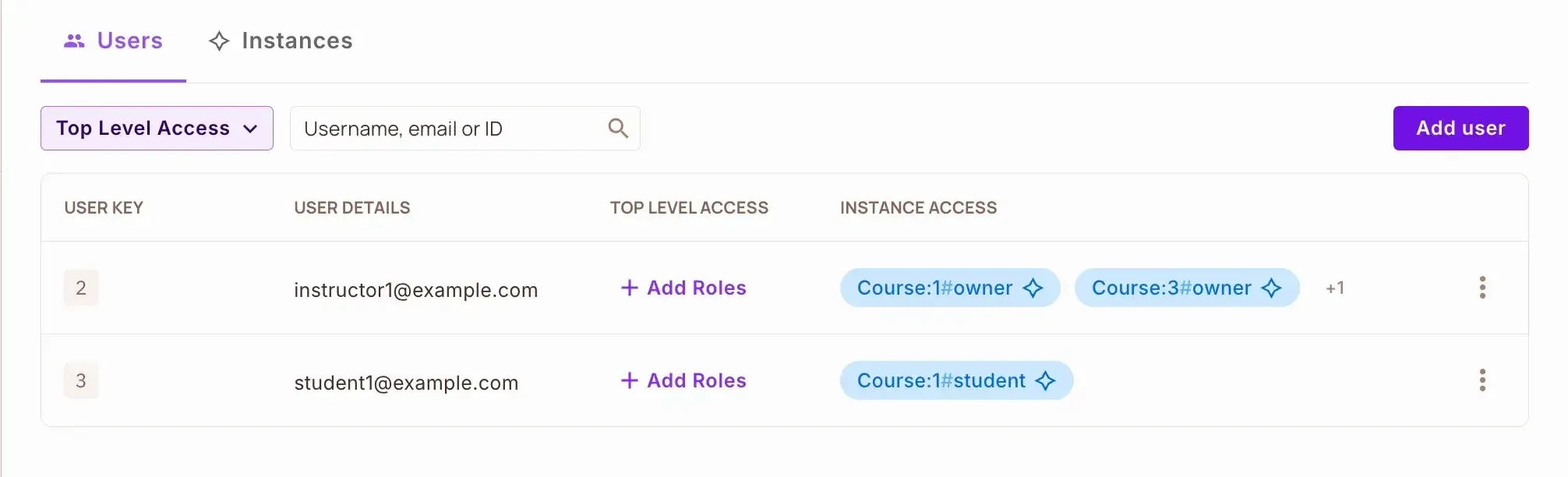
If you navigate to Directory -> Users in your Permit UI you will find the created synced users.
Finally, run your Django server with the python manage.py runserver command and access the API at http://localhost:8000. Try accessing the course endpoint with different users (instructor vs student) and varying the location header (X-User-Location) to test both ReBAC roles and ABAC attribute checks. As an instructor, you should have full access, while students will be restricted based on their progress and location.
Django’s built-in authorization system is not sufficient for modern e-learning platforms because of its static nature and inability to handle complex access patterns. In this tutorial, we've solved these limitations by integrating Permit.io into our Django application which enables us to:
Implement sophisticated permission rules based on relationships between courses, instructors, and students (ReBAC), along with dynamic attributes like progress and prerequisites (ABAC), all without complex code changes.
Control course access based on multiple factors:
Manage all authorization logic through Permit.io's user-friendly UI, separating it from our application code.
Update access rules in real time without requiring application redeployment.
This solution takes our basic Django e-learning platform and turns it into a full featured system with enterprise class authorization, a great fit for modern educational applications that require fine grained access control based on relationships and attributes.

Senior Technical Writer | Developer Advocate focused on Web Development Technologies | Community Manager | API Documentation | Documentation Engineer | Docs-as-Code | Jira | Markdown