Supabase makes it easy to add authentication to your app with built-in support for email, OAuth, and magic links. But while Supabase Auth handles who your users are, you often need an authorization layer as well.
Supabase offers a great backend with built-in auth and Row Level Security (RLS), managing fine-grained permissions—especially ones based on relationships between users and data—is far from easy.
You may want to restrict actions like editing or deleting data to resource owners, prevent users from voting on their own content, or enforce different permissions for different user roles.
This tutorial walks through how to implement Supabase authentication and authorization in a Next.js application.
We'll start with Supabase Auth for login and session management, then add authorization rules using Relationship-Based Access Control (ReBAC), enforced through Supabase Edge Functions and a local Policy Decision Point (PDP).
By the end, you’ll have a real-time collaborative polling app that supports both public and protected actions—and a flexible authorization system you can evolve as your app grows.
What We’re Building
In this guide, we’ll build a real-time polling app using Supabase and Next.js that showcases both authentication and authorization in action.
The app allows users to create polls, vote on others, and manage only their own content. It demonstrates how to implement Supabase Auth for login/signup and how to enforce authorization policies that control who can vote, edit, or delete.
We’ll use Supabase’s core features—Auth, Postgres, RLS, Realtime, and Edge Functions—combined with a Relationship-Based Access Control (ReBAC) model to enforce per-user and per-resource access rules.
Tech Stack
- Supabase – Backend-as-a-service for database, authentication, realtime, and edge functions
- Next.js – Frontend framework for building the app UI and API routes
- Permit.io – (for ReBAC) to define and evaluate authorization logic via PDP
- Supabase CLI – To manage and deploy Edge Functions locally and in production
Prerequisites
What Can This App Do?
The demo application is a real-time polling platform built with Next.js and Supabase, where users can create polls and vote on others.
- Any user (authenticated or not) can view the list of public polls
- Only authenticated users can create polls and vote
- A user cannot vote on a poll they created
- Only the creator of a poll can edit or delete it
Tutorial Overview
We’ll follow these general steps:
- Set up Supabase project, schema, auth, and RLS
- Build core app features like poll creation and voting
- Model authorization rules define roles and rules in Permit.io
- Create Supabase Edge Functions for syncing users, assigning roles, and checking permissions
- Enforce policies in the app frontend using those edge functions
Let’s get started -
Setting up Supabase in the Project
Optional: Clone the Starter Template
I've already created a starter template on GitHub with all the code you need to start so we can focus on implementing Supabase and Permit.io.
You can clone the project by running the following command:
git clone <https://github.com/permitio/supabase-fine-grained-authorization>
Once you have cloned the project, navigate to the project directory and install the dependencies:
cd realtime-polling-app-nextjs-supabase-permitio
npm install
Creating a new Project in Supabase
To get started:
- Go to https://supabase.com and sign in or create an account.
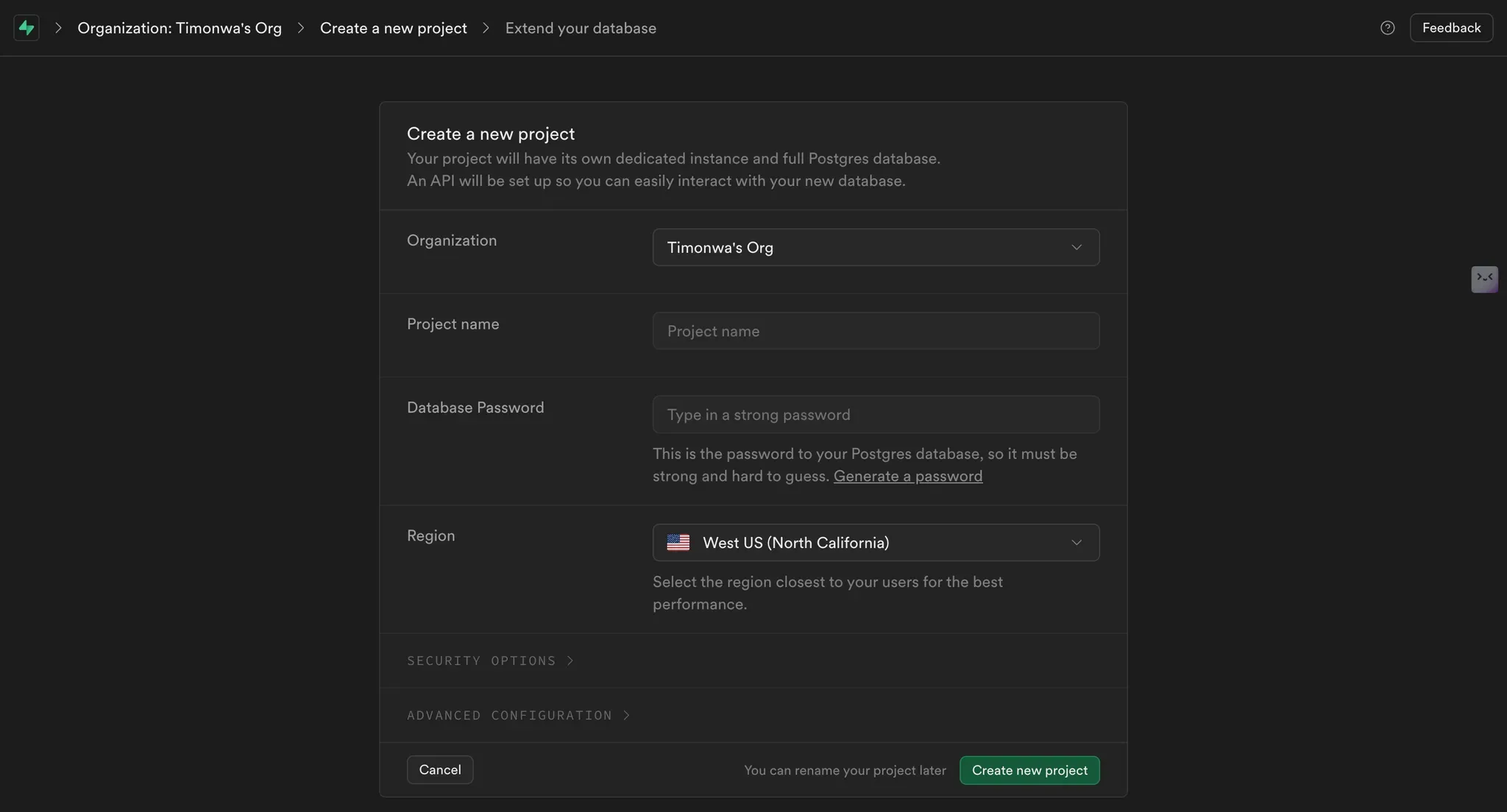
- Click "New Project" and fill in your project name, password, and region.
- Once created, go to Project Settings → API and note your Project URL and Anon Key — you’ll need them later.
Setting up Authentication and Database in Supabase
We’ll use Supabase’s built-in email/password auth:
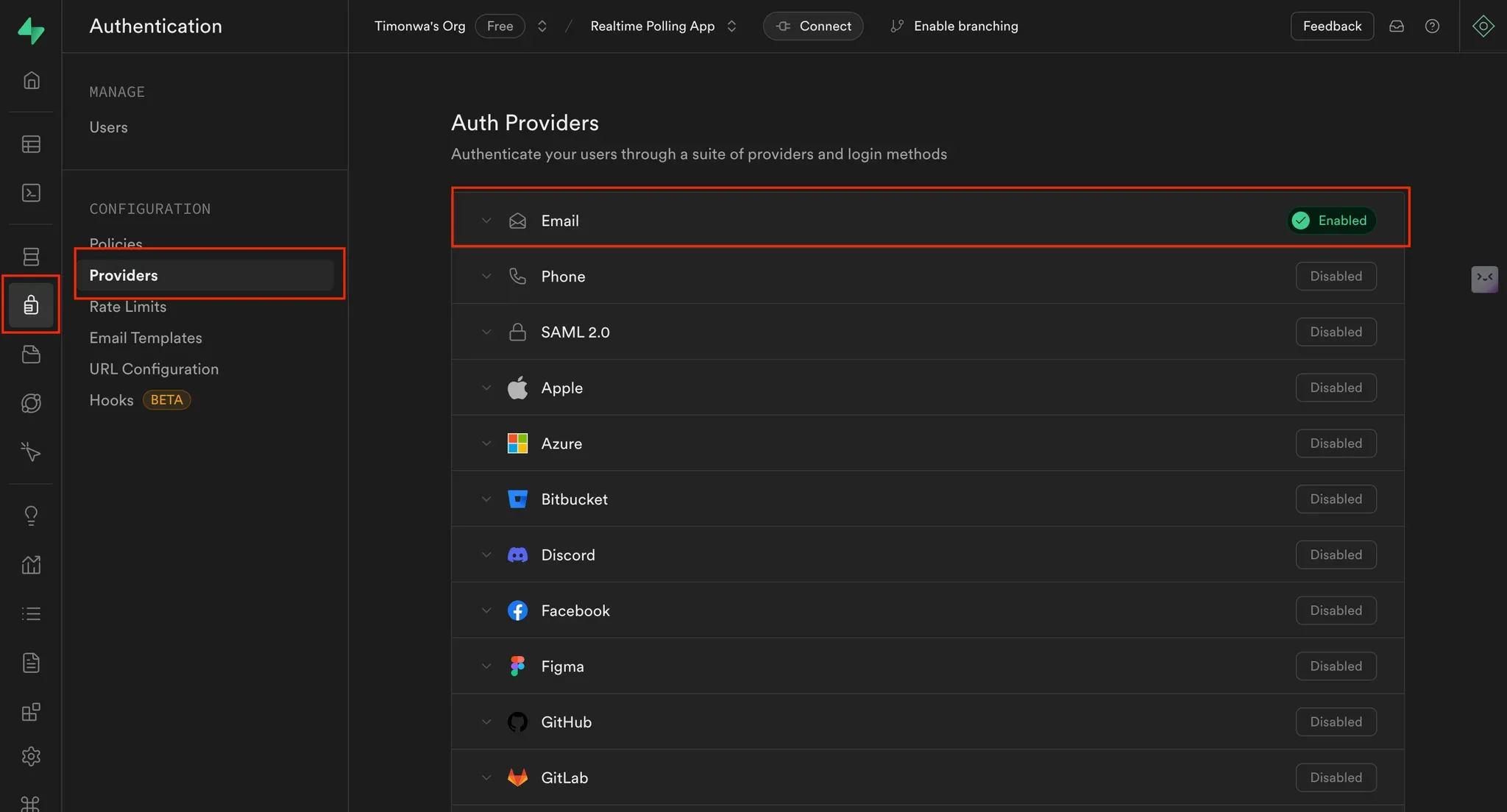
- In the sidebar, go to Authentication → Providers
- Enable the Email provider
- (Optional) Disable email confirmation for testing, but keep it enabled for production
Creating the Database Schema
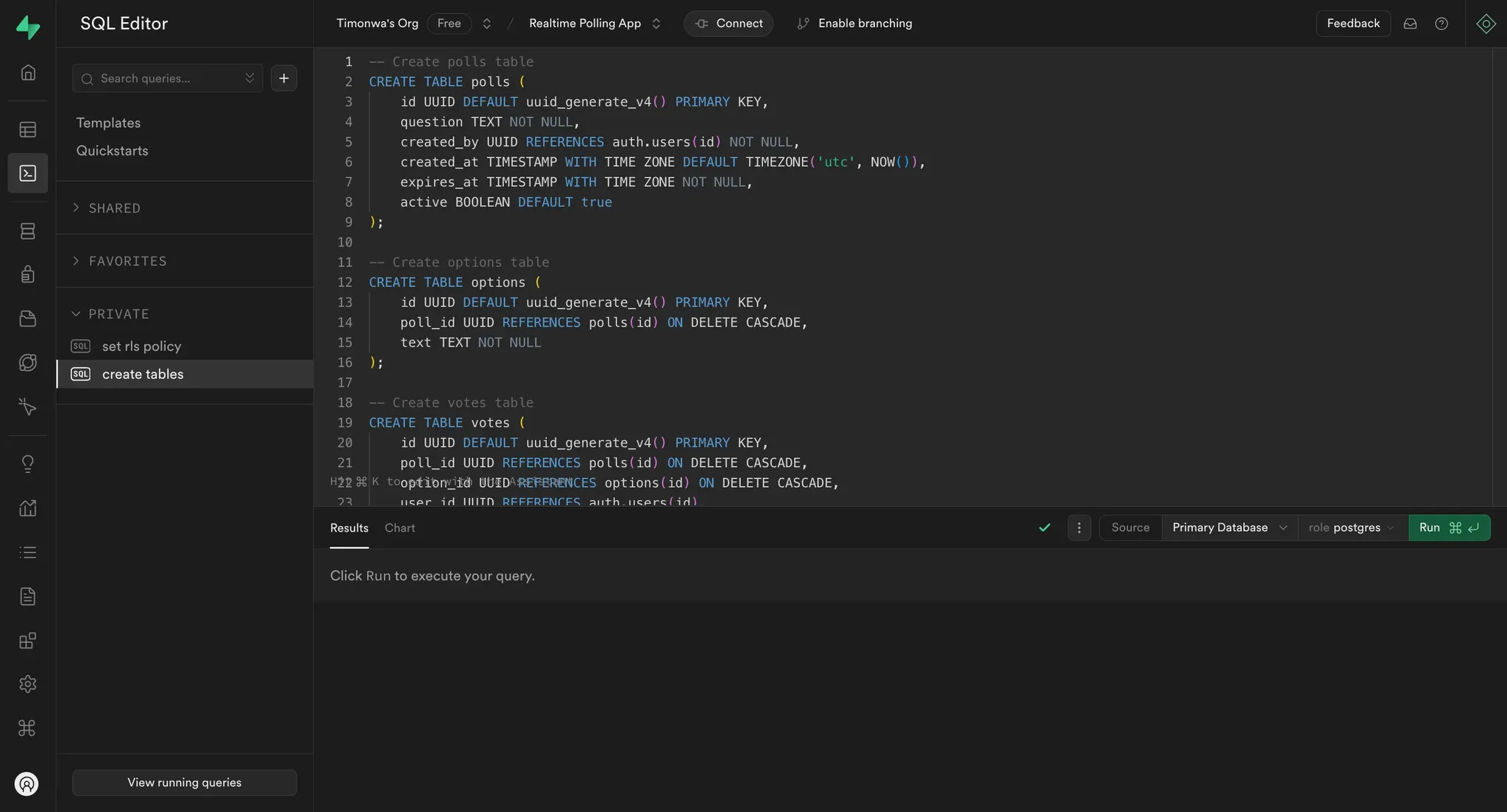
This app uses three main tables: polls, options, and votes. Use the SQL Editor in the Supabase dashboard and run the following:
-- Create a polls table
CREATE TABLE polls (
    id UUID DEFAULT uuid_generate_v4() PRIMARY KEY,
    question TEXT NOT NULL,
    created_by UUID REFERENCES auth.users(id) NOT NULL,
    created_at TIMESTAMP WITH TIME ZONE DEFAULT TIMEZONE('utc', NOW()),
    creator_name TEXT NOT NULL,
    expires_at TIMESTAMP WITH TIME ZONE NOT NULL,
);

-- Create an options table
CREATE TABLE options (
    id UUID DEFAULT uuid_generate_v4() PRIMARY KEY,
    poll_id UUID REFERENCES polls(id) ON DELETE CASCADE,
    text TEXT NOT NULL,
);

-- Create a votes table
CREATE TABLE votes (
    id UUID DEFAULT uuid_generate_v4() PRIMARY KEY,
    poll_id UUID REFERENCES polls(id) ON DELETE CASCADE,
    option_id UUID REFERENCES options(id) ON DELETE CASCADE,
    user_id UUID REFERENCES auth.users(id),
    created_at TIMESTAMP WITH TIME ZONE DEFAULT TIMEZONE('utc', NOW()),
    UNIQUE(poll_id, user_id)
);
Enabling Row Level Security (RLS)
Enable RLS for each table and define policies:
-- Polls policies
ALTER TABLE polls ENABLE ROW LEVEL SECURITY;

CREATE POLICY "Anyone can view polls" ON polls
    FOR SELECT USING (true);

CREATE POLICY "Authenticated users can create polls" ON polls
    FOR INSERT TO authenticated
    WITH CHECK (auth.uid() = created_by);

-- Options policies
ALTER TABLE options ENABLE ROW LEVEL SECURITY;

CREATE POLICY "Anyone can view options" ON options
    FOR SELECT USING (true);

CREATE POLICY "Poll creators can add options" ON options
    FOR INSERT TO authenticated
    WITH CHECK (
        EXISTS (
            SELECT 1 FROM polls
            WHERE id = options.poll_id
            AND created_by = auth.uid()
        )
    );

-- Votes policies
ALTER TABLE votes ENABLE ROW LEVEL SECURITY;

CREATE POLICY "Anyone can view votes" ON votes
    FOR SELECT USING (true);

CREATE POLICY "Authenticated users can vote once" ON votes
    FOR INSERT TO authenticated
    WITH CHECK (
        auth.uid() = user_id AND
        NOT EXISTS (
            SELECT 1 FROM polls
            WHERE id = votes.poll_id
            AND created_by = auth.uid()
        )
    );
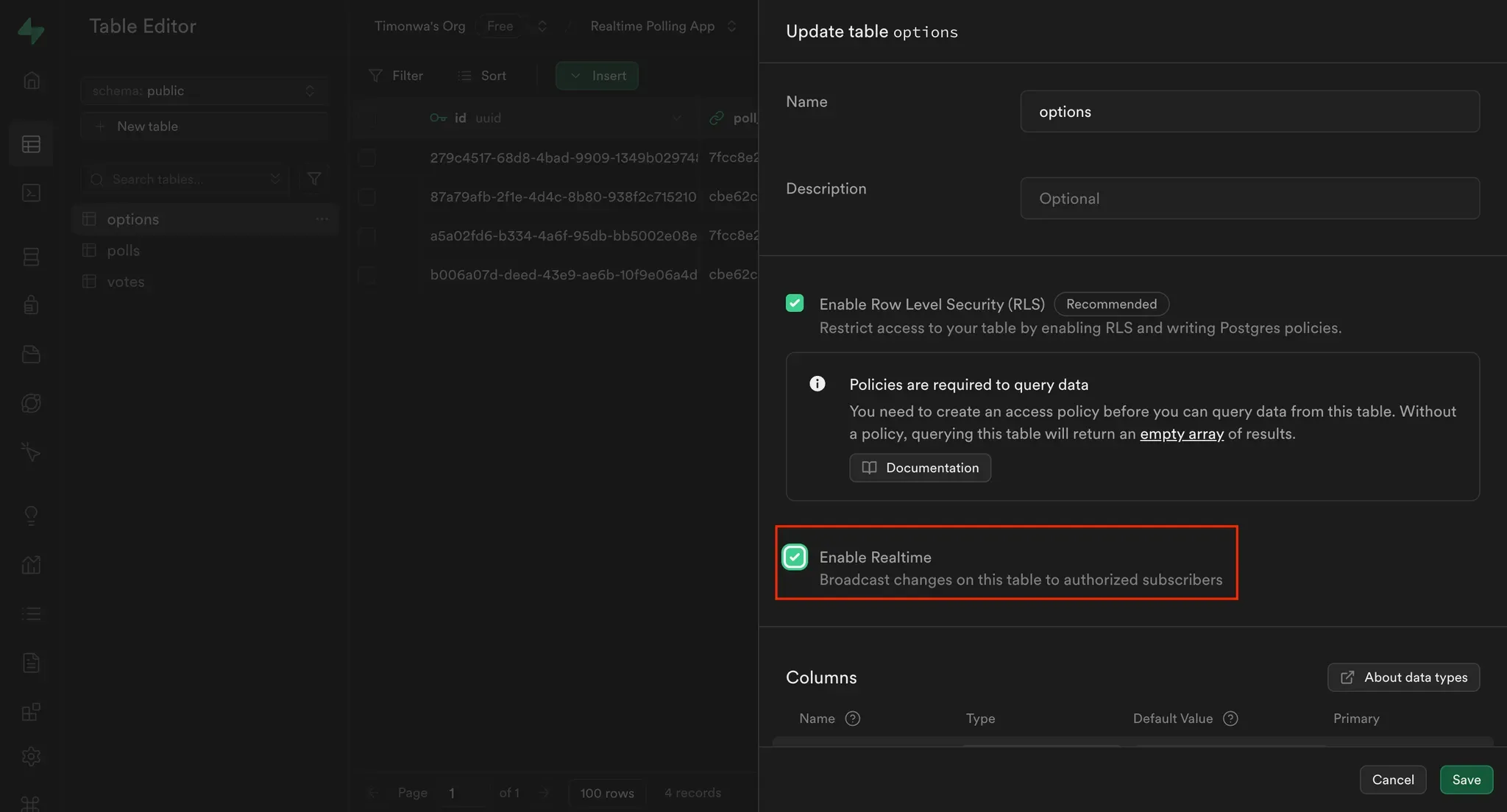
To use Supabase’s real-time features:
In the sidebar, go to Table Editor
For each of the three tables (polls, options, votes):
Implementing Supabase Email Authentication in the App
In this demo app, anyone can view the list of polls available on the app, both active and expired. To view the details of a poll, manage, or vote on any poll, the user must be logged in. We will be using email and password as means of authentication for this project. In your Next.js project, store your Supabase credentials in .env.local:
NEXT_PUBLIC_SUPABASE_URL=your_supabase_url
NEXT_PUBLIC_SUPABASE_ANON_KEY=your_anon_key
Update your login component to handle both signup and login via email/password:
import { useState } from "react";
import { createClient } from "@/utils/supabase/component";

const LogInButton = () => {
  const supabase = createClient();

  async function logIn() {
    const { error } = await supabase.auth.signInWithPassword({
      email,
      password,
    });
    if (error) {
      setError(error.message);
    } else {
      setShowModal(false);
    }
  }

  async function signUp() {
    const { error } = await supabase.auth.signUp({
      email,
      password,
      options: {
        data: {
          user_name: userName,
        },
      },
    });
    if (error) {
      setError(error.message);
    } else {
      setShowModal(false);
    }
  }

  const handleSubmit = async (e: React.FormEvent) => {
    e.preventDefault();
    setError("");

    if (isLogin) {
      await logIn();
    } else {
      await signUp();
    }
  };

  return (
    <>
      <button
        onClick={() => setShowModal(true)}
        className="flex items-center gap-2 p-2 bg-gray-800 text-white rounded-md">
        Log In
      </button>
      ...
    </>
  );
};

export default LogInButton;
Here, we are using Supabase’s signInWithPassword method to log in a user and the signUp method to sign up a new user with their email and password. We are also storing the user's name in the user_name field in the user's metadata.
You can also use supabase.auth.signOut() to log users out and redirect them:
import { createClient } from "@/utils/supabase/component";
import { useRouter } from "next/router";

const LogOutButton = ({ closeDropdown }: { closeDropdown: () => void }) => {
  const router = useRouter();
  const supabase = createClient();

  const handleLogOut = async () => {
    await supabase.auth.signOut();
    closeDropdown();
    router.push("/");
  };

  return (
  ...
  );
};

export default LogOutButton;
Here, we are using the signOut method from Supabase to log out the user and redirect them to the home page.
Listening for Changes in the User's Authentication State
Listening for changes in the user's authentication state allows us to update the UI based on the user's authentication status. This allows you to:
- Show/hide UI elements like login/logout buttons
- Conditionally restrict access to protected pages (like voting or managing polls)
- Ensure only authenticated users can perform restricted actions
We’ll use supabase.auth.onAuthStateChange() to listen to these events and update the app accordingly.
In the Layout.tsx file: Track Global Auth State
import React, { useEffect, useState } from "react";
import { createClient } from "@/utils/supabase/component";
import { User } from "@supabase/supabase-js";

const Layout = ({ children }: { children: React.ReactNode }) => {
  const [user, setUser] = useState<User | null>(null);

  useEffect(() => {
    const fetchUser = async () => {
      const supabase = createClient();
      const { data } = supabase.auth.onAuthStateChange((event, session) => {
        setUser(session?.user || null);
      });

      return () => {
        data.subscription.unsubscribe();
      };
    };

    fetchUser();
  }, []);

  return (
    ...
  );
};

export default Layout;
Restrict Access on Protected Pages
On pages like poll details or poll management, you should also listen for authentication state changes to prevent unauthenticated users from accessing them.
Here’s how it looks in pages/polls/[id].tsx:
import { createClient } from "@/utils/supabase/component";
import { User } from "@supabase/supabase-js";

const Page = () => {
  const [user, setUser] = useState<User | null>(null);

  useEffect(() => {
    const fetchUser = async () => {
      const supabase = createClient();
      const { data } = supabase.auth.onAuthStateChange((event, session) => {
        setUser(session?.user || null);
        setLoading(false);
      });

      return () => {
        data.subscription.unsubscribe();
      };
    };

    fetchUser();
  }, []);

  return (
    ...
  );

export default Page;
And a similar pattern applies in pages/polls/manage.tsx, where users should only see their own polls if logged in:
import { createClient } from "@/utils/supabase/component";
import { User } from "@supabase/supabase-js";

const Page = () => {
  const [user, setUser] = useState<User | null>(null);

  const supabase = createClient();

  useEffect(() => {
    const fetchUser = async () => {
      const { data } = supabase.auth.onAuthStateChange((event, session) => {
        setUser(session?.user || null);
        if (!session?.user) {
          setLoading(false);
        }
      });

      return () => {
        data.subscription.unsubscribe();
      };
    };

    fetchUser();
  }, []);

  return (
    ...
  );
};

export default Page;
These patterns ensure your UI reflects the user’s current authentication status and forms the basis for the authorization checks we'll add later. For example, you’ll later use this user object when calling the checkPermission Edge Function to determine whether a user is allowed to vote or manage a specific poll.
Building the Polling App Functionality
With Supabase configured and authentication working, we can now build the core functionality of the polling app. In this section, we’ll cover:
- Creating new polls
- Fetching and displaying polls in real-time
- Implementing a voting system
This gives us the basic app behavior that we’ll soon protect with fine-grained permissions.
Creating New Polls
Users must be logged in to create polls. Each poll includes a question, an expiration date, and a set of options. We also record who created the poll so we can later use that relationship for access control.
Inside NewPoll.tsx, fetch the authenticated user and use Supabase to insert the poll and its options:
import React, { useEffect, useState } from "react";
import { createClient } from "@/utils/supabase/component";
import { User } from "@supabase/supabase-js";

const NewPoll = () => {
  const [user, setUser] = useState<User | null>(null);

  const supabase = createClient();

  useEffect(() => {
    const fetchUser = async () => {
      const supabase = createClient();
      const { data } = supabase.auth.onAuthStateChange((event, session) => {
        setUser(session?.user || null);
      });

      return () => {
        data.subscription.unsubscribe();
      };
    };

    fetchUser();
  }, []);

  const handleSubmit = async (e: React.FormEvent) => {
    e.preventDefault();

    if (question.trim() && options.filter(opt => opt.trim()).length < 2) {
      setErrorMessage("Please provide a question and at least two options.");
      return;
    }

     // Create the poll
     const { data: poll, error: pollError } = await supabase
      .from("polls")
      .insert({
        question,
        expires_at: new Date(expiryDate).toISOString(),
        created_by: user?.id,
        creator_name: user?.user_metadata?.user_name,
      })
      .select()
      .single();

    if (pollError) {
      console.error("Error creating poll:", pollError);
      setErrorMessage(pollError.message);
      return;
    }

    // Create the options
    const { error: optionsError } = await supabase.from("options").insert(
      options
        .filter(opt => opt.trim())
        .map(text => ({
          poll_id: poll.id,
          text,
        }))
    );

    if (!optionsError) {
      setSuccessMessage("Poll created successfully!");
      handleCancel();
    } else {
      console.error("Error creating options:", optionsError);
      setErrorMessage(optionsError.message);
    }
  };

  return (
     ...
  );
};

export default NewPoll;
We’ll later call an Edge Function here to assign the “creator” role in Permit.io.
Fetching and Displaying Polls
Polls are divided into active (not yet expired) and past (expired). You can fetch them using Supabase queries filtered by the current timestamp, and set up real-time subscriptions to reflect changes instantly.
Example from pages/index.tsx:
import { PollProps } from "@/helpers";
import { createClient } from "@/utils/supabase/component";

export default function Home() {
  const supabase = createClient();

  useEffect(() => {
    const fetchPolls = async () => {
      setLoading(true);
      const now = new Date().toISOString();

      try {
        // Fetch active polls
        const { data: activePolls, error: activeError } = await supabase
          .from("polls")
          .select(
            `
            id,
            question,
            expires_at,
            creator_name,
            created_by,
            votes (count)
          `
          )
          .gte("expires_at", now)
          .order("created_at", { ascending: false });

        if (activeError) {
          console.error("Error fetching active polls:", activeError);
          return;
        }

        // Fetch past polls
        const { data: expiredPolls, error: pastError } = await supabase
          .from("polls")
          .select(
            `
            id,
            question,
            expires_at,
            creator_name,
            created_by,
            votes (count)
          `
          )
          .lt("expires_at", now)
          .order("created_at", { ascending: false });

        if (pastError) {
          console.error("Error fetching past polls:", pastError);
          return;
        }

        setCurrentPolls(activePolls);
        setPastPolls(expiredPolls);
      } catch (error) {
        console.error("Unexpected error fetching polls:", error);
      } finally {
        setLoading(false);
      }
    };

    fetchPolls();

        // Set up real-time subscription on the polls table:
    const channel = supabase
      .channel("polls")
      .on(
        "postgres_changes",
        {
          event: "*",
          schema: "public",
          table: "polls",
        },
        fetchPolls
      )
      .subscribe();

    return () => {
      supabase.removeChannel(channel);
    };
  }, []);

  return (
    ...
  );
}
Viewing and Managing User Polls
Here, we are fetching active and past polls from the polls table in Supabase. We are also setting up a real-time subscription to listen for changes in the polls table so that we can update the UI with the latest poll data. To differentiate between active and past polls, we are comparing the expiry date of each poll with the current date.
Update the pages/manage.tsx page to fetch and display only polls created by the user:
import { PollProps } from "@/helpers";

const Page = () => {

  useEffect(() => {
    if (!user?.id) return;

    const fetchPolls = async () => {
      try {
        const { data, error } = await supabase
          .from("polls")
          .select(
            `
            id,
            question,
            expires_at,
            creator_name,
            created_by,
            votes (count)
          `
          )
          .eq("created_by", user.id)
          .order("created_at", { ascending: false });

        if (error) {
          console.error("Error fetching polls:", error);
          return;
        }

        setPolls(data || []);
      } catch (error) {
        console.error("Unexpected error fetching polls:", error);
      } finally {
        setLoading(false);
      }
    };

    fetchPolls();

    // Set up real-time subscription
    const channel = supabase
      .channel(`polls_${user.id}`)
      .on(
        "postgres_changes",
        {
          event: "*",
          schema: "public",
          table: "polls",
          filter: `created_by=eq.${user.id}`,
        },
        fetchPolls
      )
      .subscribe();

    return () => {
      supabase.removeChannel(channel);
    };
  }, [user]);

   return (
    ...
  );
};

export default Page;
Here, we only fetch polls created by the user and listen for real-time updates in the polls table so that the UI is updated with the latest poll data.
Also, update the PollCard component so that if a logged-in user is the poll creator, icons for editing and deleting the poll will be displayed to them on the poll.
import { createClient } from "@/utils/supabase/component";
import { User } from "@supabase/supabase-js";

const PollCard = ({ poll }: { poll: PollProps }) => {
  const [user, setUser] = useState<User | null>(null);

  useEffect(() => {
    const supabase = createClient();
    const fetchUser = async () => {
      const { data } = supabase.auth.onAuthStateChange((event, session) => {
        setUser(session?.user || null);
        setLoading(false);
      });

      return () => {
        data.subscription.unsubscribe();
      };
    };

    fetchUser();
  }, []);

  return (
    ...
      )}
    </Link>
  );
};

export default PollCard;
So now, on a poll card, if the logged-in user is the poll creator, icons for editing and deleting the poll will be displayed to them. This allows the user to manage only their polls.
Implementing the Poll Voting System
The voting logic enforces:
- Only one vote per user per poll
- Creators cannot vote on their own polls
- Votes are stored in the
votes table
- Results are displayed and updated in real time
Let’s break down how this works in the ViewPoll.tsx component:
Fetch the Logged-In User
We need the current user’s ID to determine voting eligibility and record their vote.
import { createClient } from "@/utils/supabase/component";
import { User } from "@supabase/supabase-js";

const ViewPoll = () => {
  const [user, setUser] = useState<User | null>(null);

  const supabase = createClient();

  useEffect(()
    const fetchUser = async () => {
      const {
        data: { user },
      } = await supabase.auth.getUser();
      setUser(user);
    };

    fetchUser();
  }, []);
Load Poll Details and Check Voting Status
Once we have the user, we fetch:
- The poll itself (including options and vote counts)
- Whether this user has already voted
We also call these again later in real-time updates.
  useEffect(() => {
    if (!user) {
      return;
    }

    const checkUserVote = async () => {
      const { data: votes } = await supabase
        .from("votes")
        .select("id")
        .eq("poll_id", query.id)
        .eq("user_id", user.id)
        .single();

      setHasVoted(!!votes);
      setVoteLoading(false);
    };

    const fetchPoll = async () => {
      const { data } = await supabase
        .from("polls")
        .select(
          `
          *,
          options (
            id,
            text,
            votes (count)
          )
        `
        )
        .eq("id", query.id)
        .single();

      setPoll(data);
      setPollLoading(false);

      checkUserVote();
    };

    fetchPoll();
Listen for Real-Time Updates
We subscribe to changes in the votes table, scoped to this poll. When a new vote is cast, we fetch updated poll data and voting status.
    const channel = supabase
      .channel(`poll-${query.id}`)
      .on(
        "postgres_changes",
        {
          event: "*",
          schema: "public",
          table: "votes",
          filter: `poll_id=eq.${query.id}`,
        },
        () => {
          fetchPoll();
          checkUserVote();
        }
      )
      .subscribe();

    return () => {
      supabase.removeChannel(channel);
    };
  }, [query.id, user]);
Handle the Vote Submission
If the user hasn’t voted and is allowed to vote (we’ll add a permission check later), we insert their vote.
  const handleVote = async (optionId: string) => {
    if (!user) return;

    try {
      const { error } = await supabase.from("votes").insert({
        poll_id: query.id,
        option_id: optionId,
        user_id: user.id,
      });

      if (!error) {
        setHasVoted(true);
      }
    } catch (error) {
      console.error("Error voting:", error);
    }
  };
Display the Poll Results
We calculate the total number of votes and a countdown to the expiration time. You can then use this to display progress bars or stats.
  if (!poll || pollLoading || voteLoading) return <div>Loading...</div>;

  // 6. calculate total votes
  const totalVotes = calculateTotalVotes(poll.options);
  const countdown = getCountdown(poll.expires_at);

  return (
  ...
  );
};

export default ViewPoll;
With this setup in place, your voting system is fully functional. But right now, anyone logged in could technically try to vote—even on their own poll. Next, we’ll add authorization checks using Permit.io and Supabase Edge Functions to enforce those rules.
Before we do that, let’s first look at the type of authorization layer we are going to implement.
Understanding ReBAC (Relationship-Based Access Control)
Supabase handles authentication and basic row-level permissions well, but it doesn’t support complex rules like:
- Preventing users from voting on their own polls
- Assigning per-resource roles (like “creator” for a specific poll)
- Managing access via external policies
To support these kinds of relationship-based permissions, we’ll implement ReBAC with Permit.io.
Relationship-Based Access Control (ReBAC) is a model for managing permissions based on the relationships between users and resources. Instead of relying solely on roles or attributes (as in RBAC or ABAC), ReBAC determines access by evaluating how a user is connected to the resource they’re trying to access.
In this tutorial, we apply ReBAC to a polling app:
- A user who created a poll is the only one who can manage (edit/delete) it
- A user cannot vote on their own poll
- Other authenticated users can vote once per poll
By modeling these relationships in Permit.io, we can define fine-grained access rules that go beyond Supabase’s built-in Row Level Security (RLS). We’ll enforce them at runtime using Supabase Edge Functions and Permit’s policy engine.
For more on ReBAC, check out Permit.io’s ReBAC docs.
Access Control Design
For our Polling app, we will define:
Setting up Permit.io
Let’s walk through setting up the authorization model in Permit.
Create a new project in Permit.io
- Name it something like
supabase-polling
Define the polls resource
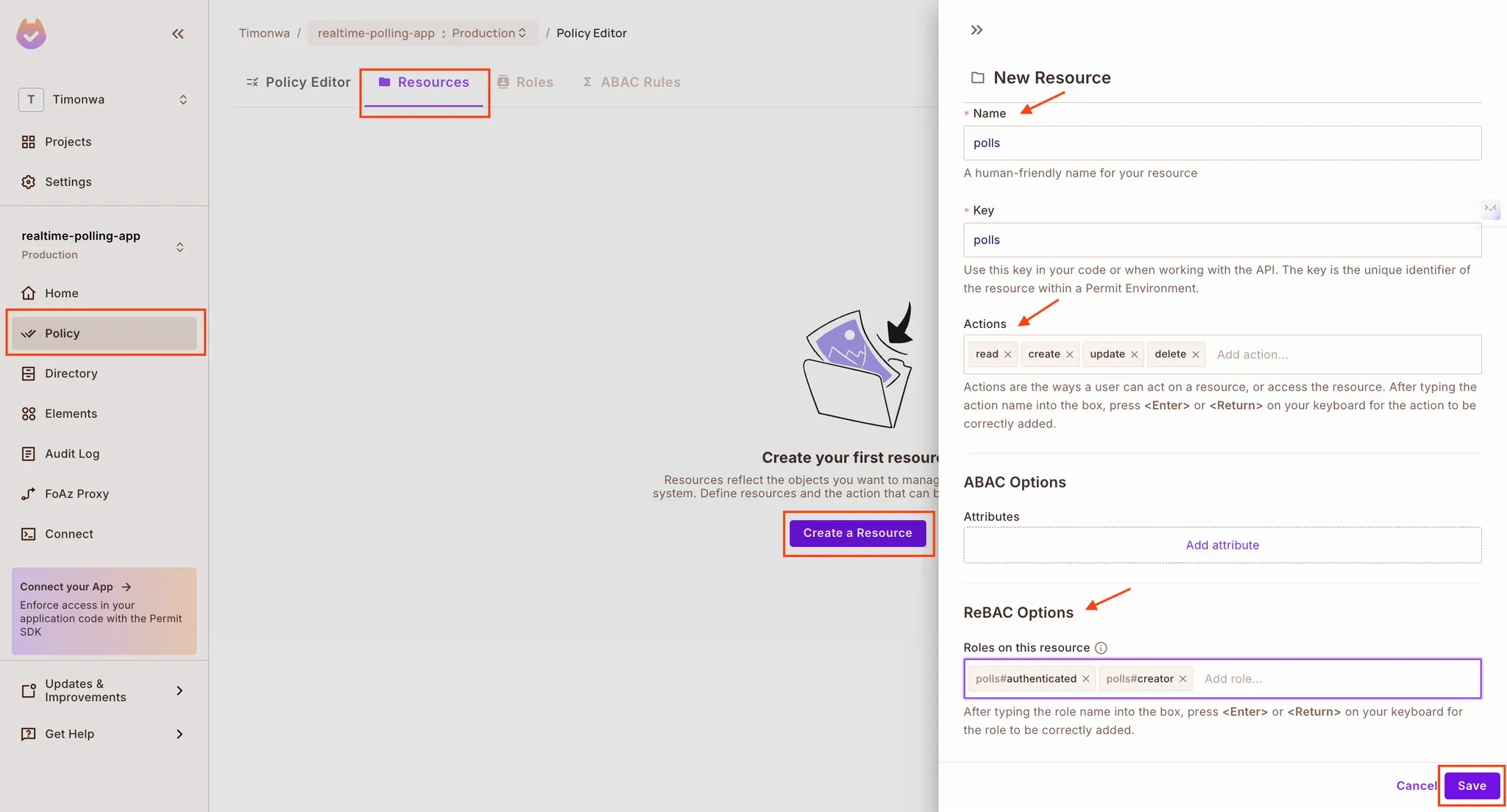
- Go to the Policy → Resources tab
- Click “Create Resource”
- Name it
polls, and add the actions: read, create, update, delete
Enable ReBAC for the resource
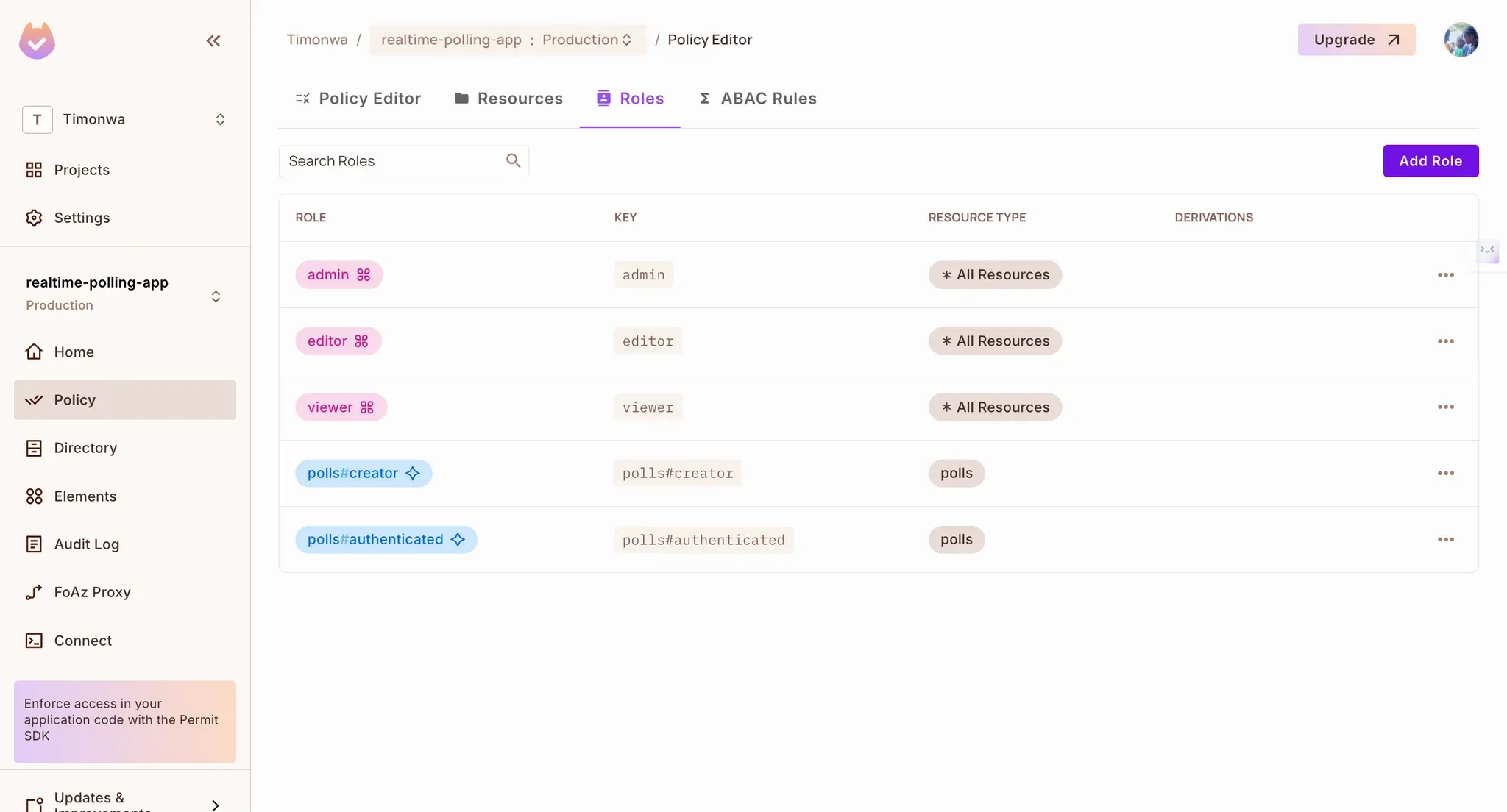
Navigate to the "Roles" tab to view the roles from the resources we just created. Note that Permit created the default roles (admin, editor, user) that are unnecessary for this tutorial.
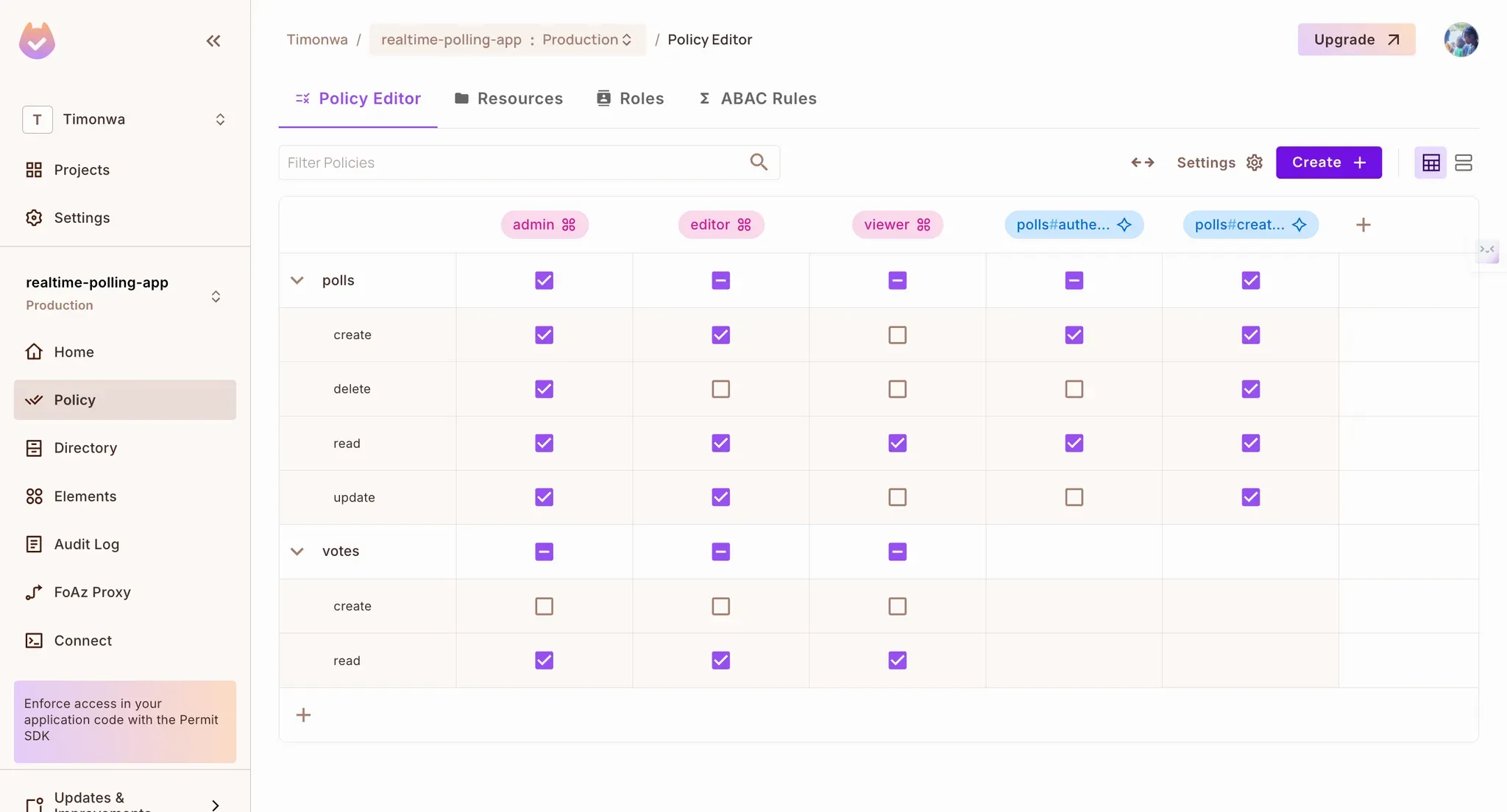
Define access policies
Add resource instances
- Go to Directory → Instances
- Add individual poll IDs as resource instances (you’ll automate this later when new polls are created)
- Assign roles to users per poll (e.g.
user123 is creator of poll456)
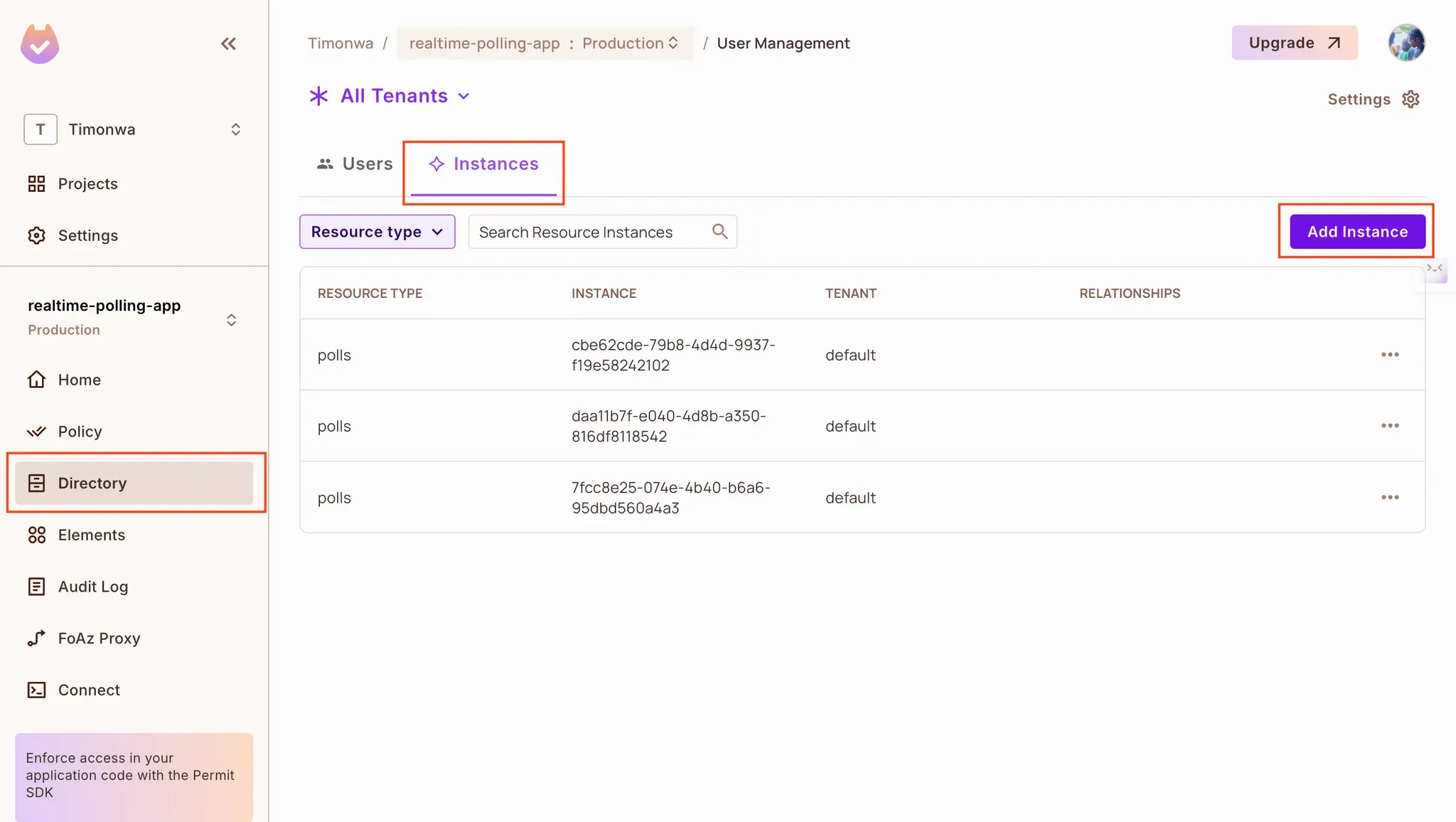
This structure gives us the power to write flexible access rules and enforce them per user, per poll.
Now that we have completed the initial setup on the Permit dashboard, let's use it in our application. Next, we’ll connect Permit.io to our Supabase project via Edge Functions that:
- Sync new users
- Assign creator roles
- Check access on demand
Setting up Permit in the Polling Application
Permit offers multiple ways to integrate with your application, but we'll use the Container PDP for this tutorial. You have to host the container online to access it in Supabase Edge functions. You can use services like railway.com. Once you have hosted it, save the url for your container.
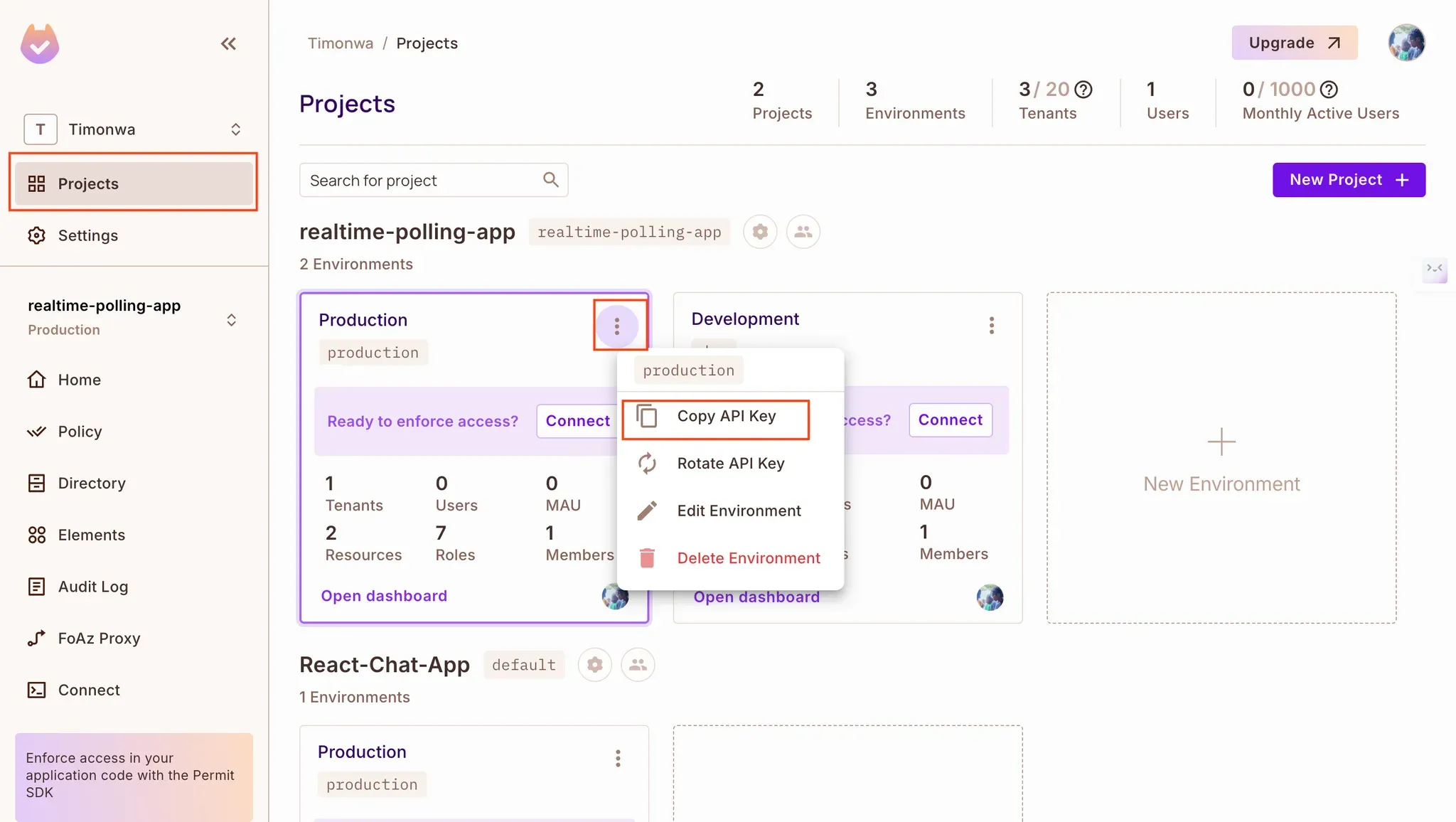
Obtain your Permit API key by clicking "Projects" in the Permit dashboard sidebar, navigating to the project you are working on, clicking the three dots, and selecting "Copy API Key".
Creating Supabase Edge Function APIs for Authorization
Supabase Edge Functions are perfect for integrating third-party services like Permit.io. We’ll use them to enforce our ReBAC rules at runtime by checking whether users are allowed to perform specific actions on polls.
Create Functions in Supabase
Initialise Supabase in your project and create three different functions using the supabase functions new command. These will be the starting point for your functions:
npx supabase init
npx supabase functions new syncUser
npx supabase functions new updateCreatorRole
npx supabase functions new checkPermission
This will create a functions folder in the supabase folder along with the endpoints. Now, let’s write the codes for each endpoint.
Syncing Users to Permit.io on Signup (syncUser.ts)
This function listens for Supabase’s SIGNED_UP auth event. When a new user signs up, we sync their identity to Permit.io and assign them the default authenticated role.
import "jsr:@supabase/functions-js/edge-runtime.d.ts";
import { Permit } from "npm:permitio";

 const corsHeaders = {
  'Access-Control-Allow-Origin': "*",
  'Access-Control-Allow-Headers': 'Authorization, x-client-info, apikey, Content-Type',
  'Access-Control-Allow-Methods': 'POST, GET, OPTIONS, PUT, DELETE',
}

// Supabase Edge Function to sync new users with Permit.io
Deno.serve(async (req) => {

   const permit = new Permit({
    token: Deno.env.get("PERMIT_API_KEY"),
    pdp: "<https://real-time-polling-app-production.up.railway.app>",
   });

  try {
    const { event, user } = await req.json();

    // Only proceed if the event type is "SIGNED_UP"
    if (event === "SIGNED_UP" && user) {
      const newUser = {
        key: user.id,
        email: user.email,
        name: user.user_metadata?.name || "Someone",
      };

      // Sync the user to Permit.io
      await permit.api.createUser(newUser);
      await permit.api.assignRole({
        role: "authenticated",
        tenant: "default",
        user: user.id,
      });

      console.log(`User ${user.email} synced to Permit.io successfully.`);
    }

    // Return success response
    return new Response(
      JSON.stringify({ message: "User synced successfully!" }),
      { status: 200, headers: corsHeaders },
    );
  } catch (error) {
    console.error("Error syncing user to Permit: ", error);
    return new Response(
      JSON.stringify({
        message: "Error syncing user to Permit.",
        "error": error
      }),
      { status: 500, headers: { "Content-Type": "application/json" } },
    );
  }
});
Assigning the Creator Role (updateCreatorRole.ts)
Once a user creates a poll, this function is called to:
- Sync the poll as a new Permit.io resource instance
- Assign the user the
creator role for that poll
import "jsr:@supabase/functions-js/edge-runtime.d.ts";
import { Permit } from "npm:permitio";

const corsHeaders = {
  'Access-Control-Allow-Origin': "*",
  'Access-Control-Allow-Headers': 'Authorization, x-client-info, apikey, Content-Type',
  'Access-Control-Allow-Methods': 'POST, GET, OPTIONS, PUT, DELETE',
}

Deno.serve(async (req) => {
  const permit = new Permit({
    token: Deno.env.get("PERMIT_API_KEY"),
    pdp: "<https://real-time-polling-app-production.up.railway.app>",
  });

  try {
    const { userId, pollId } = await req.json();

    // Validate input parameters
    if (!userId || !pollId) {
      return new Response(
        JSON.stringify({ error: "Missing required parameters." }),
        { status: 400, headers: { "Content-Type": "application/json" } },
      );
    }

    // Sync the resource (poll) to Permit.io
    await permit.api.syncResource({
      type: "polls",
      key: pollId,
      tenant: "default",
      attributes: {
        createdBy: userId
      }
    });

    // Assign the creator role to the user for this specific poll
    await permit.api.assignRole({
      role: "creator",
      tenant: "default",
      user: userId,
      resource: {
        type: "polls",
        key: pollId,
      }
    });

    return new Response(
      JSON.stringify({
        message: "Creator role assigned successfully",
        success: true
      }),
      { status: 200, headers: corsHeaders },
    );
  } catch (error) {
    console.error("Error assigning creator role: ", error);

    return new Response(
      JSON.stringify({
        message: "Error occurred while assigning creator role.",
        error: error
      }),
      { status: 500, headers: { "Content-Type": "application/json" } },
    );
  }
});
Checking Permissions (checkPermission.ts)
This function acts as the gatekeeper—it checks whether a user is allowed to perform a given action (create, read, update, delete) on a specific poll.
import "jsr:@supabase/functions-js/edge-runtime.d.ts";
import { Permit } from "npm:permitio";

const corsHeaders = {
  "Access-Control-Allow-Origin": "*",
  "Access-Control-Allow-Headers":
    "Authorization, x-client-info, apikey, Content-Type",
  "Access-Control-Allow-Methods": "POST, GET, OPTIONS, PUT, DELETE",
};

Deno.serve(async req => {
  const permit = new Permit({
    token: Deno.env.get("PERMIT_API_KEY"),
    pdp: "<https://real-time-polling-app-production.up.railway.app>",
  });

  try {
    const { userId, operation, key } = await req.json();

    // Validate input parameters
    if (!userId || !operation || !key) {
      return new Response(
        JSON.stringify({ error: "Missing required parameters." }),
        { status: 400, headers: { "Content-Type": "application/json" } }
      );
    }

    // Check permissions using Permit's ReBAC
    const permitted = await permit.check(userId, operation, {
      type: "polls",
      key,
      tenant: "default",
      // Include any additional attributes that Permit needs for relationship checking
      attributes: {
        createdBy: userId, // This will be used in Permit's policy rules
      },
    });

    return new Response(JSON.stringify({ permitted }), {
      status: 200,
      headers: corsHeaders,
    });
  } catch (error) {
    console.error("Error checking user permission: ", error);

    return new Response(
      JSON.stringify({
        message: "Error occurred while checking user permission.",
        error: error,
      }),
      { status: 500, headers: { "Content-Type": "application/json" } }
    );
  }
});
Local Testing
Start your Supabase dev server to test the functions locally:
npx supabase start
npx supabase functions serve
You can then hit your functions at:
<http://localhost:54321/functions/v1/><function-name>
Example:
<http://localhost:54321/functions/v1/checkPermission>
Integrating Authorization Checks in the UI
Now that we’ve created our authorization logic with Permit.io and exposed it via Supabase Edge Functions, it’s time to enforce those checks inside the app’s components.
In this section, we’ll update key UI components to call those functions and conditionally allow or block user actions like voting or managing polls based on permission checks.
NewPoll.tsx: Assign Creator Role After Poll Creation
After creating a poll and saving it to Supabase, we call the updateCreatorRole function to:
- Sync the new poll as a resource in Permit.io
- Assign the current user the
creator role for that specific poll
const handleSubmit = async (e: React.FormEvent) => {
  e.preventDefault();

  if (question.trim() && options.filter(opt => opt.trim()).length < 2) {
    setErrorMessage("Please provide a question and at least two options.");
    return;
  }

  try {
    // Create the poll
    const { data: poll, error: pollError } = await supabase
      .from("polls")
      .insert({
        question,
        expires_at: new Date(expiryDate).toISOString(),
        created_by: user?.id,
        creator_name: user?.user_metadata?.user_name,
      })
      .select()
      .single();

    if (pollError) {
      console.error("Error creating poll:", pollError);
      setErrorMessage(pollError.message);
      return;
    }

    // Create the options
    const { error: optionsError } = await supabase.from("options").insert(
      options
        .filter(opt => opt.trim())
        .map(text => ({
          poll_id: poll.id,
          text,
        }))
    );

    if (optionsError) {
      console.error("Error creating options:", optionsError);
      setErrorMessage(optionsError.message);
      return;
    }

    // Update the creator role in Permit.io
    const response = await fetch(
      "<http://127.0.0.1:54321/functions/v1//updateCreatorRole>",
      {
        method: "POST",
        headers: {
          "Content-Type": "application/json",
        },
        body: JSON.stringify({
          userId: user?.id,
          pollId: poll.id,
        }),
      }
    );

    const { success, error } = await response.json();

    if (!success) {
      console.error("Error updating creator role:", error);
      // Note: We don't set an error message here as the poll was still created successfully
    }

    setSuccessMessage("Poll created successfully!");
    handleCancel();
  } catch (error) {
    console.error("Error in poll creation process:", error);
    setErrorMessage("An unexpected error occurred while creating the poll.");
  }
};
ViewPoll.tsx: Restrict Voting Based on Permissions
Before allowing a user to vote on a poll, we call the checkPermission function to verify they have the create permission on the votes resource. This is how we enforce the rule: “A creator cannot vote on their own poll.”
Check voting permission:
const [canVote, setCanVote] = useState(false);

useEffect(() => {
  const checkPermission = async () => {
    if (!user || !query.id) return;

    try {
      const response = await fetch("<http://127.0.0.1:54321/functions/v1/checkPermission>", {
        method: "POST",
        headers: {
          "Content-Type": "application/json",
        },
        body: JSON.stringify({
          userId: user.id,
          operation: "create",
          key: query.id,
        }),
      });

      const { permitted } = await response.json();
      setCanVote(permitted);
    } catch (error) {
      console.error("Error checking permission:", error);
      setCanVote(false);
    }
  };

  checkPermission();
}, [user, query.id]);
Disable vote buttons if user isn’t allowed:
<button
  onClick={() => handleVote(option.id)}
  disabled={!user || !canVote}}
  className="w-full text-left p-4 rounded-md hover:bg-slate-100 transition-colors disabled:opacity-50 disabled:cursor-not-allowed">
  {option.text}
</button>
Show a message if the user is not allowed to vote:
{user && !canVote && (
  <p className="mt-4 text-gray-600">You cannot vote on your own poll</p>
)}
PollCard.tsx: Control Access to Edit/Delete
We also restrict poll management actions (edit and delete) by checking if the user has the update or delete permission on that poll.
Check management permissions:
const [canManagePoll, setCanManagePoll] = useState(false);

useEffect(() => {
  const checkPollPermissions = async () => {
    if (!user || !poll.id) return;

    try {
      // Check for both edit and delete permissions
      const [editResponse, deleteResponse] = await Promise.all([
        fetch("<http://127.0.0.1:54321/functions/v1/checkPermission>", {
          method: "POST",
          headers: {
            "Content-Type": "application/json",
          },
          body: JSON.stringify({
            userId: user.id,
            operation: "update",
            key: poll.id,
          }),
        }),
        fetch("/api/checkPermission", {
          method: "POST",
          headers: {
            "Content-Type": "application/json",
          },
          body: JSON.stringify({
            userId: user.id,
            operation: "delete",
            key: poll.id,
          }),
        }),
      ]);

      const [{ permitted: canEdit }, { permitted: canDelete }] =
        await Promise.all([editResponse.json(), deleteResponse.json()]);

      // User can manage poll if they have either edit or delete permission
      setCanManagePoll(canEdit || canDelete);
    } catch (error) {
      console.error("Error checking permissions:", error);
      setCanManagePoll(false);
    }
  };

  checkPollPermissions();
}, [user, poll.id]);
Conditionally show management buttons:
Replace:
{user?.id === poll?.created_by && (
With:
{canManagePoll && (
  <div className="flex justify-start gap-4 mt-4">
    <button type="button" onClick={handleEdit}>
    </button>
    <button type="button" onClick={handleDelete}>
    </button>
  </div>
)}
Testing the Integration
Once integrated, you should see the following behaviors in the app:
- Logged-out users can view polls but not interact
- Authenticated users can vote on polls they didn’t create
- Creators cannot vote on their own polls
- Only creators see edit/delete options on their polls
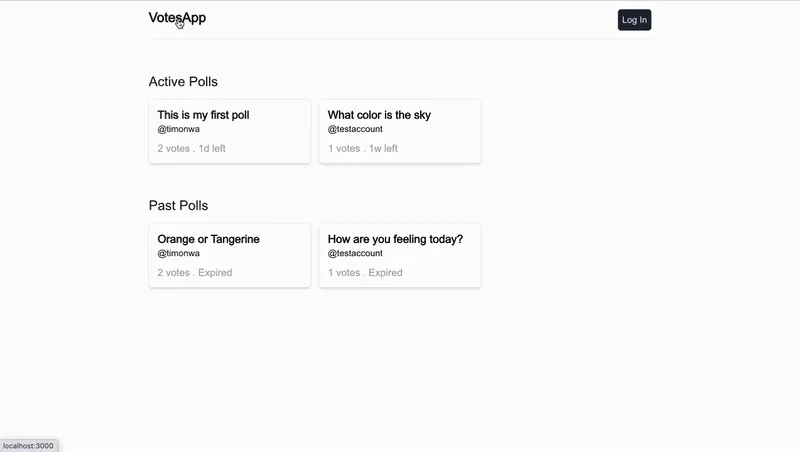
You should be able to see the application's changes by going to the browser. On the home screen, users can view the list of active and past polls, whether they are logged in or not. However, when they click on a poll, they will not be able to view the poll details or vote on it. Instead, they will be prompted to log in.
Once logged in, the user can view the details of the poll and vote on it. However, if the user is the creator of the poll, they will not be able to vote on it. They will see a message indicating that they cannot vote on their own poll. They will also be allowed to manage any poll that they create.
Conclusion
In this tutorial, we explored how to implement Supabase authentication and authorization in a real-world Next.js application.
We started by setting up Supabase Auth for login and signup, created a relational schema with Row Level Security, and added dynamic authorization logic using ReBAC. With the help of Supabase Edge Functions and a Policy Decision Point (PDP), we enforced permission checks directly from the frontend.
By combining Supabase Auth with flexible access control, we were able to:
- Authenticate users via email and password
- Restrict voting and poll management to authorized users
- Prevent creators from voting on their own polls
- Assign and evaluate user roles based on relationships to data
This setup gives you a scalable foundation for building apps that require both authentication and fine-grained authorization.
Further Reading
Got questions? Join our Slack community, where hundreds of developers are building and discussing authorization.