Nuxt is a Vue-powered framework that offers server-side rendering, built-in routing, and API endpoints out of the box. But while Nuxt handles authentication well, structured authorization—determining what a user is allowed to do—requires additional logic.
To solve this, we’ll define ABAC and ReBAC access control policies outside our codebase, enabling more flexible and scalable access control. Our sample project is a food delivery application with multiple roles and real-world business logic.
By the end of this tutorial, you'll be able to:
- Define resource-specific policies
- Use user and resource attributes for authorization (ABAC)
- Assign and check permissions based on relationships (ReBAC)
- Sync app data in real time for policy evaluation
- Enforce fine-grained access control in Nuxt middleware
If you are looking for a more basic guide, we also have one on “Implementing Multi-Tenant RBAC in Nuxt.js”.
Let’s start by planning our authorization strategy.
Planning Our Implementation
Before jumping into code, we need to clearly define what we're securing and how.
This tutorial will walk you through:
- Declaring resources like
Order and Meal, and the actions users can take on them.
- Setting up roles such as
customer, vendor, rider, and admin, and deciding which actions they’re allowed to perform.
- Extending our model with ABAC, where conditions (e.g.,
order.cost > 500) affect ccess.
- Adding ReBAC, where permissions are derived from relationships (e.g., a vendor can fulfill only their own orders).Syncing user and resource data with
- Permit.io, so that permission checks are always based on real-time context.
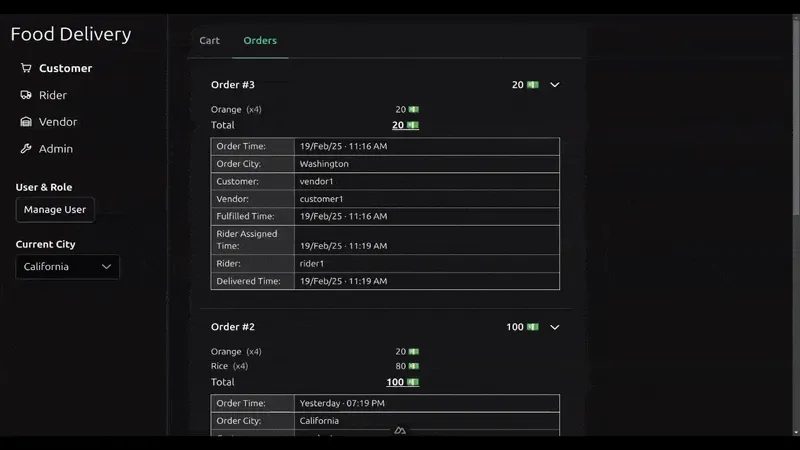
A short demo of what our application will look like
Our Demo Application: A Food Delivery App
To demonstrate fine-grained authorization, we’ll use a sample food delivery system that supports multiple roles and actions.
The roles include:
- Customer – Places orders
- Vendor – Prepares and fulfills meals
- Rider – Delivers orders
- Admin – Oversees operations and assigns riders
In our previous RBAC tutorial, we covered how to grant static permissions to these roles. Here, we’ll expand that model using ABAC and ReBAC to define conditional and relationship-based permissions—for example, enforcing free delivery only on high-value orders, or allowing vendors to fulfill only meals they created.
If you need a refresher on RBAC, start with our RBAC in Vue.js guide, then return here to build on it.
The source code for this project is available here.
Frontend Stack
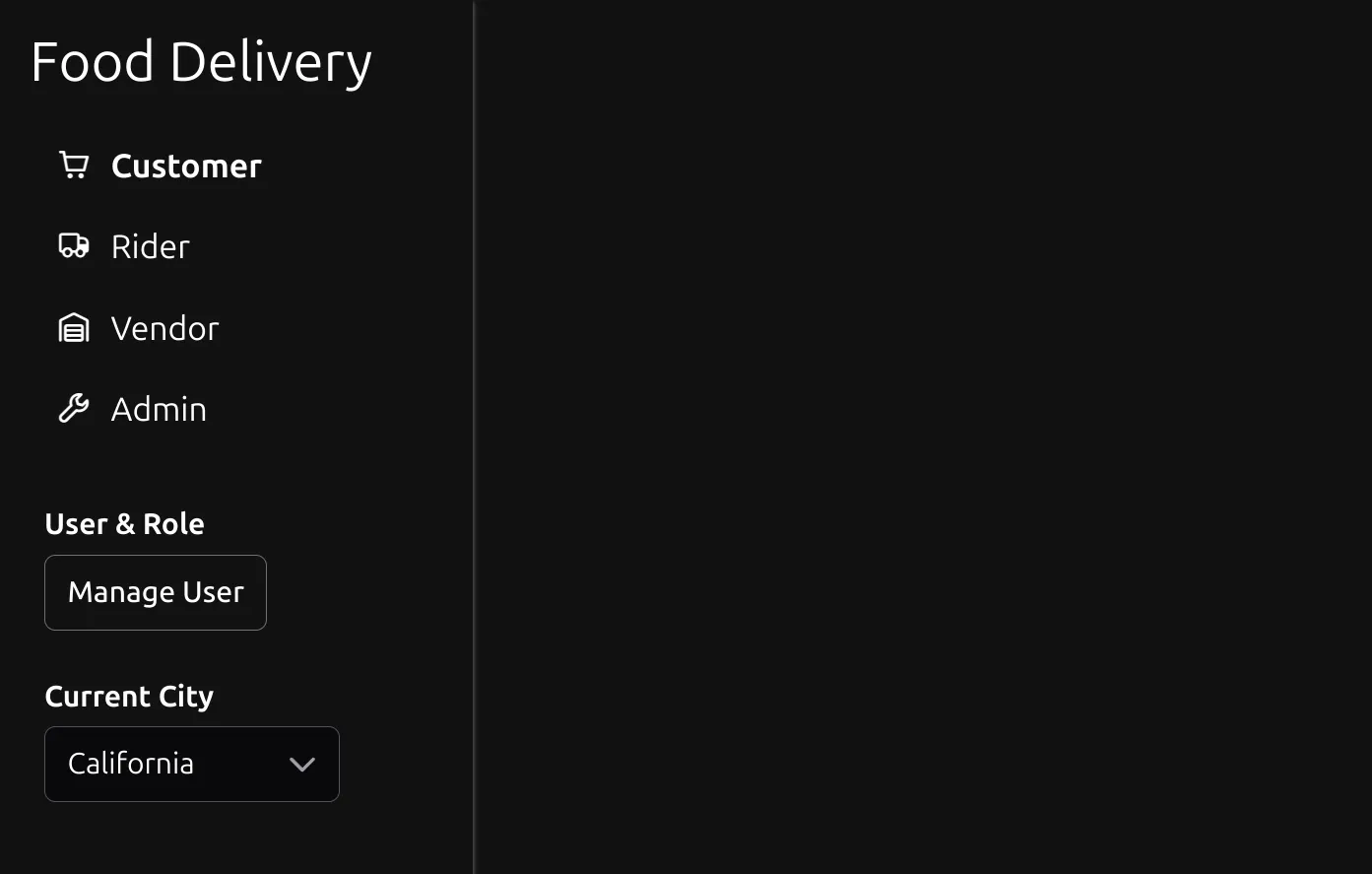
The Nuxt frontend uses:
These libraries are preconfigured as modules in the project’s nuxt.config.ts file.
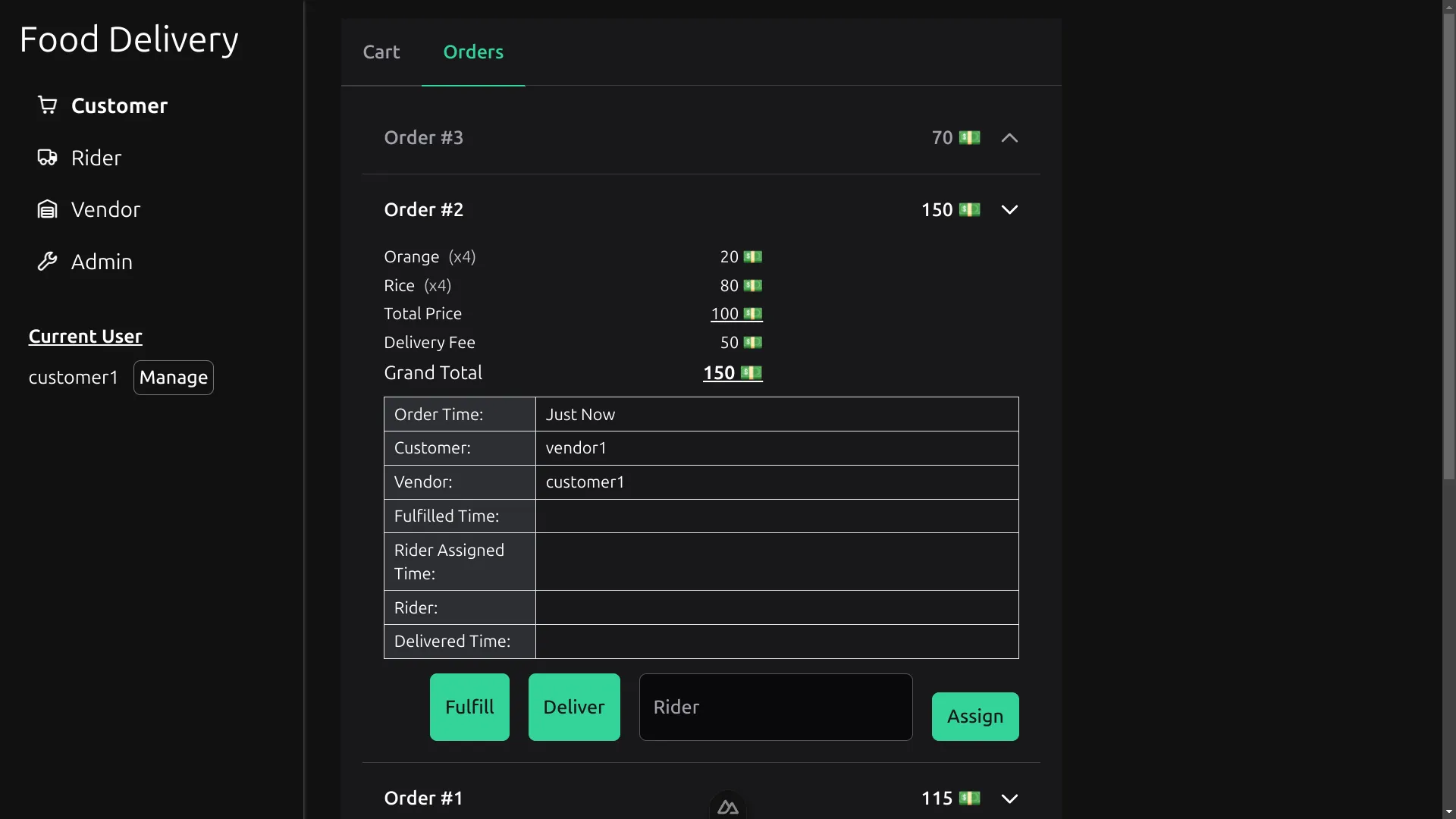
The app includes a shared OrdersDisplay.vue component, which powers each role’s main page. It displays order data and allows authorized users to trigger actions like fulfill, deliver, or assign ****rider —depending on their role and policy constraints.
<script setup lang="ts">
// ... imports

// ... variables

const displayOrderDetails = (order: Order) => ({
  // ... key/value pairs
});

const fulfill = async (orderId: number) => {
  // ...
};

const assignRider = async (e: FormSubmitEvent, orderId: number) => {
  // ...
};

const deliver = async (orderId: number) => {
  // ...
};
</script>

<template>
  <p v-if="orders.all.length == 0" class="text-center opacity-30 mt-4 mb-8">
    No Orders Yet.
  </p>

  <Accordion :value="orders.all.map(({ id }) => id)" multiple>
    <AccordionPanel
      v-for="order of orders.all"
      :key="order.id"
      :value="order.id"
    >
      <AccordionHeader>
        <div class="grow flex justify-between mr-4">
          <h3>Order #{{ order.id }}</h3>
          <span> {{ order.totalPrice }} 💵 </span>
        </div>
      </AccordionHeader>
      <AccordionContent>
        <div class="max-w-xs">
          <div
            class="flex items-start justify-between mb-1 text-sm"
            v-for="{ quantity, name, price } of order.meals"
          >

            <!-- ... Order's Meal Breakdown -->

          </div>
        </div>
        <ul class="border-b mb-3">
          <li v-for="(value, key) in displayOrderDetails(order)">

            <!-- ... Order's Info Table -->

          </li>
        </ul>

        <div class="flex flex-wrap justify-end gap-4">
          <Button type="submit" label="Fulfill" @click="fulfill(order.id)" />
          <Button type="submit" label="Deliver" @click="deliver(order.id)" />
          <Form v-slot="$form" @submit="(e) => assignRider(e, order.id)">
            <FloatLabel variant="in">
              <InputText id="rider-name" name="rider" type="text" />
              <label for="rider-name">Rider</label>
            </FloatLabel>
            <Button type="submit" label="Assign" />
          </Form>
        </div>
      </AccordionContent>
    </AccordionPanel>
  </Accordion>
</template>
Backend Stack
On the backend, we use Nuxt’s built-in server engine, powered by Nitro and h3, to create:
- Routes for handling CRUD operations
- Middleware to enforce authorization
- Utility files for reading/writing data
The two main resources—Meal and Order—are manipulated through API routes, and their logic is shared between the frontend and backend. These resources will also become the foundation for our ABAC and ReBAC policies.
Integrating for Fine-Grained Authorization
To handle authorization cleanly and dynamically, we’ll integrate Permit.io—a platform for managing policies outside the app code. Permit allows us to:
- Define resource types, actions, roles, and conditions
- Sync user and resource data from our Nuxt app
- Check permissions in real time using
permit.check()
By using Permit’s SDK, we avoid hardcoding logic and instead enforce rules based on up-to-date context, making our app easier to manage and scale. This is especially important when dealing with fine-grained access control like ABAC and ReBAC.
Our integration flow will include:
- Creating resources and actions in the Permit UI
- Syncing app data to Permit using the SDK
- Enforcing policies in Nuxt middleware based on user/resource context
We’ll cover each of these steps in detail below.
What App Data Matters for Authorization?
In fine-grained authorization, data drives access decisions. That includes:
These user attributes allow you to define dynamic rules, such as:
“Only riders with over 500 deliveries can take high-value orders.”
These are resource attributes, which can be used to enforce rules like:
“Only fulfill orders with a cost of more than 500.”
These connections form the foundation of ReBAC. Instead of using attributes alone, ReBAC checks whether a relationship exists before granting access.
To enable ABAC and ReBAC, you must keep the authorization configuration in Permit in sync with your application. This means:
- Creating or updating user/resource data whenever it changes
- Including all relevant attributes and relationships in those syncs
- Deleting entities when they’re removed from your app
In the next section, we’ll show how to configure Permit in Nuxt to begin syncing data and performing real-time checks.
How to set up Permit.io in a Nuxt app
To begin enforcing ABAC and ReBAC in your Nuxt project, you’ll first need to install and configure the Permit.io SDK and connect it to a Policy Decision Point (PDP)—Permit’s real-time policy engine. Here’s how to set it up step by step:
- Get Your Permit.io **Token:**Log in to the Permit Console and generate a Permit API key. You’ll use this to authenticate the SDK and connect to your PDP.
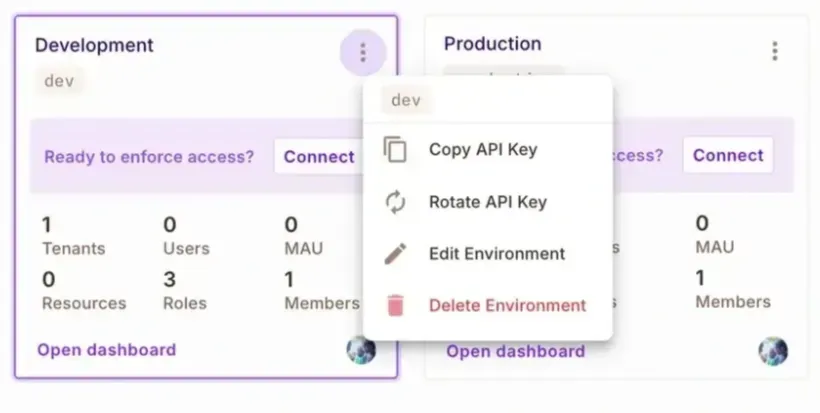
- **Run a PDP Locally or in Production
**The PDP evaluates permissions at runtime. For ABAC and ReBAC policies, you must run a dedicated PDP (self-hosted via Docker).
The following command launches a PDP on localhost:7766 :
docker run -it \\
  -p 7766:7000 \\
  --env PDP_API_KEY=<your-permit-api-key> \\
  --env PDP_DEBUG=True \\
  permitio/pdp-v2:latest
- Add Permit Config to Your
.env
Create a .env file in the project’s root and define the Permit token and PDP:
PERMIT_TOKEN=permit_key_XXXXXXXXXXXXXXXXXXXXXXXXX
PERMIT_PDP=http://localhost:7766
- Install the Permit.io SDK
Install the SDK using your package manager:
npm install permitio
- Configure Nuxt to Use Permit
Update your
nuxt.config.ts to include the Permit package in build.transpile, and load your environment variables into Nuxt’s runtime:
// In nuxt.config.ts

export default defineNuxtConfig({

  // ... other properties

  build: { transpile: ['permitio'] },
  runtimeConfig: {
    permitToken: process.env.PERMIT_TOKEN,
    permitPdp: process.env.PERMIT_PDP
  }
});
- Create a Global Permit Instance
Use the Nuxt runtime config to declare a reusable Permit instance. This will be used across your app to sync data and check permissions.
// In /server/utils/permit.ts

import { Permit } from 'permitio';

const config = useRuntimeConfig(); // using Nuxt runtime to get env vars
export const permit = new Permit({
  pdp: config.permitPdp,
  token: config.permitToken
});
Nuxt’s auto-import system allows you to reference this instance anywhere in your server code without manually importing it each time.
Once this setup is complete, you’ll be ready to sync app data to Permit and begin using the permit.check() function to enforce ABAC and ReBAC rules. We’ll cover both next.
How to Sync App Data with the Permit.io SDK in Nuxt
Once Permit is configured in your Nuxt app, the next step is to keep it in sync with your application’s data. This ensures that Permit always evaluates policies against up-to-date user and resource information.
You should sync data when users or resources are created, updated, or deleted.
Syncing Users
Permit’s SDK provides methods on permit.api.users for managing user data:
You can use .create to add a new user, .update to modify an existing one, .sync to either create or update based on the user’s existence, and .delete to remove a user. For example:
// Creating a new user with attributes
await permit.api.users.create({
  key: 'user_123',
  email: 'user@example.com',
  attributes: { age: 12 }
});

// Updating a user
await permit.api.users.update(
  'user_123',
  { attributes: { age: 13 } }
);

// Syncing a user (create if not exists, update if exists)
// with instance role assignment
await permit.api.users.sync({
  key: 'user_123',
  email: 'user@example.com',
  attributes: { files: 25, premium: false },
  role_assignments: [
    { role: 'owner', resource_instance: 'resource_123' }
  ]
});

// Deleting a user
await permit.api.users.delete('user_123');
Tip: When assigning instance roles (used in ReBAC), use resource_instance. For RBAC, use tenant. Learn more in Permit’s multitenancy guide.
Syncing Resource Instances
Resources like Order and Meal are managed via permit.api.resourceInstances. This allows you to represent specific instances of resources and assign attributes or roles to them.
Instances represent unique resources in the app database and are a core part of ReBAC
// Creating a new resource instance with attributes
await permit.api.resourceInstances.create({
  key: 'order_456',
  resource: 'Order',
  attributes: { fulfilled: false, delivered: false },
  tenant: 'California'
});

// Updating a resource instance's attributes
await permit.api.resourceInstances.update('order_456', {
  attributes: { fulfilled: true }
});

// Deleting an instance
await permit.api.resourceInstances.delete('order_456');
Keeping Data Fresh
When you make these SDK calls in the appropriate parts of your app, the changes are immediately sent to your Permit project.
Permit automatically cleans up stale data:
- Deleting a user also removes all their role assignments
- Deleting a resource instance clears related assignments
This ensures your policies stay clean and consistent over time.
Permit also supports a wide range of other SDK methods (e.g., for roles, conditions, attributes, tenants, and derivations). You can explore the full list in the API reference, or browse suggestions via IDE autocompletion under permit.api.
Implementing Attribute-Based Access Control (ABAC) in Nuxt
ABAC (Attribute-Based Access Control) allows you to define access rules based on user and resource attributes, rather than just roles. This enables more granular, flexible permission logic that scales better than RBAC alone.
Instead of saying "Riders can deliver orders," ABAC lets you say:
“Riders can deliver high-value orders if they have completed at least 500 deliveries.”
When to Use ABAC
Use ABAC when access depends on real-time context or attributes such as:
order.cost > 500user.account_type == 'premium'project.status == 'archived' && user.role == 'manager'
It is most useful when dealing with:
- Conditional permissions
- Apps with a large number of roles, to avoid role explosion from too many static combinations
- You want runtime flexibility without changing code or redeploying
ABAC does not replace RBAC—it extends it by adding more granularity.
How to set up ABAC Policies in Permit.io
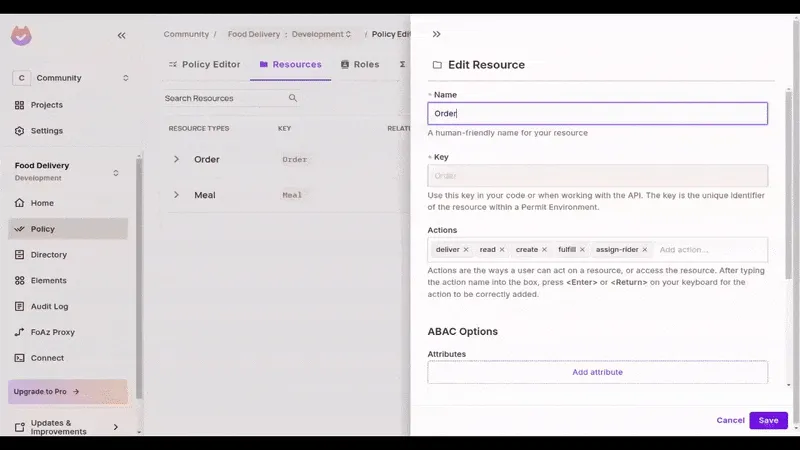
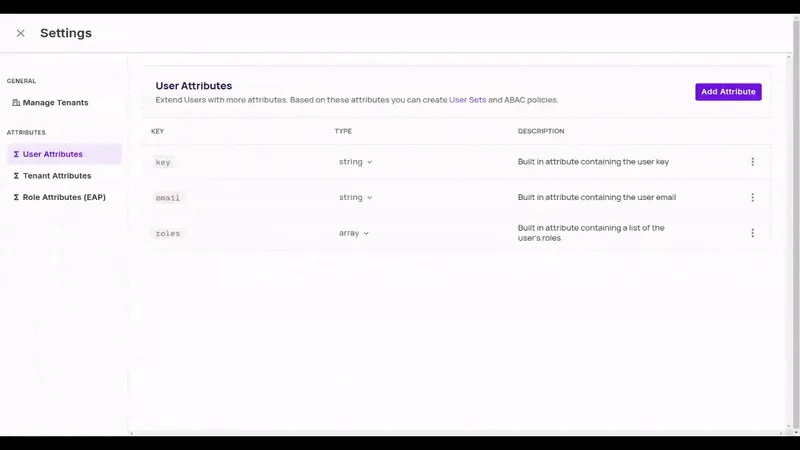
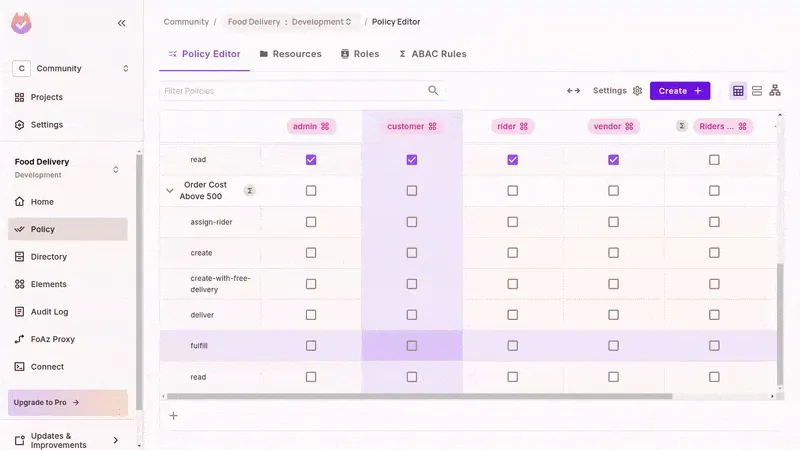
- Enforce with
permit.check() in the Nuxt Middleware
In all SDKs, Permit.io gives you a check function to look up a user’s permission for an action on a resource. Calling permit.check with the appropriate arguments will return a boolean (true or false) value for whether or not the acting user is authorized based on our defined policies. In your Nuxt backend, use middleware to enforce the policies:
Free delivery conditions:
// In /server/middleware/permissions/issue-free-delivery.ts file

export default defineEventHandler(async (event) => {
  // Don't process if this is not a create order route
  if (event.path != '/orders' || event.method != 'POST') return;

  // Get user from the request headers;
  const { user } = event.node.req.headers as any;

  // Obtain order cost from the event context
  const { totalPrice } = event.context.newOrder;

  // Check with Permit if order can get free delivery
  const canHaveFreeDelivery = await permit.check(
    user,
    'create-with-free-delivery',
    { type: 'Order', attributes: { cost: totalPrice } }
  );

  // Issue free delivery if authorised
  if (canHaveFreeDelivery) event.context.newOrder.deliveryFee = 0;

  // Not handling when the free delivery is not issued inorder not to
  // break the flow of the application as users can still proceed to pay
  // for delivery
});
Rider eligibility check:
// In /server/middleware/permissions/check-rider-elibility.ts file

export default defineEventHandler(async (event) => {
  // Don't process if this is not a deliver order route
  if (
    !event.path.startsWith('/order') ||
    event.method != 'POST' ||
    event.path.split('/')[3] != 'deliver'
  ) {
    return;
  }

  // Get user from the request headers
  const { user } = event.node.req.headers as any;

  // Obtain order details from the event context
  const { orders, orderIndex } = event.context;
  const { totalPrice } = orders[orderIndex];

  // Check with Permit if the rider can make the delivery
  const canRiderDeliver = await permit.check(
    { key: user, attributes: { number_of_rides: 505 } }, // hardocded 505 for demo
    'deliver',
    { type: 'Order', attributes: { cost: totalPrice } }
  );

  // Prevent the rider from doing the delivery if not authorised
  if (!canRiderDeliver) {
    return {
      success: false,
      message: 'You are not permitted to perform this action'
    };
  }

  // Otherwise allow Nuxt to continue handling the event
});
Notes on Attribute Usage -
- If you’ve already synced attributes, you don’t need to pass them to
permit.check()—Permit will use them.
- If you pass them at runtime, they override synced values. This gives you flexibility to use either approach.
Implementing Relationship-Based Access Control (ReBAC) in Nuxt
ReBAC (Relationship-Based Access Control) determines access based on the relationships between users and resources, rather than just roles or attributes.
Instead of saying “Vendors can fulfill any order,” ReBAC lets you say:
“A vendor can fulfill an order only if they’re the creator of that order.”
This unlocks instance-level permissions that are dynamic and contextual.
When to Use ReBAC
ReBAC is ideal when permissions depend on how entities are linked, such as:
- A user is assigned to a projectA customer owns a specific orderA manager oversees a group of riders
Use ReBAC for:
- Instance-level access control
- Role derivation (e.g., view rights on a folder → view rights on its files)
- Avoiding over-permissioning in multi-tenant, multi-owner environments
Like ABAC, ReBAC complements RBAC—it doesn’t replace it.
How to Set Up ReBAC Policies in Permit.io
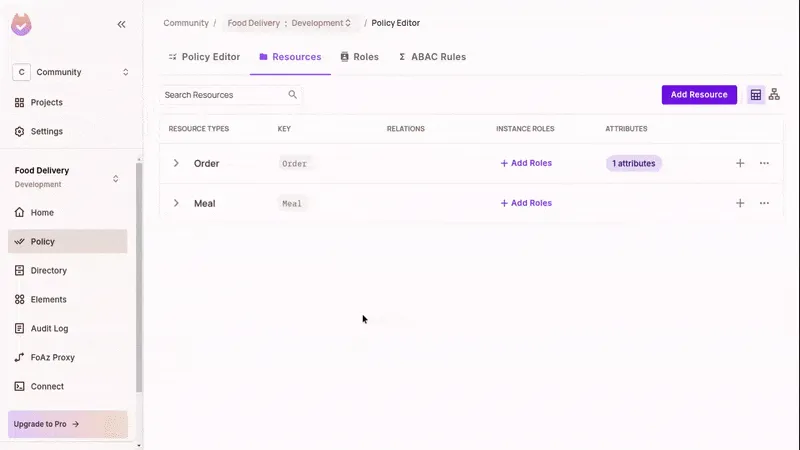
- Define an Instance Role
In the Permit UI, add an instance role (e.g.,
Vendor) to the Order resource.
- **Update Policy Permissions
**In the Policy Editor, allow actions (e.g.,
fulfill) only for users who hold the Vendor role on that specific order.
- Assign Instance Roles in Code
- Use the SDK to assign a user to a resource instance using
roleAssignments.assign():
await permit.api.roleAssignments.assign({
  user: vendor,
  role: 'Vendor',
  resource_instance: `Order:${orderId}`
});**Sync the Resource Instance**
Be sure to create the instance in Permit before assigning roles to it:
await permit.api.resourceInstances.create({
  key: orderId,
  resource: 'Order',
  attributes: { cost: totalPrice },
  tenant: 'default'
});
Enforce ReBAC Policies with permit.check() in Nuxt
Permit uses the instance role and resource key to determine if the user has access. In your Nuxt middleware, pass the resource type and key into permit.check():
// In /server/middleware/permissions/check-fulfilling-vendor.ts

export default defineEventHandler(async (event) => {
  // Don't process if this is not a fulfill order route
  if (
    !event.path.startsWith('/order') ||
    event.method != 'POST' ||
    event.path.split('/')[3] != 'fulfill'
  ) {
    return;
  }

  // Get user from the request headers;
  const { user } = event.node.req.headers as any;

  // Obtain orderId from the event context
  const { orderId } = event.context;

  // Check with Permit if the vendor can fulfill the order
  const canFulfillOrder = await permit.check(
    user,
    'fulfill',
    { type: 'Order', key: orderId } // providing orderId for ReBAC
  );

  // Prevent the vendor from fulfilling the order if not authorised
  if (!canFulfillOrder) {
    return {
      success: false,
      message: 'You are not permitted to perform this action'
    };
  }

  // Otherwise allow Nuxt to continue handling the event
});Sync Instance Roles When Orders Are Created
When a new order is created, assign the vendor to it immediately. This makes the ReBAC check above work correctly.
// In /server/routes/orders/index.post.ts

export default defineEventHandler(async (event) => {
  const { newOrder, orders } = event.context;
  orders.unshift(newOrder);
  saveOrders(orders);
  const { id, totalPrice, vendor } = newOrder;

  // Sync the new order with Permit
  await permit.api.resourceInstances.create({
    key: id,
    resource: 'Order',
    attributes: { cost: totalPrice },
    tenant: 'default'
  });

  // Set the Order's Vendor with Permit
  await permit.api.roleAssignments.assign({
    user: vendor,
    role: 'Vendor',
    resource_instance: `Order:${id}`
  });

  return { id };
});
Note: You only need to provide the role name (Vendor) and the resource instance in Order:ID format. Permit resolves the full relationship internally.
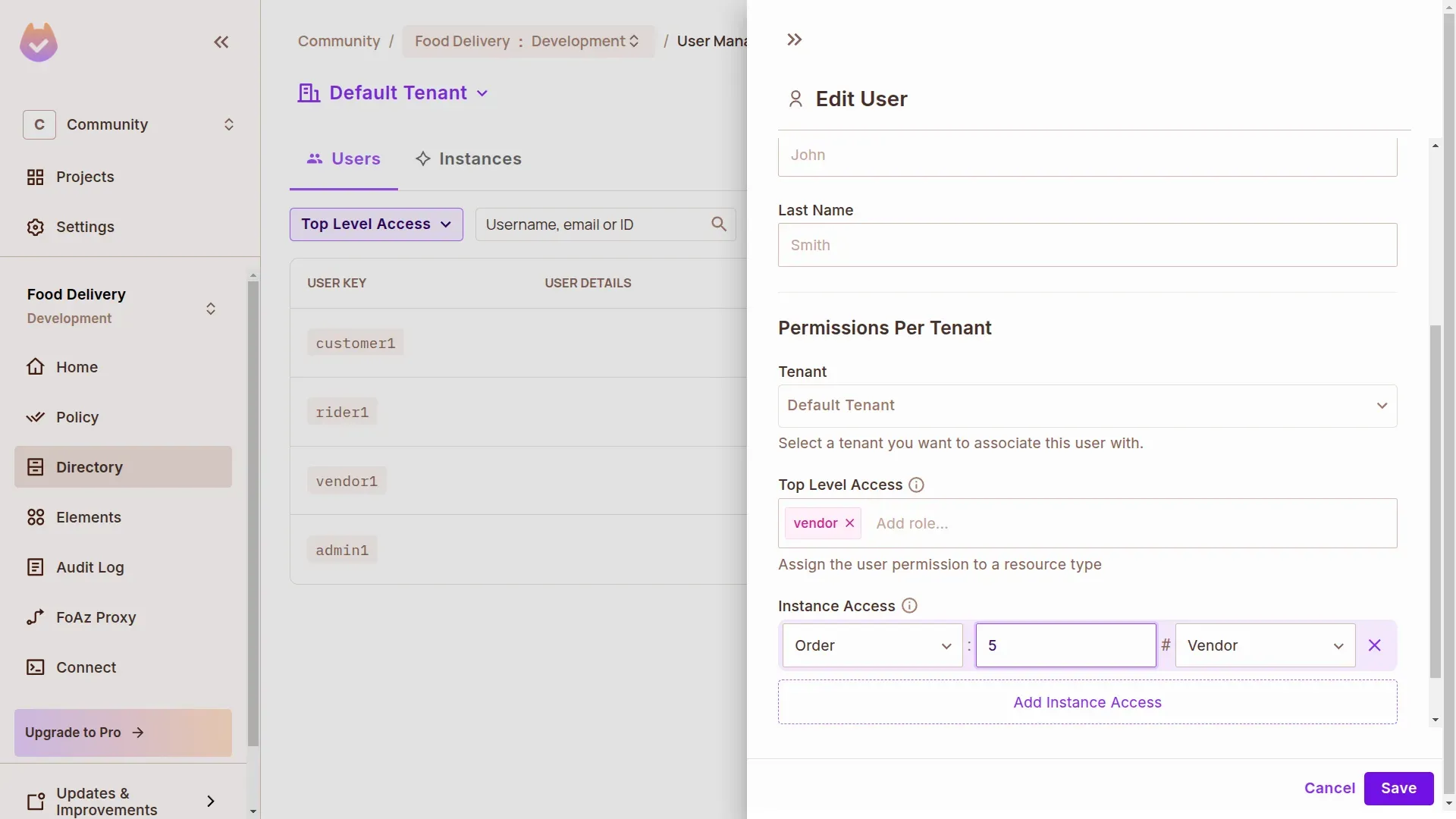
Visualizing ReBAC in Permit
You can view your ReBAC setup directly in the Permit UI:
- Instance roles and assignments
- Resource relationships and role derivations
- Connected users and access graphs
This visibility makes it easy to audit, test, and evolve your authorization model as your app scales.
Summary
In this guide, we explored how to implement fine-grained authorization in Nuxt.js using Permit.io, with a focus on ABAC (Attribute-Based Access Control) and ReBAC (Relationship-Based Access Control).
We used a food delivery app as our example and walked through:
- Modeling roles, actions, and resources using Permit’s visual policy editor
- Syncing app data (users, resource instances, attributes) in real time with Permit’s SDK
- Enforcing ABAC policies using user/resource attributes and dynamic conditions
- Implementing ReBAC by assigning instance roles and evaluating relationships in middleware
- Combining ABAC, ReBAC, and RBAC to cover every permission use case
By decoupling your access logic from app code and syncing context to an external PDP, you unlock runtime flexibility, stronger security, and cleaner code—all without reinventing authorization from scratch.
Looking to adopt fine-grained access control in your Vue/Nuxt app?
Get started with Permit.io or join our developer community to explore more patterns.