
DeepSeek Completely Changed How We Use Google Zanzibar
Google Zanzibar provides fine-grained authorization, but managing it at scale remains a challenge. This article explores using DeepSeek to automate ReBAC tuple generation.


- Share:

Loading
2938 Members
 Join Permit's Slack
Google Zanzibar is one of the most well-known fine-grained authorization systems, enabling large-scale applications to define and enforce access control through Policy-as-Graph structures. While powerful, Zanzibar requires a lot of data to sync, yet its implementations lack built-in automation tools. This requires manual management of relationship-based access control (ReBAC) tuples, a process that can easily become tedious and error-prone.
With the rise in popularity and functionality of AI agents, we decided to test an experimental approach: using DeepSeek R1 to automate Zanzibar tuple generation.
Combining Permit.io and DeepSeek R1, we attempted to streamline Zanzibar management by:
While not yet production-ready, we think the idea of using AI agents to assist humans in automating access control might not be too far away - and we’d love to hear your feedback on how this model can be further refined and optimized for real-world production deployments.
In this article, we’ll explore:
That being said, let’s start with the basics -
Google Zanzibar is an authorization system developed to manage fine-grained access control across Google's services (e.g., Drive, YouTube, Maps). Instead of using traditional role-based access control (RBAC) or access control lists (ACLs), Zanzibar defines permissions as relationships in a graph, allowing for hierarchical and highly granular access control. By handling millions of authorization requests per second, Zanzibar ensures that even at massive scales, access control remains fast, consistent, and secure.
Policy-as-Graph structures define entities (users, groups, resources) as nodes and relationships as edges. Instead of listing static permissions, Zanzibar allows access control decisions to be traversed dynamically through relationships.
For example, if:
Then Alice automatically has access to all the files without explicitly assigning permissions to each one.
Google Zanzibar’s Policy-as-Graph enables the creation of Relationship-Based Access Control (ReBAC) policies. ReBAC is an authorization model in which access permissions are determined by the relationships between users and resources rather than static roles or attributes.
As we’ve seen in the previous section, instead of explicitly granting permissions, ReBAC derives access from relationships. This approach is ideal for hierarchical, social, and organization-based systems where permissions naturally follow structured relationships.
A relationship tuple is a structured way to represent a user-resource relationship in a ReBAC system. Each tuple typically follows this format:
resource_type:resource_id#relation@subject
For example, the tuple:
document:report123#editor@alice
Means that Alice has an editor relationship with the document report123, granting her access based on the policy. Tuples act as building blocks of ReBAC policies, allowing the system to determine who can access what based on predefined relationships.
Understanding ReBAC policies and tuples, we need to discuss the limitations of Zanzibar’s architecture. While extremely powerful, it’s quite difficult to manage at scale.
As you probably guessed, the biggest pain point in this endeavor is manually defining and updating ReBAC tuples.
For instance, if an organization changes its team structure, it must manually update thousands of tuples to reflect new permissions. This is quite time-consuming, error-prone, and difficult to audit and maintain. Without automation, managing Zanzibar at scale quickly becomes unmanageable.
To simplify Zanzibar deployments, we propose a hybrid approach in which:
No. AI-generated data extraction for access control still requires human supervision to ensure correctness and security. However, we think this approach is a promising step toward automated fine-grained authorization management.
To demonstrate this approach, we’ll build a Zanzibar-powered authorization system where:
Let’s dive into the tutorial!
To get started, let’s create a new Node.js project.
I assume you have Node.js installed and can understand JavaScript (don’t worry; the basics are all you need).
npm init -y
Due to DeepSeek’s popularity and increased demand, they’ve had to close their API (At least for now), which is only open for paid and existing customers.
For this tutorial, we’ll use the DepSeek model from Nebius AI Studio using OpenAI SDK. It’s the same full-weight DeepSeek model but hosted on EU servers. Nebius AI Studio is a full-stack AI inference platform that provides seamless access to multiple open-source models for anyone to use.
The OpenAI SDK makes using DeepSeek easy due to its compatibility and zero configuration requirements. We just need to change the baseURL and our API key.
These are the packages that we’ll be using:
nodemon, dotenv, cors, express, openai, and permitio
Install them using the following command:
npm install nodemon dotenv cors express openai permitio
Now we’re done with the installations, we need to get our API keys.
We need two API keys: our Permit API key and our Nebius API key.
Put these API keys into your .env file.
As mentioned previously, we are going to set up Relationship-Based Access Control (ReBAC) policies in the Permit.io dashboard.
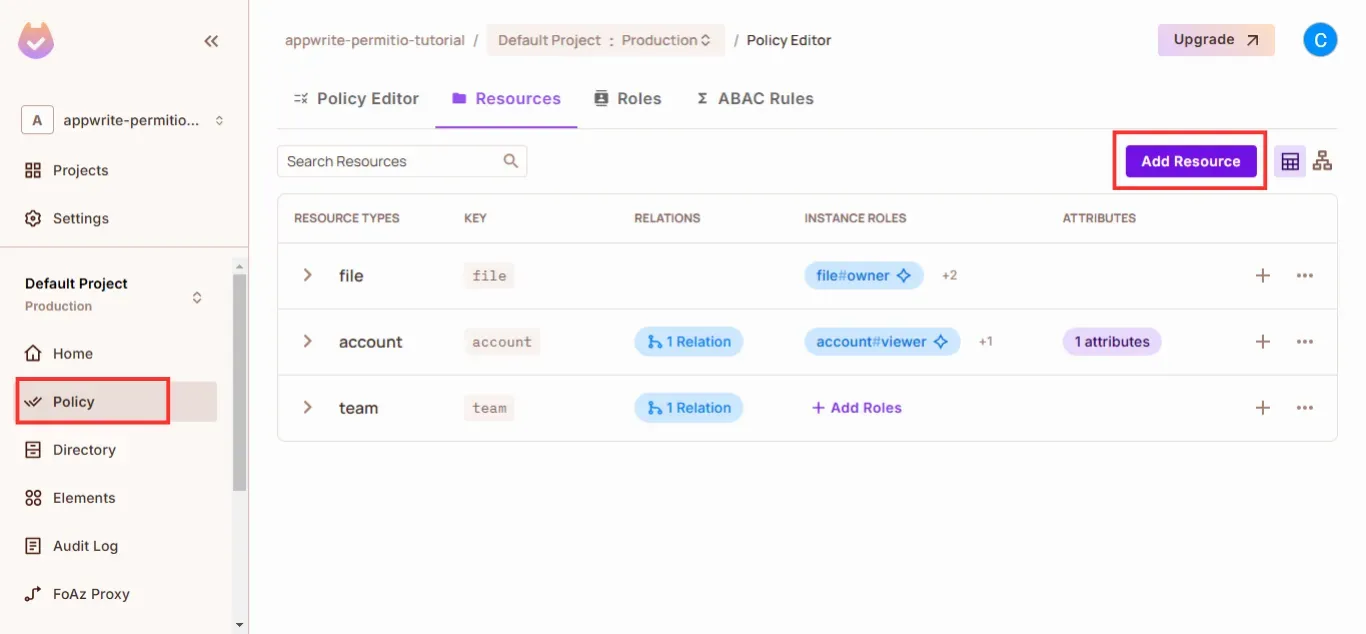
In your Permit dashboard, click on the “Policy” tab on the left panel and add in your resources by clicking “Add Resource”.
Suppose we are building this DeepSeek R1 relationship tuple generator for a product organization. This organization has different teams and accounts, and teams can only manage the accounts associated with them.
We’ll create two resources: team and account. The team resource will have a manages relationship with the account resource.
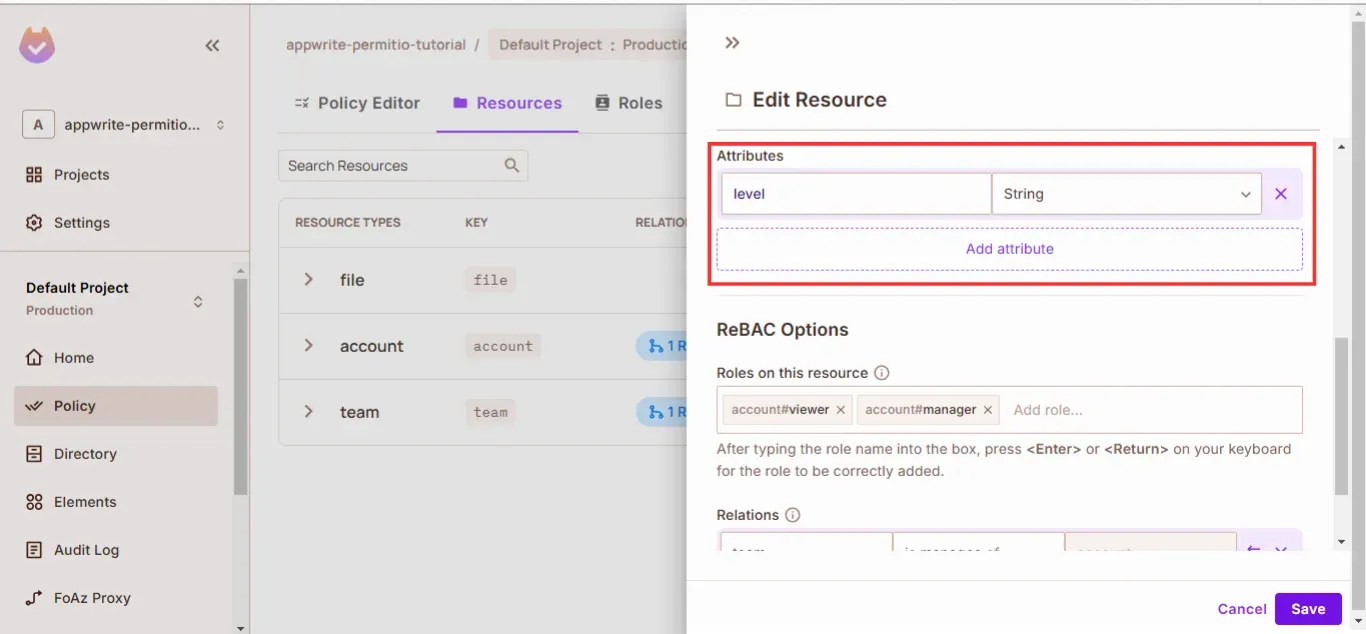
The account resource will have a level attribute:
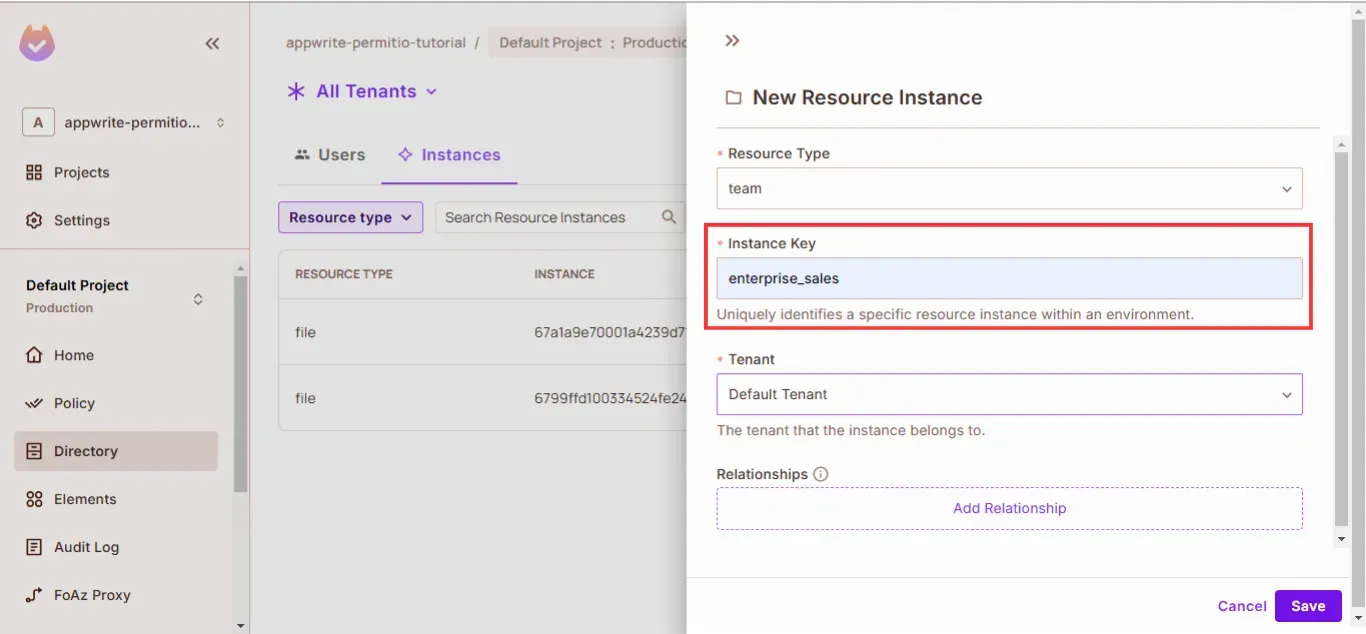
After creating your resources, click on the “Directory” tab on the left panel and add your resource instances.
In our case, we want to create resource instances of:
team will represent the users that handle enterprise salesaccount will represent the enterprise account where proceeds from enterprise sales are depositedAdd the resource instances: team:enterprise_sales and account:enterprise.
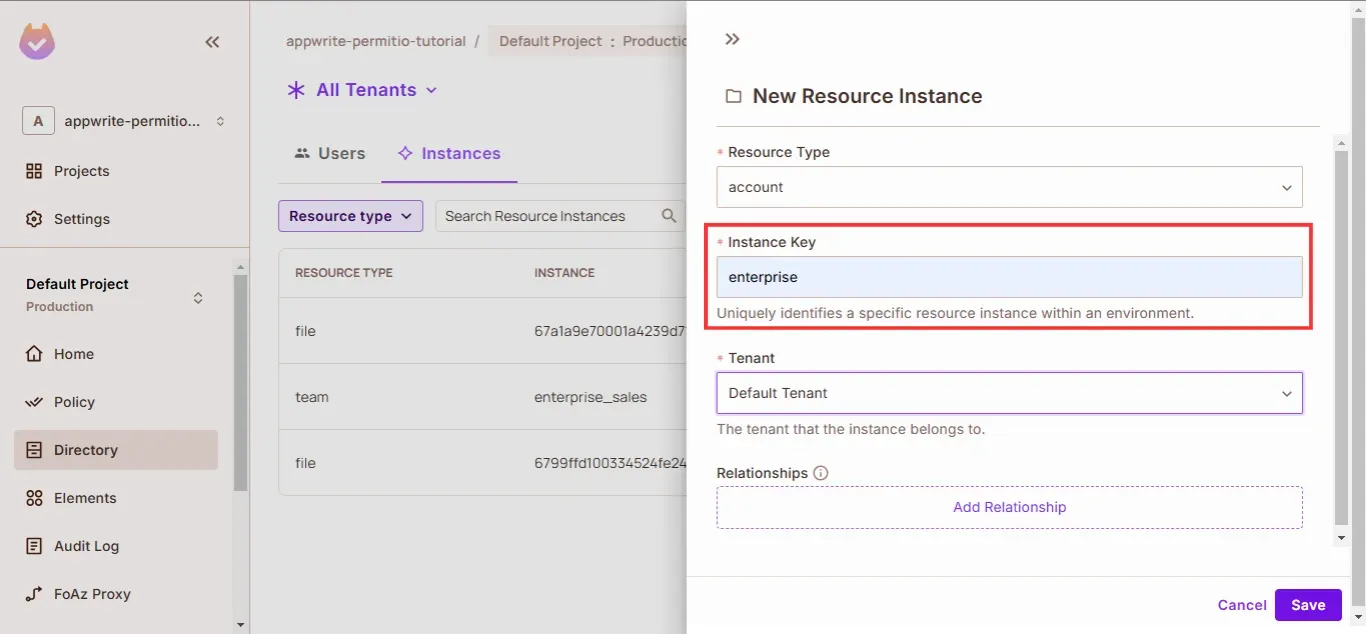
With all of the different elements that comprise our relationship-based policy, in the next section, we’re going to build out the relationship tuple generator.
Create an index.js file and add the following configuration:
const { Permit } = require("permitio");
const express = require("express");
const dotenv = require("dotenv");
const { OpenAI } = require("openai");
const cors = require("cors");

dotenv.config();

const permit = new Permit({
  pdp: "<http://localhost:7766>",
  token: process.env.PERMIT_API_KEY_PROD,
});

const openai = new OpenAI({
  baseURL: "<https://api.studio.nebius.ai/v1/>",
  apiKey: process.env.MY_OWN_NEBIUS_API_KEY,
});

const app = express();
const PORT = process.env.PORT || 3000;

app.use(express.json());
app.use(cors());

app.listen(PORT, () => {
  console.log(`Server running on port ${PORT}`);
});
In the code above, we’re setting up the configurations of our app, including OpenAI and Permit.
In this section, we’ll create two functions for generating a prompt and parsing the AI response into an object.
In the index.js file, add the following code:
function generatePrompt(userInput) {
    return `Parse the following sentence into a REBAC relationship tuple for use in Permit.io:

      Sentence: "${userInput}"

      Identify the following:
      - **Subject:** Include type and instance if available (e.g., "team:enterprise_sales").
      - **Relation:** Extract the main action verb (e.g., "manages").
      - **Object:** Include type and instance if available (e.g., "account:enterprise").
  - **Attributes:** Extract any metadata or qualifiers relevant to the object (e.g., {"level": "enterprise"}). If no attributes exist, return an empty object.

  Return the result in this JSON format:
  \\`\\`\\`json
  {
    "subject": "type:id",
    "relation": "verb",
    "object": "type:id",
    "attributes": {
        "key": "value"
        }
  }
  \\`\\`\\`

  Ensure that the response remains consistent in format, with exact JSON keys as shown, even if some fields are empty.`;
  }

function transformJson(jsonString) {
    const jsonMatch = jsonString.match(/```json\\n({[\\s\\S]*?})\\n```/);
    const extractedJson = jsonMatch ? jsonMatch[1] : null;
    try {
      const data = JSON.parse(extractedJson);

      // Return the JSON string with correct formatting
      return data;
    } catch (error) {
      console.error("Invalid JSON input:", error);
      return null;
    }
  }
The generatePrompt function returns the prompt we will use to prompt the DeepSeek R1 model. We are using a function to get the response to ensure a fairly consistent result for the same input.
The transformJson function parses the AI response for the generated relationship tuple and returns it as an object.
In this section, we will create a relationship tuple in Permit using the Permit SDK and the object returned by transformJson function.
Use the following code to create a ReBAC relationship tuple in Permit:
/* example structure:

"rawRebacTuple": {
	 "subject": "team:enterprise_sales",
   "relation": "manages",
   "object": "account:enterprise",
   "attributes": {
		   "level": "enterprise"
    }
}
*/
const result = await permit.api.relationshipTuples.create({
    subject: `${rebacTuple?.subject}`,
    relation: `${rebacTuple?.relation}`,
    object: `${rebacTuple?.object}`,
});
Our final index.js should look like this:
const { Permit } = require("permitio");
const express = require("express");
const dotenv = require("dotenv");
const { OpenAI } = require("openai");
const cors = require("cors");

dotenv.config();

const permit = new Permit({
  pdp: "<http://localhost:7766>",
  token: process.env.PERMIT_API_KEY_PROD,
});

const openai = new OpenAI({
  baseURL: "<https://api.studio.nebius.ai/v1/>",
  apiKey: process.env.MY_OWN_NEBIUS_API_KEY,
});

const app = express();
const PORT = process.env.PORT || 3000;

app.use(express.json());
app.use(cors());

app.post("/generate-rebac", async (req, res) => {
  const { text } = req.body;

  function generatePrompt(userInput) {
    return `Parse the following sentence into a REBAC relationship tuple for use in Permit.io:

      Sentence: "${userInput}"

      Identify the following:
      - **Subject:** Include type and instance if available (e.g., "team:enterprise_sales").
      - **Relation:** Extract the main action verb (e.g., "manages").
      - **Object:** Include type and instance if available (e.g., "account:enterprise").
  - **Attributes:** Extract any metadata or qualifiers relevant to the object (e.g., {"level": "enterprise"}). If no attributes exist, return an empty object.

  Return the result in this JSON format:
  \\`\\`\\`json
  {
    "subject": "type:id",
    "relation": "verb",
    "object": "type:id",
    "attributes": {
        "key": "value"
        }
  }
  \\`\\`\\`

  Ensure that the response remains consistent in format, with exact JSON keys as shown, even if some fields are empty.`;
  }

  const prompt = generatePrompt(text);

  function transformJson(jsonString) {
    const jsonMatch = jsonString.match(/```json\\n({[\\s\\S]*?})\\n```/);
    const extractedJson = jsonMatch ? jsonMatch[1] : null;
    try {
      const data = JSON.parse(extractedJson);

      // Return the JSON string with correct formatting
      return data;
    } catch (error) {
      console.error("Invalid JSON input:", error);
      return null;
    }
  }

  try {
    const response = await openai.chat.completions.create({
      temperature: 0.6,
      messages: [
        {
          role: "system",
          content: prompt,
        },
      ],
      model: "deepseek-ai/DeepSeek-R1",
    });

    const responseText = response.choices[0].message.content;
    const rawRebacTuple = transformJson(responseText);

    const result = await permit.api.relationshipTuples.create({
      subject: `${rebacTuple?.subject}`,
      relation: `${rebacTuple?.relation}`,
      object: `${rebacTuple?.object}`,
    });

    console.log(result);
    return res.status(200).json({
      success: true,
      responseText,
      rawRebacTuple,
      rebacTuple,
      relationTupleCreated: true,
    });
  } catch (error) {
    console.error(error);
    return res.status(500).json({
      success: false,
      error: error.message,
      relationTupleCreated: false,
    });
  }
});

app.listen(PORT, () => {
  console.log(`Server running on port ${PORT}`);
});
Now it’s time to test our application. I’ll use the following text: "The enterprise sales team manages all enterprise-level accounts."
Since our interface is a Node.js application, we’ll use Postman to test our integration.
Go to the Postman website or use the desktop application (if you have it installed). Add the URL and the prompt (mark it as raw), and send the request.
You should get something like this:
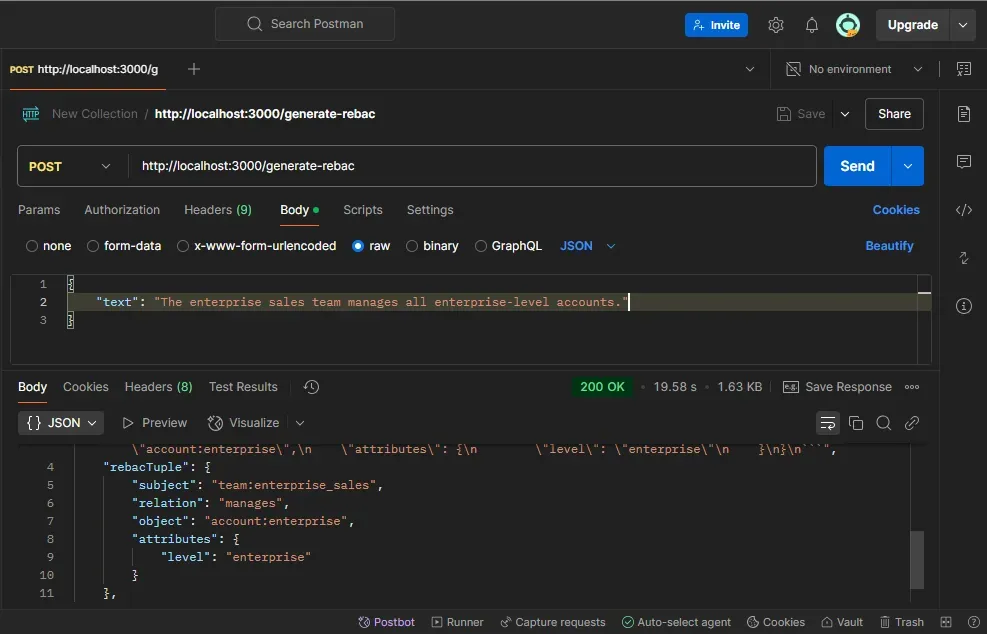
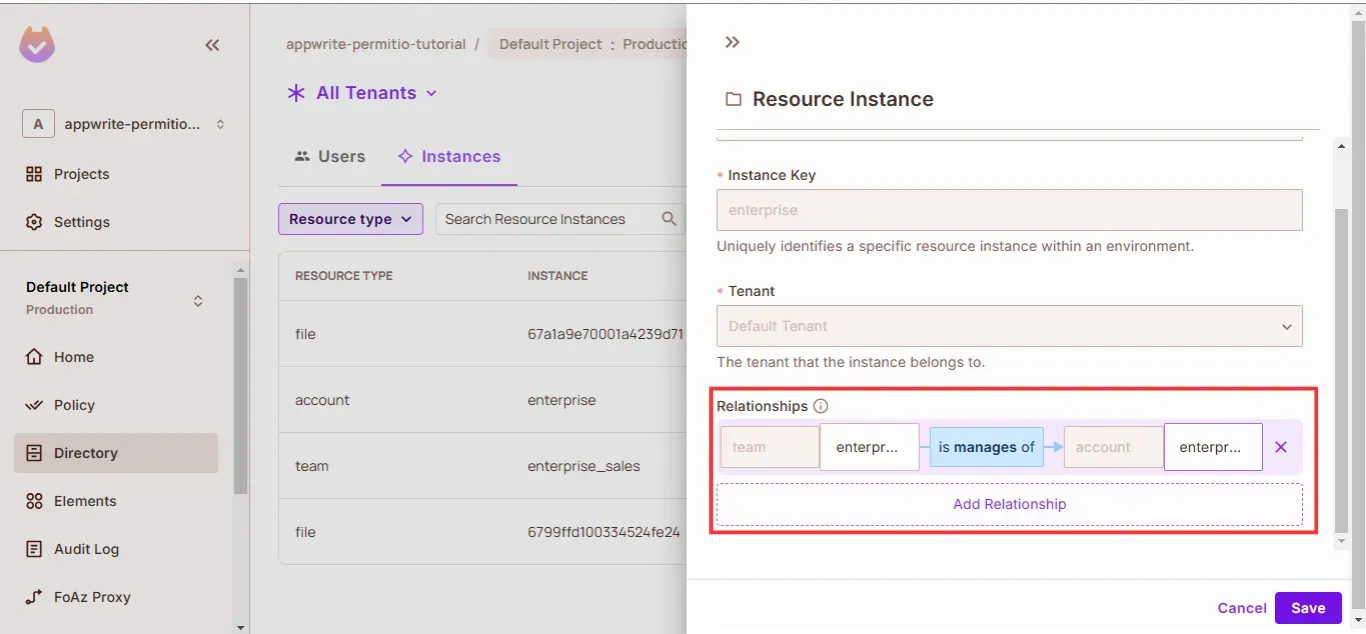
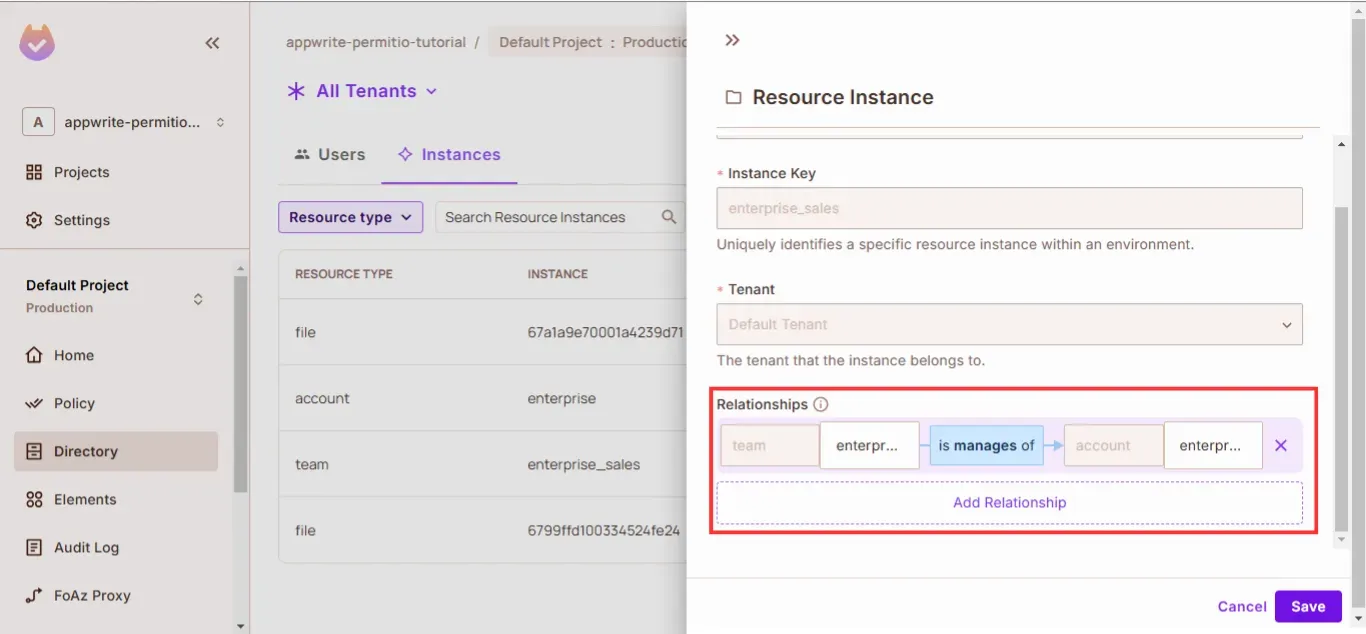
If you check the team:enterprise_sales and account:enterprise resources in your dashboard, you’ll see that the relationship has been added automatically.
To truly function in a real-world environment, an AI-enhanced access control system must integrate with several additional event-driven workflows, automated access request systems, and AI-driven permission management tools. Below are key integrations that would be required for such a system to operate efficiently in production.
Real-world applications require real-time updates to keep access control policies synchronized with changes in user activity, resource creation, and system events. An event-driven architecture ensures that access control remains up to date without manual intervention.
How Would it Work?
This type of integration eliminates manual updates, ensuring that access control scales efficiently in dynamic environments.
A Permission Bot would act as an intelligent assistant that automates access requests and approvals, reducing dependency on IT teams while maintaining security policies.
How Would it Work?
A user requests accessusing a conversational interface (e.g., Slack, Teams, or a chatbot).
Natural Language Processing (NLP) interprets the request and verifies the user's current permissions.
If the user is eligible, the bot grants access automatically through the access control system.
If approval is required, the bot notifies an admin, providing them with a simple way to approve or deny the request.
Rather than waiting for users to request access, AI Agents can anticipate permissions needed and proactively request them on the user's behalf.
How Would it Work?
Example Use Cases
Scenario 1: Proactive Permission Requests
Alice tries to access a restricted bug report but lacks the necessary permissions.
Instead of Alice manually requesting access, the AI agent immediately notifies the admin:
Scenario 2: Predictive Access Based on Behavior
This “experiment” demonstrates how AI can assist in automating fine-grained authorization within Google Zanzibar by leveraging DeepSeek R1 and Permit.io. By using natural language processing to generate ReBAC tuples, we eliminate much of the manual overhead typically associated with managing relationship-based access control.
However, for this approach to be real-world ready, it requires further integrations with:
While this solution is not yet production-ready, it signals a shift towards AI-assisted access control, reducing complexity while maintaining security and compliance. As organizations scale, automated, intelligent permission management will become essential to handle the growing complexity of fine-grained authorization at scale.
We’d love to hear your thoughts on how you would refine this model. What other AI-driven enhancements would make authorization even more seamless?
Let us know your thoughts in our Slack community!

Full-Stack Software Technical Leader | Security, JavaScript, DevRel, OPA | Writer and Public Speaker