Managing and storing data in the browser efficiently is a crucial aspect of building web applications in terms of performance, user experience, and security. Web developers often rely on client-side storage solutions like cookies and local storage to save user preferences, authentication tokens, and other essential data.
But what exactly is the difference between cookies and local storage? When should you use one over the other? And how do security concerns impact your choice?
Both cookies and local storage allow websites to store information on a user’s browser, but they serve different purposes and come with unique benefits and drawbacks. Understanding these differences can help you make informed decisions about which storage mechanism to use in various scenarios.
In this article, we’ll break down:
- What cookies and local storage are
- How they work
- Their pros and cons
- A direct comparison between them
- Best practices for using each securely
By the end, you’ll hopefully know exactly when to use cookies vs. local storage and how to make the right choice for your web applications.
You can watch our video version of this article here:
Without further adieu, let's get into it -
What is Client-Side Storage
Web applications often need to store data in the browser to improve performance, maintain user preferences, and support authentication. Since HTTP is a stateless protocol, it does not track previous requests or responses. This means it requires storage solutions that allow websites to retain information across visits/interactions.
Client-side storage refers to methods that store data directly in a user’s browser rather than on a remote server. This reduces server load, speeds up access to frequently used data, and improves overall user experience. The two primary types of client-side storage are:
- Cookies – Small pieces of data stored in the browser that can be sent with every HTTP request.
- Local storage – A larger, persistent storage solution that remains available even after the browser is closed.
While cookies and local storage allow websites to store data, they serve different purposes. The next sections will explore these storage methods in detail, starting with local storage.
What is Local Storage?
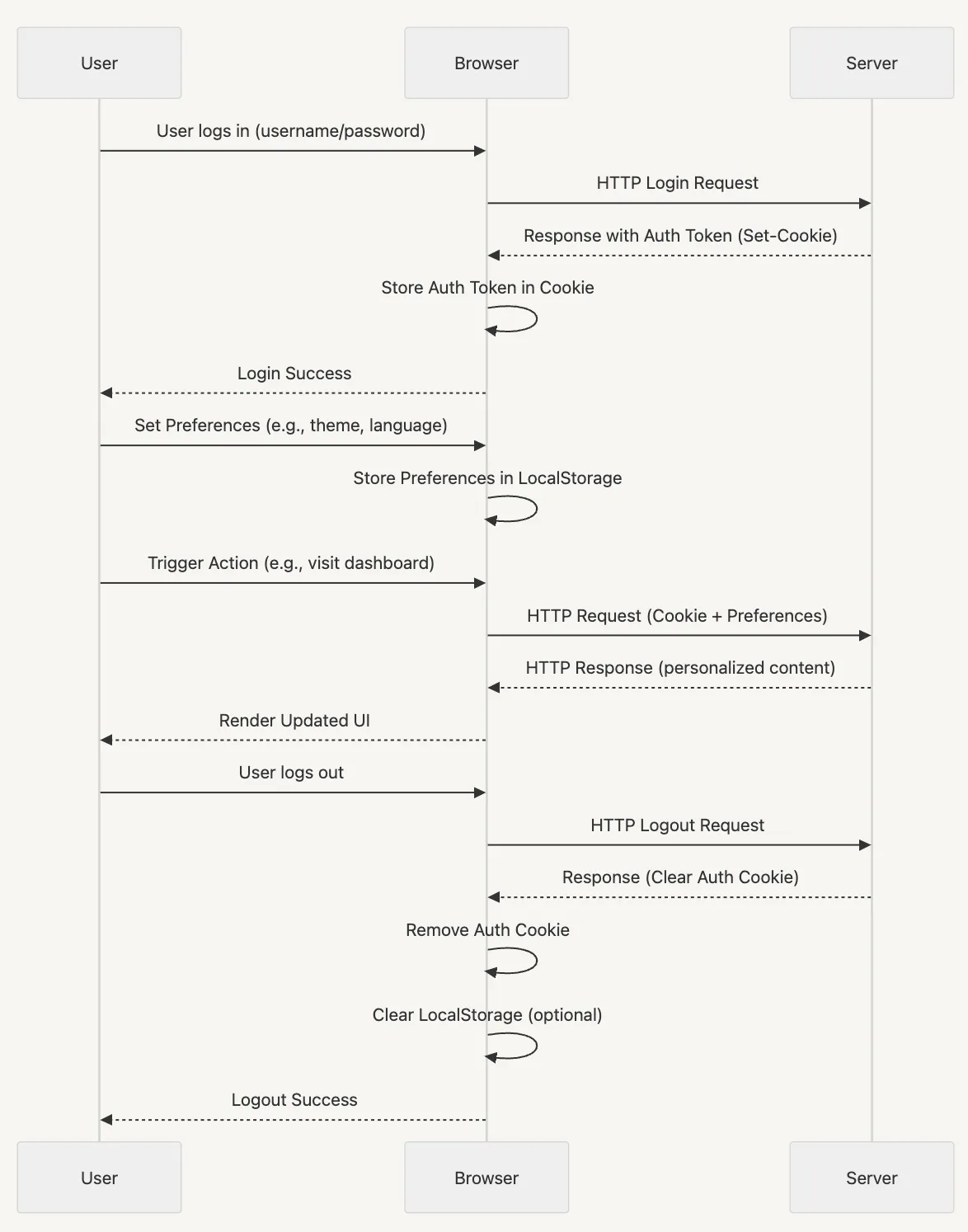
Local storage is a browser-based storage mechanism that allows web applications to store data in key-value pairs. Local storage data is not sent with every HTTP request (unlike cookies), making it more efficient for storing non-sensitive data on the client side.
How Local Storage Works
Local storage is part of the Web Storage API and is accessible through JavaScript using the localStorage object. Data stored in local storage persists indefinitely unless manually removed by the user (or through JavaScript). This makes it useful for storing information that should persist across sessions, like user preferences, theme settings, or cached data.
Key Characteristics of Local Storage
- Persistent storage – Data remains even after the browser is closed and reopened.
- Client-side only – Data is not automatically shared with the server.
- Key-value storage – Stores data as strings, but objects can be stored using
JSON.stringify() and retrieved using JSON.parse().
- Storage capacity – Typically 5MB to 10MB, depending on the browser.
Pros of Local Storage
- Larger storage capacity compared to cookies.
- Data isn’t sent with every HTTP request (reducing unnecessary traffic).
- Easy to use with JavaScript methods such as
setItem() and getItem().
- Works across multiple pages within the same origin.
Cons of Local Storage
- Not secure for sensitive data (as it’s accessible through JavaScript), making it vulnerable to cross-site scripting (XSS) attacks.
- Can’t be accessed by the server, meaning data must be manually sent via an AJAX request if needed.
- Limited to the same origin, preventing access across different domains.
Local storage is best suited for storing non-sensitive, client-side data that needs to persist across browser sessions. This means it isn’t suited for authentication or security-critical information.
Next, we’ll look at what cookies are.
What are Cookies?
Cookies are small text files that websites store in a user's browser to retain information across visits. Unlike local storage, cookies are designed to be accessible by both the client and the server, making them essential for authentication, session management, and tracking user behavior.

How Cookies Work
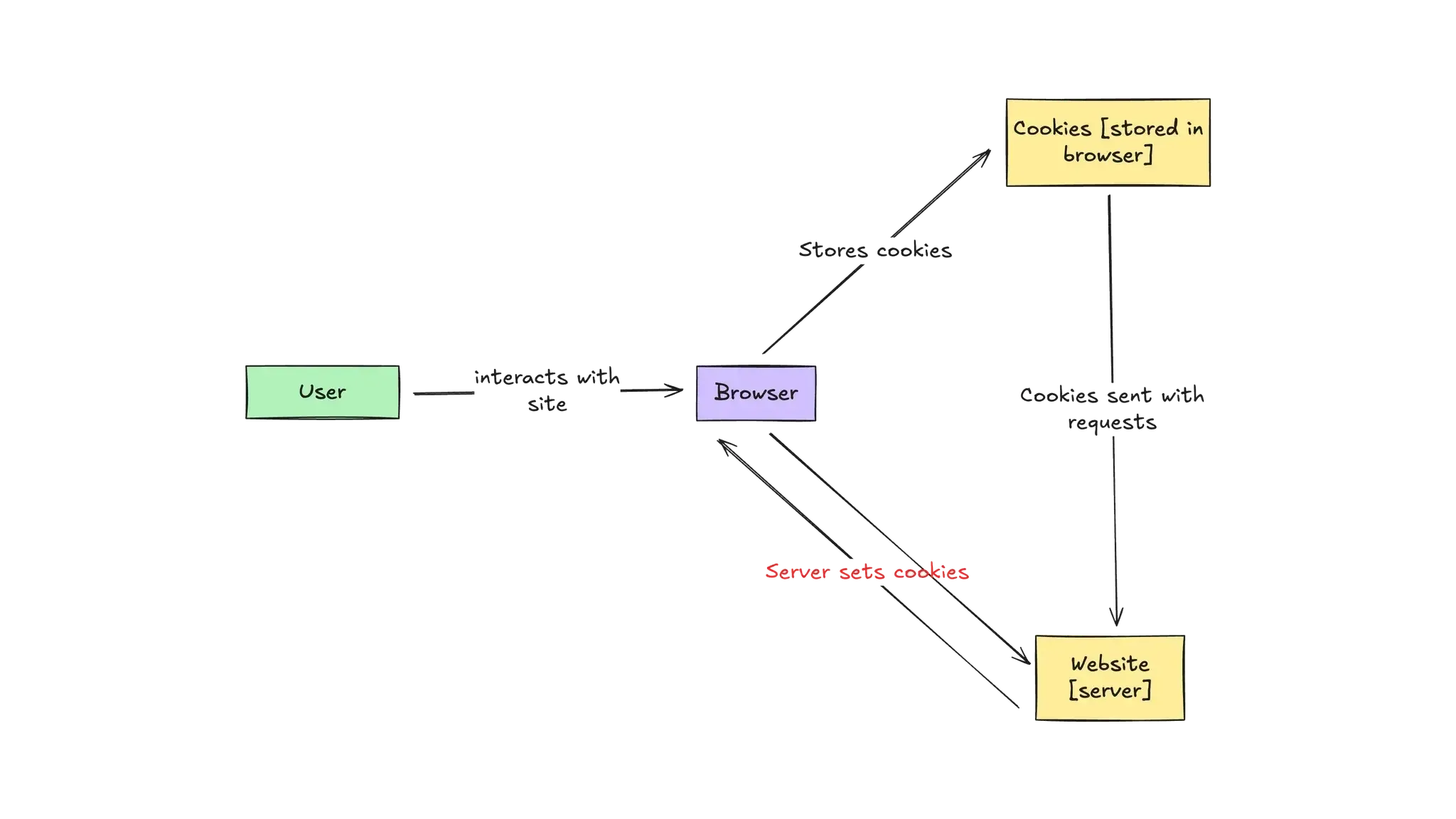
When a user visits a website, the server can send a cookie along with the HTTP response. The browser then stores this cookie and includes it in subsequent requests to the same domain. This allows the server to recognize returning users and maintain session data.
Cookies can be configured with different attributes, such as:
- Expiration date – Determines whether the cookie is a session cookie (deleted when the browser closes) or a persistent cookie (retained until its expiration date).
- Secure – Ensures the cookie is only transmitted over HTTPS connections.
- HttpOnly – Prevents JavaScript from accessing the cookie, reducing exposure to cross-site scripting (XSS) attacks.
- SameSite – Restricts cookies from being sent with cross-site requests, mitigating cross-site request forgery (CSRF) attacks.
Key Characteristics of Cookies
- Small storage capacity – Limited to 4KB per cookie.
- Accessible by both client and server – Essential for session tracking and authentication.
- Automatically included in HTTP requests – Sent with every request to the same domain.
- Supports expiration settings – Can persist across sessions or expire when the browser is closed.
Pros of Cookies
- Cookies allow server-side access, making them suitable for authentication and user sessions.
- They can be configured with security attributes (
HttpOnly, Secure, SameSite) to enhance protection.
- Cookies have persistent storage with expiration settings, allowing control over how long data is retained.
Cons of Cookies
- The limited storage capacity of cookies makes them unsuitable for storing large amounts of data.
- As cookies are sent with every HTTP request, they lead to increased network traffic, potentially affecting performance.
- Cookies are vulnerable to CSRF attacks as they are automatically included in cross-site requests unless properly secured.
Cookies are most effective for managing authentication, maintaining user sessions, and tracking user behavior. They should not be used for storing large or non-essential data due to their storage limitations and impact on performance.
Next, we’ll compare cookies and local storage side by side.
Cookies vs. Local Storage: Side-by-Side Comparison
As covered in previous sections, both cookies and local storage allow websites to store data in a user's browser, but they differ in their use cases, performance, and security implications. Below is a direct comparison of the two:
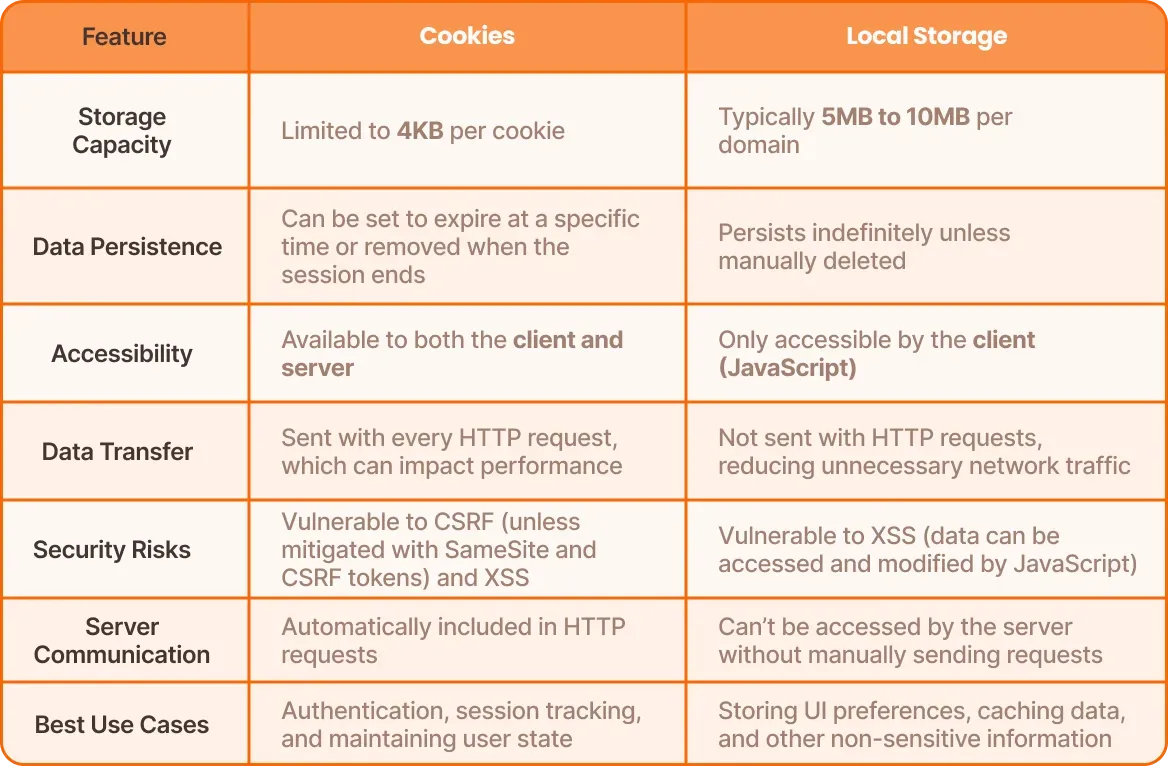
As we can see from the table above:
- Cookies are ideal for authentication and session management because they are accessible by both the client and server. However, they should be properly secured to prevent vulnerabilities.
- Local storage is best for storing non-sensitive data on the client side, such as UI preferences and cached content, since it has a larger capacity and does not affect HTTP requests.
- Neither storage method should be used for sensitive data, such as authentication tokens, without additional security measures.
Considering this, let’s look at when to use cookies vs. local storage based on different scenarios.
When to Use Local Storage vs. Cookies
Choosing between cookies and local storage depends on your application's needs. Here are some key scenarios that can help you determine when each storage method fits best:
Use Cookies When:
- Authentication and Session Management – Cookies are the best option for storing authentication tokens because they can be set as
HttpOnly, preventing JavaScript from accessing them and reducing exposure to XSS attacks.
- Server-Side Access is Required – Since cookies are automatically included with every HTTP request, they allow the server to read stored values and maintain session states.
- Data Needs Expiration Control – Cookies can be set to expire at a specific time, making them useful for managing session timeouts.
- Cross-Page or Cross-Tab Persistence is Needed – Cookies are available across all tabs and windows as long as they share the same domain.
Use Local Storage When:
- Storing Non-Sensitive Client-Side Data – Local storage is useful for saving UI preferences, cached data, or other non-security-related information.
- Reducing Server Load and Network Traffic – Since local storage is not included in HTTP requests, it improves performance by keeping frequently accessed data on the client-side.
- Long-Term Data Retention is Needed – Unlike cookies, local storage persists indefinitely unless manually removed, making it useful for storing data that should remain available across browser sessions.
- Handling Larger Storage Needs – Local storage provides significantly more space than cookies, making it better suited for storing larger amounts of data.
Cookies vs. Local Storage: Security Considerations
Security is a critical factor when deciding between cookies and local storage, especially when dealing with authentication, user sessions, or sensitive information. Both storage methods come with risks that must be properly managed.
One of the biggest challenges developers face is deciding where to store authentication and authorization data. Applications store authentication tokens in local storage or cookies, but this must be done carefully and securely.
Handling authorization data requires that applications have a way to manage user roles, permissions, and access control centrally rather than relying on client-side storage methods that can be manipulated or exploited.
Here are some security considerations to keep in mind in this context:
Avoid Using Both for Sensitive Data
First of all - neither cookies nor local storage should be used to store sensitive information like passwords or authentication tokens without additional security measures. If local storage is used to store authentication tokens, it is vulnerable to XSS attacks. If cookies are not configured properly (HttpOnly, Secure, SameSite), they can be exploited through CSRF attacks.
For the safest authentication strategy, server-managed session tokens or secure HttpOnly cookies are preferred.
Don’t Store Authorization Data in Cookies or Local Storage
Beyond authentication, another major security challenge is how applications store and enforce user permissions and access control. Relying on local storage or cookies to keep track of user roles, permissions, or access levels comes with significant risks:
- Data can be manipulated – Since both local storage and cookies exist in the client’s browser, a user (or an attacker) can modify stored authorization data, potentially escalating privileges or bypassing restrictions.
- No real-time access control – When permissions are stored in the client’s browser, changes to user roles or access rights require additional logic to refresh or sync data, making it harder to enforce dynamic access control.
- Security risks grow with complexity – As applications scale, managing authorization logic through client-side storage becomes unmanageable and unsafe, increasing the chances of security loopholes.
Utilize a Centralized, Server-Side Authorization Approach
Applications need a centralized, server-side approach to managing user roles and permissions. This ensures that access control remains dynamic, secure, and manipulation-resistant.
Permit.io addresses these challenges by providing a structured way to handle authorization externally without exposing critical data in the browser. By moving access control logic to the backend, applications can:
Prevent unauthorized role modifications by ensuring that permissions are enforced by the server.
Dynamically update user access without requiring manual intervention or browser storage synchronization.
Eliminate security risks associated with storing authorization data in local storage or cookies.

By handling authorization separately from authentication, applications gain a more secure, scalable, and flexible access control system that does not rely on insecure client-side storage.
Choosing the Right Method
Understanding the difference between cookies and local storage is a must for making informed decisions about data storage, authentication, and performance in web applications.
While cookies are best suited for authentication and session management, local storage provides a more efficient way to store non-sensitive client-side data without increasing network traffic.
When it comes to authorization data and access control, neither storage method is truly secure. Storing user roles, permissions, or access tokens in the browser can lead to security risks, privilege escalation, and data breaches.
A server-side authorization approach can ensure dynamic, centralized, and secure access control without exposing sensitive data to the client.
Got authentication or authorization questions? Join our Slack community