With AI-based applications experiencing rapid growth (Whether due to industry hype or actual innovative use cases), it’s clear that when these tools are implemented, they require a fine-grained permission system that’s able to regulate what actions they are requested to perform.
When users interact with AI through natural language, their requests must be both understood and secured from a policy perspective. Some users might require access to sensitive analytics, while others should only have access to view general data.
This is especially true in AI-driven advisory features, where there must be an extra focus put into which requests are granted or restricted.
Traditional API-based access control relies on rigid endpoints, where structured commands like GET /stats or /advisory dictate access. However, natural language requests are, naturally, much more nuanced. Consider the difference between:
- "Show me my portfolio stats" (a simple data retrieval request)
- "How should I diversify my portfolio?" (a request for AI-driven financial advice)
Both involve investment-related queries but require distinct permission levels.
In this guide, we present an experimental approach that combines OpenAI’s language models with Permit.io to implement AI-driven prompt classification for access control.
The Idea: AI-Driven Prompt Classification
Instead of relying on predefined command structures, I suggest the following method -
- Natural language interaction – Users can make requests in plain English.
- Intent classification – AI understands what the user is actually asking.
- Dynamic access enforcement – Permissions are applied based on user roles and attributes.
This flow can ensure access control adapts to real-world usage rather than forcing users into restrictive request formats - without the need to hardcode permission paths or use manual intent classification.
Before we dive into our proposed solution, it’s important to understand how prompt classification has evolved over time. From basic validation to AI-driven classification, let’s explore the different approaches and their limitations.
The Evolution of AI Prompt Classification
Basic Input Validation
Early API security relied on input validation techniques such as length checks, character validation, and format verification. While effective for preventing malformed input, this approach fails to understand intent. Consider:
"Show me today's FOREX rates"
"Display sensitive FOREX data"
To a basic validation system, both are just strings—but they have significantly different security implications.
Pattern Matching for Requests
Developers then introduced pattern-based access control, mapping specific command structures to permissions:
/^get_basic_rates/ -> public access
/^get_sensitive_data/ -> restricted access
This approach improved security but lacked flexibility. For instance, a command injection like "Show rates; DROP TABLE users;" could still bypass security filters.
AI-Powered Dynamic Classification
Instead of rigid rules, AI-based classifiers analyze user intent dynamically. The system interprets a request like:
"How should I balance my investments?"
and maps it to structured permissions:
{
    "resourceType": "FinancialAdvice",
    "resourceKey": "portfolio_strategy",
    "action": "read"
}
Similarly, a simple data request like:
"Show my investment balance"
is classified as:
{
    "resourceType": "FinancialData",
    "resourceKey": "portfolio_value",
    "action": "read"
}
Why AI-Based Classification Works
AI classification allows for subtle distinctions that traditional pattern-matching fails to capture. Consider:
| Request |
Classified Resource Type |
Access Level |
| "I need help with my investments." |
FinancialAdvice |
Restricted (Advisor Role) |
| "Show me my current investment returns." |
FinancialData |
Basic Access |
By using AI for classification, we ensure a more accurate and secure permission assignment.
Why It Doesn’t
That being said, while AI-based classification significantly enhances access control by understanding user intent dynamically, it is not infallible. Misinterpretations can occur due to ambiguous phrasing, adversarial inputs designed to exploit the system, or just plain old AI hallucination. Therefore, this suggested solution should always be subject to human oversight, particularly in high-stakes scenarios involving sensitive data or critical services. Nonetheless, it’s an interesting angle to consider.
How Does This Implementation Work?
To enforce permissions dynamically, we use policies that define how access is granted based on the AI-classified intent. Policies help bridge the gap between natural language processing and structured security enforcement.
By using an Attribute-Based Access Control (ABAC) model, we can assign permissions based on both user attributes (e.g., role, membership status) and resource attributes (e.g., sensitivity level, data type). Instead of hardcoding static rules, policies evaluate requests in real time, ensuring adaptive security based on AI-classified intent.
Policies in AI-Based Classification
When a user submits a request, AI classification extracts intent and assigns structured attributes to the request. This structured data is then evaluated against predefined policies to determine if access is granted.
For example, if a user requests financial advice:
{
    "resourceType": "FinancialAdvice",
    "resourceKey": "investment_strategy",
    "action": "read"
}
The system applies policies such as:
- Only users with the
ai_advisor role can access FinancialAdvice resources.
- Users with a
premium_user role may access premium financial data but not advisory services.
- Public users can only retrieve general investment data, not personalized advice.
Defining Policies for AI-Classified Requests
Our system needs to handle multiple request types, such as:
- Hotel rates with different access levels (IATA, premium, public).
- Financial data and advisory services with role-based access.
We define policies that combine roles for basic access and resource attributes for fine-grained control. Let’s build these step by step.
- Role-based permissions: Assign users to roles like
viewer, premium_user, and ai_advisor.
- Resource-based policies: Define which roles can access which types of data.
- AI-driven decision-making: Use OpenAI’s classification output to determine request type and enforce policies accordingly.
By integrating AI classification with real-time policy evaluation, our system ensures users can only access resources appropriate to their role and intent—making access control more intelligent and flexible.
Implementing AI-Based Classification with Policy Based Access Control
Now that we’ve went over the idea behind the implementation, let’s dive into a practical implementation example. By integrating OpenAI’s classification capabilities with Permit.io, we can create a dynamic permission system that adapts to user intent in real-time. This section will walk you through setting up your system, from defining policies to enforcing access decisions.
All the code for the following implementation is available in the following GitHub repository: https://github.com/permitio/permit-prompt-filtering
By the end, you'll have a working model that leverages AI to classify user requests and applies the appropriate security rules using Permit.io’s access control framework. Let’s get started!
Step 1: User Roles
To manage access to our conditional resources, we need a way to categorize users. While we could use dynamic conditions for this (like checking specific user attributes), we'll use roles for simplicity and clarity. This approach makes our permissions easier to understand and maintain.
To follow these steps, you’ll need a Permit.io account.
Create these roles in your dashboard:
iata_agent: Access to IATA and public ratespremium_user: Access to premium and public ratesai_advisor: Access to financial adviceviewer: Basic access to public rates and financial data
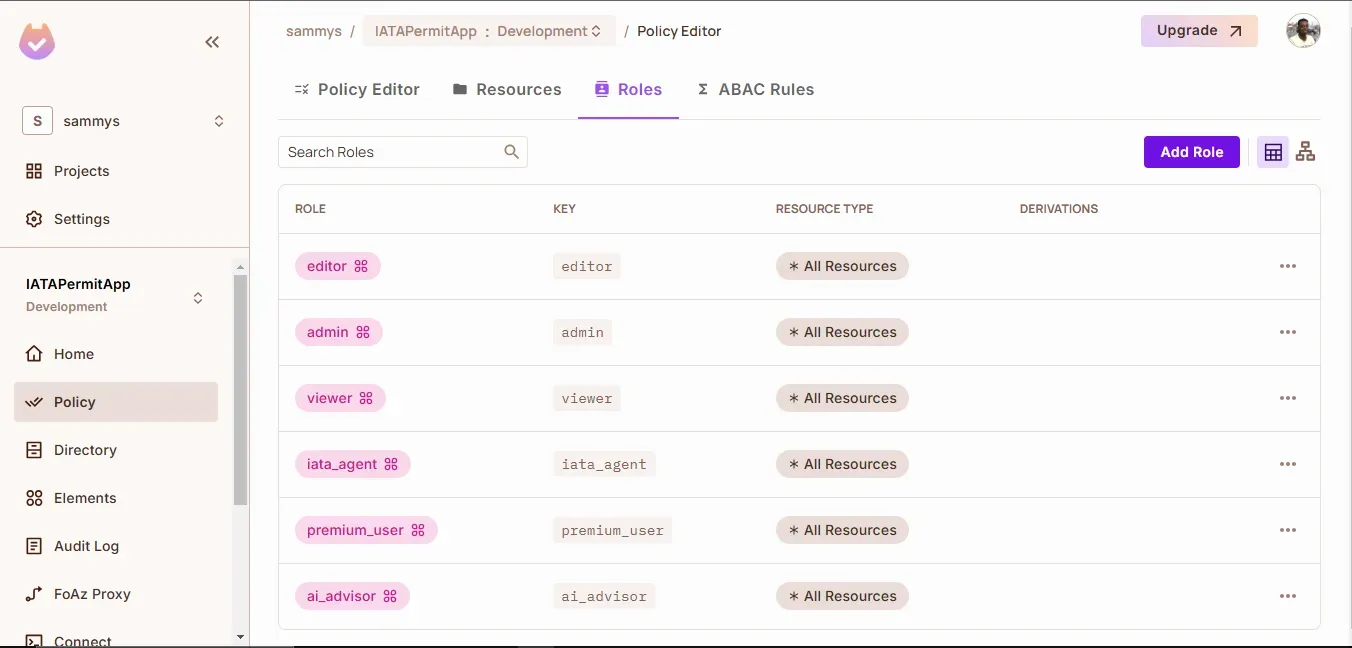
Roles list in the dashboard
Step 2: Resource Types
Before we assign permissions to specific items (like hotel rates or financial data), we need to define them as resources in Permit.io. A resource type is like a category or template for whatever you’re protecting. In our case, we’ll create a HotelType resource so we can differentiate between various rate types (IATA, premium, and public). This helps our system understand exactly what’s being accessed—making it easier to apply fine-grained controls later.
Here’s how to set it up:
Navigate to Resources on your Permit.io dashboard
Create HotelType resource:
- Add
rateType attribute (string) for IATA, premium, and public rates
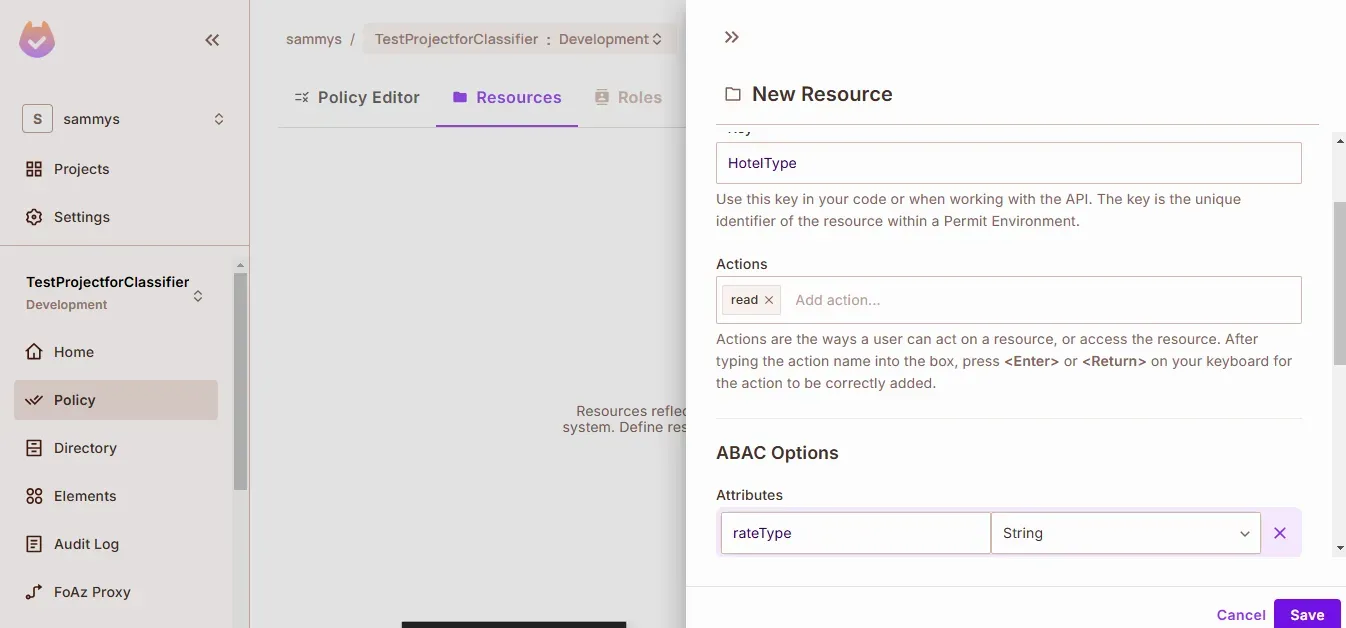
Creating HotelType resource with rateType attribute
Create two financial resources:
FinancialData for basic portfolio informationFinancialAdvice for AI recommendations
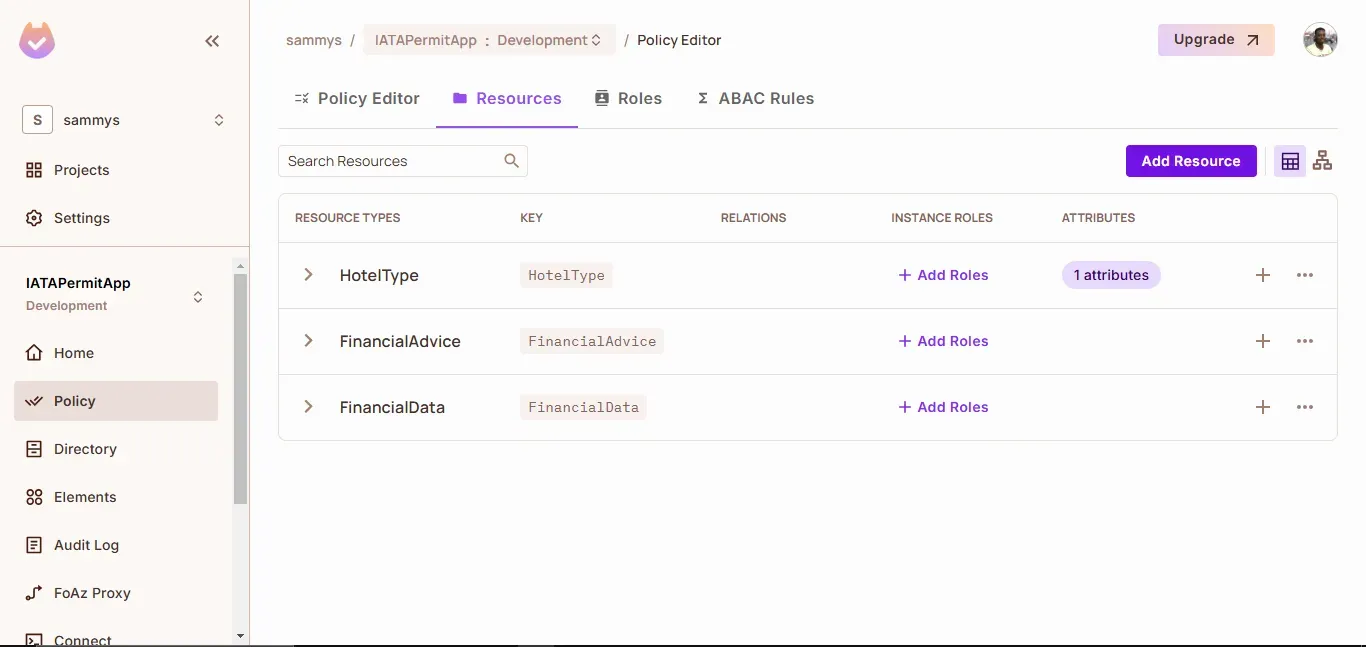
Final resources view showing all three types
Step 3: Resource Sets
Next, we need to organize our resources into groups—or resource sets—so that we can apply permissions consistently across similar items. Resource sets allow you to define conditions that group-specific resources together based on their attributes. In our case, we will create separate sets for IATA rates, premium rates, and public rates.
Here's how to set it up:
Create iata_rates:
- Resource type:
HotelType
- Condition:
resource.rateType equals "IATA"
Create premium_rates:
- Resource type:
HotelType
- Condition:
resource.rateType equals "premium"
Create public_rates:
- Resource type:
HotelType
- Condition:
resource.rateType equals "public"
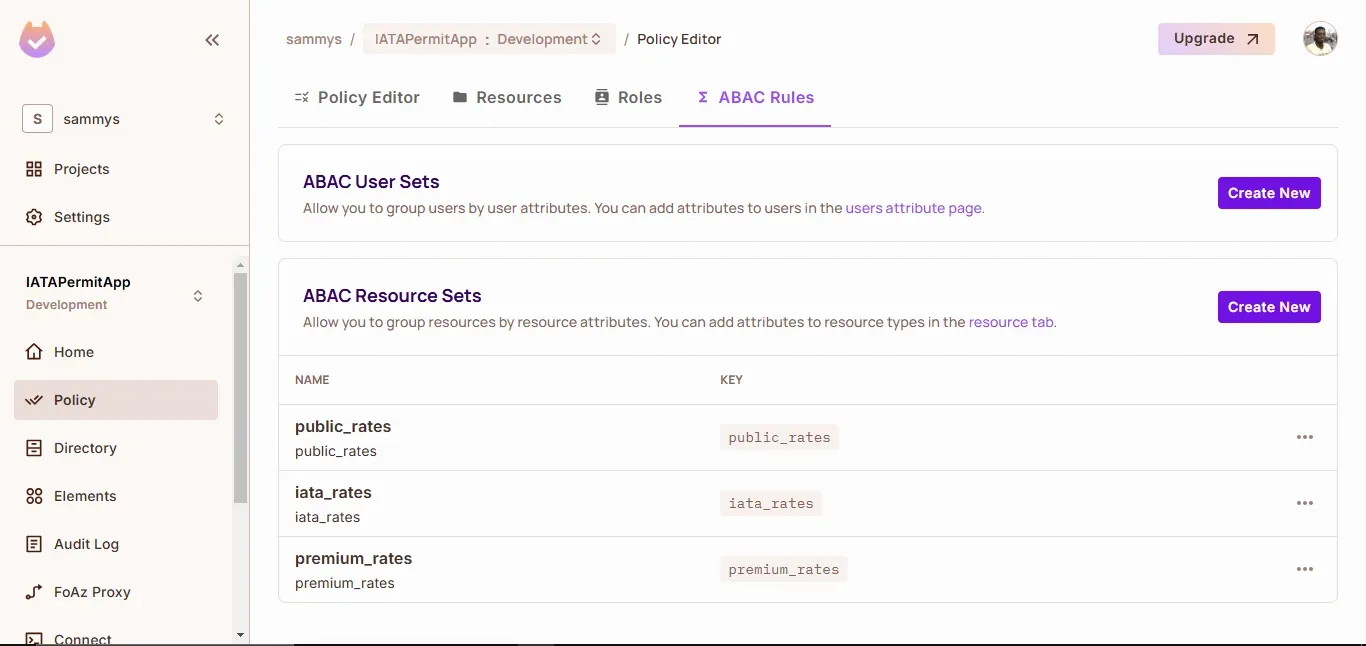
Resource set configuration
Step 4: Permission Rules
Now that we have our resource sets organized, the final piece is to define permission rules that tie user roles to these sets. Permission rules tell the system which roles are allowed to access which resource sets—and with what level of access.
Here's how to set it up:
Configure base permissions:
- All roles can read
public_rates
viewer role can read FinancialData
Configure special access:
iata_agent can read iata_ratespremium_user can read premium_ratesai_advisor can read FinancialAdvice
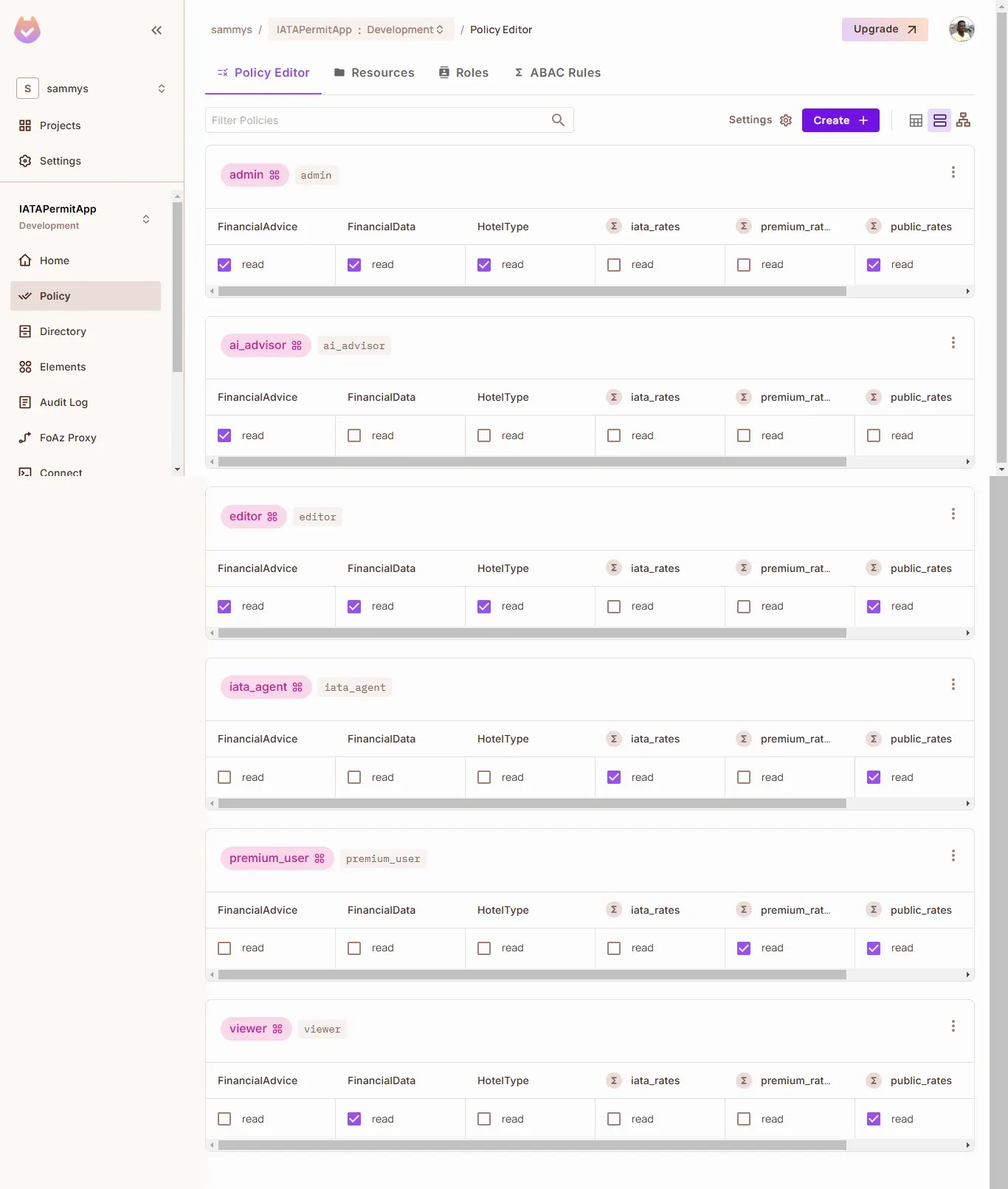
Policy editor showing permission matrix
Code Implementation
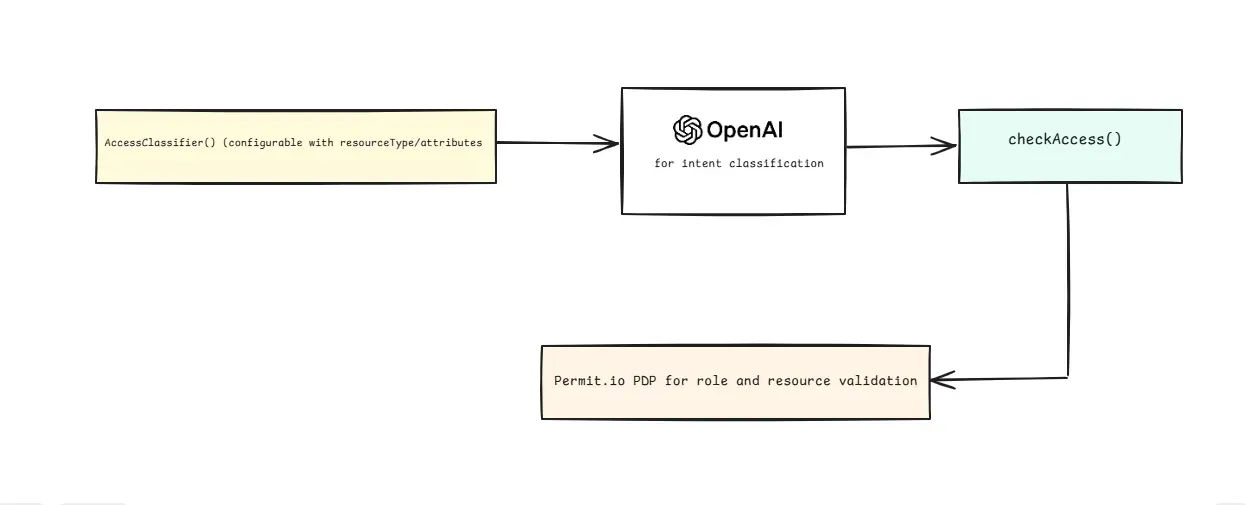
Now that we've configured our permissions in Permit.io let's build our classification system. Our code needs to:
- Use OpenAI to analyze natural language requests
- Determine if users want data access or advice
- Map these requests to the appropriate roles and permissions
Before You Start
You'll need:
- OpenAI API key (that supports the
gpt-4 model)
- Node.js environment
Set up your project:
npm install openai permitio dotenv
Create a .env file:
OPENAI_API_KEY=your_key_here
PERMIT_API_KEY=your_permit_key
PDP_URL=your_pdp_url
Building the Classifier
The classifier is designed for high adaptability. This allows for the configuration of specific resource types or attributes, ensuring the system interprets a wide range of requests.
const classifier = new AccessClassifier(resourceType, attributes);

// The system adapts based on what you pass:
classifier('HotelType', ['rateType'])     // For hotel rate requests
classifier('FinancialAdvice')             // For financial requests
classifier(null, ['sensitivity'])         // For generic attribute checking
The key to this flexibility is the system's prompt engineering. The carefully crafted prompt, guides the classifier to interpret user queries accurately and map them to the correct resource types and attributes. Let's look at how it works:
class AccessClassifier {
    constructor(resourceType = null, attributes = []) {
        this.openai = new OpenAI({
            apiKey: process.env.OPENAI_API_KEY
        });

        this.resourceType = resourceType;
        this.attributes = attributes;
        this.systemPrompt = this.buildSystemPrompt();
    }

    buildSystemPrompt() {
        // Base prompt explaining the classifier's job
        let prompt = `You are a request classifier that understands user intent.
Your job is to analyze requests and determine:
1. The type of resource being requested
2. Any relevant attributes of that resource
3. The intent behind the request (data access vs advisory)

Output format:
{
    "resourceType": "determined from context",
    "resourceKey": "specific identifier",
    "attributes": "relevant attributes if any",
    "action": "usually read"
}`;

        // Add configuration-specific instructions
        if (this.resourceType) {
            prompt += `\\n\\nClassify requests specifically for: ${this.resourceType}`;
        }

        if (this.attributes.length) {
            prompt += `\\n\\nLook for these attributes: ${this.attributes.join(', ')}`;
        }

        // Examples showing the classifier's flexibility
        prompt += `\\n\\nExample classifications:
[Request]: "Show me the data"
[Output]: {
    "resourceType": "determined by context",
    "resourceKey": "data",
    "attributes": {},
    "action": "read"
}

[Request]: "I need access to X with Y permission"
[Output]: {
    "resourceType": "X",
    "resourceKey": "identifier",
    "attributes": {"permission": "Y"},
    "action": "read"
}`;

        return prompt;
    }
}
Here is an example of the classifier's configurability and output:
// The classifier adapts based on configuration
const classifier = new AccessClassifier(resourceType, attributes);

// Example usage with output
const result = await classifier.classify("What's the price for Hilton?");
// Returns structured data for permission check:
{
    resourceType: "HotelType",
    resourceKey: "hilton",
    attributes: {
        rateType: "public"  // Inferred from context
    },
    action: "read"
}
Running the PDP
For development, we need to run a local Policy Decision Point (PDP) to evaluate our permissions. Let's set this up:
First, you'll need Docker installed. Then pull the Permit.io PDP image:
docker pull permitio/pdp-v2:latest
Run the PDP container:
docker run -it -p 7766:7000 \\
    --env PDP_DEBUG=True \\
    --env PDP_API_KEY=<YOUR_API_KEY> \\
    permitio/pdp-v2:latest
Connect your application to the local PDP:
const permit = new Permit({
    token: process.env.PERMIT_API_KEY,
    pdp: process.env.PDP_URL
});
Verify the connection:
# Check if container is running
docker ps

# Look for PDP logs
docker logs <container_id>
Note: While Permit.io offers a Cloud PDP for quick experiments, we're using the Container PDP because:
- It supports our role-based permissions
- It provides faster response times for local development
- It allows offline development and testing
With the PDP running, your application can now make real-time permission checks against the policies we configured earlier.
Permission Check Implementation
With the classifier interpreting each request’s intent (as shown in the diagram), the next step is translating that classification into a permission check. Once the system identifies whether a request targets, for example, HotelType or FinancialAdvice, it calls checkAccess(), which consults the Permit.io PDP to see if the user’s role or attributes allow the requested action. If the user is authorized, the request proceeds; otherwise, it’s denied.
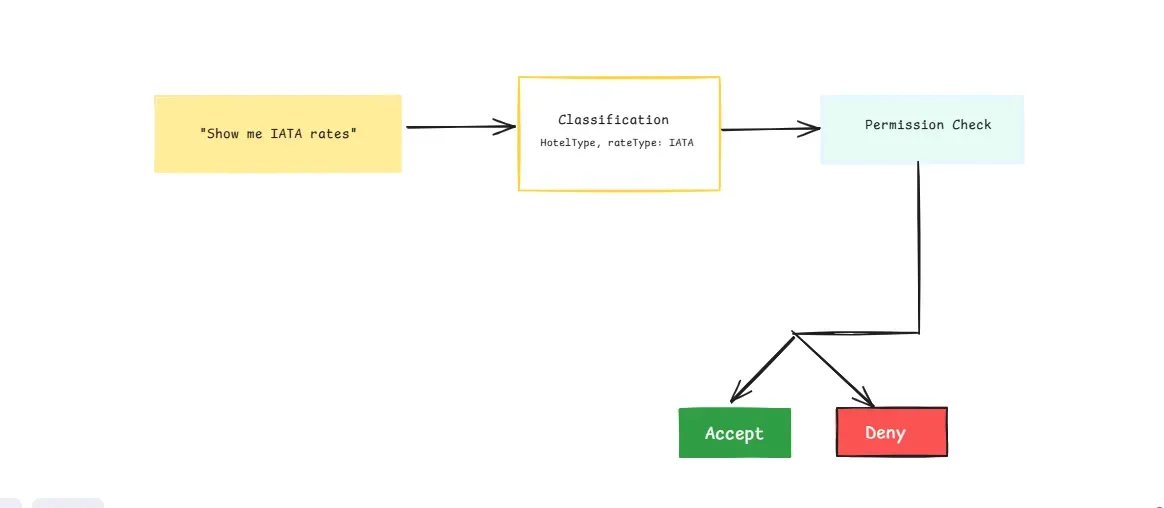
Let's see how our system processes requests:
// First, create our domain-specific classifiers
const hotelClassifier = new AccessClassifier('HotelType', ['rateType']);
const financeClassifier = new AccessClassifier('FinancialAdvice');

// Example requests
const request = "Show me my current portfolio value";
const classification = await financeClassifier.classify(request);
const allowed = await checkAccess('regular_user_1', classification);
The checkAccess function is the core of our permission system. It takes a user ID and the classified request, constructs a resource object that Permit.io can understand, and evaluates permissions based on both roles and resource attributes. When access is denied, it provides context-specific feedback about why the request failed.
Here's the implementation:
async function checkAccess(userId, parsedRequest) {
    try {
        console.log('\\n🔒 Checking Permission:');
        console.log(`👤 User: ${userId}`);
        console.log(`📑 Resource Type: ${parsedRequest.resourceType}`);
        console.log(`🎯 Action: ${parsedRequest.action}`);

        let resource = {
            type: parsedRequest.resourceType,
            key: parsedRequest.resourceKey
        };

        // Add attributes only if they exist
        if (Object.keys(parsedRequest.attributes || {}).length > 0) {
            resource.attributes = parsedRequest.attributes;
            console.log('📋 Attributes:', parsedRequest.attributes);
        }

        try {
            const permitted = await permit.check(
                userId,
                parsedRequest.action,
                resource
            );

            if (permitted) {
                console.log('✅ Access Granted');
            } else {
                // Log specific denial reason
                if (parsedRequest.resourceType === 'HotelType') {
                    console.log('❌ Access Denied - Insufficient rate type permissions');
                } else if (parsedRequest.resourceType === 'FinancialAdvice') {
                    console.log('❌ Access Denied - User not authorized for financial advice');
                } else {
                    console.log('❌ Access Denied - Insufficient permissions');
                }
            }

            return permitted;
        } catch (checkError) {
            if (checkError.message.includes('role')) {
                console.error('❌ Role-based permission check failed:', checkError.message);
            } else if (checkError.message.includes('attribute')) {
                console.error('❌ Attribute-based permission check failed:', checkError.message);
            } else {
                console.error('❌ Permission check failed:', checkError.message);
            }
            throw checkError;
        }
    } catch (err) {
        console.error("❌ Permission check failed:", err);
        throw err;
    }
}
Testing the System
Now that we have the classifier and permission system set up let's see it in action. We'll test different types of requests to demonstrate how the system:
- Understands user intent from natural language
- Maps requests to appropriate permissions
- Enforces access rules correctly
//Regular user requesting data vs advice
const dataRequest = "Show me my portfolio stats";
const adviceRequest = "How should I invest?";

// The system correctly distinguishes intent
const dataClassification = await classifier.classify(dataRequest);
// Output: { resourceType: "FinancialData", ... }

const adviceClassification = await classifier.classify(adviceRequest);
// Output: { resourceType: "FinancialAdvice", ... }

// Permissions are enforced appropriately
await checkAccess('regular_user_1', dataClassification);   // ✅ Allowed
await checkAccess('regular_user_1', adviceClassification); // ❌ Denied
Watch the system handle real-time requests:
Conclusion
AI-driven prompt classification introduces a new way of dynamic and intuitive access control, bridging the gap between natural language requests and structured security policies. By leveraging OpenAI’s language understanding capabilities alongside Permit.io’s policy-based access control, we’ve demonstrated how developers can build intelligent permission systems that adapt in real-time to user intent.
This approach ensures that access decisions remain flexible and context-aware, eliminating the need for rigid, hardcoded rules. However, as powerful as AI classification is, human oversight remains essential to mitigate misinterpretations, adversarial inputs, or AI hallucinations that could lead to unintended access.
I’d love to hear your thoughts and use-case ideas for this implementation and discuss this idea in our Slack community, so hit me up there!