The introduction of AI agents into applications is spreading like wildfire, enabling automation and personalized user experiences. While that might sound nice and useful, deploying AI agents into production environments requires more than just a powerful AI model. Namely, it requires secure access control to prevent unauthorized use, data leaks, and compliance violations.
PydanticAI is a powerful framework that’s commonly used to simplify the development of AI agents by providing structured input validation, response management, and security enforcement.
In this guide, we’ll explore how combining PydanticAI with Permit.io, a fine-grained authorization provider, can enable developers to implement fine-grained access control as part of their AI agent deployment, securing AI agents from input to output. By following a structured four-perimeter approach (which we will discuss in the next section), we’ll build a security model that ensures only authorized users can interact with the AI system, sensitive data remains protected, external system interactions are secure, and AI-generated responses comply with regulations. Let’s get started!
What We’ll Build: The Four-Perimeter Framework
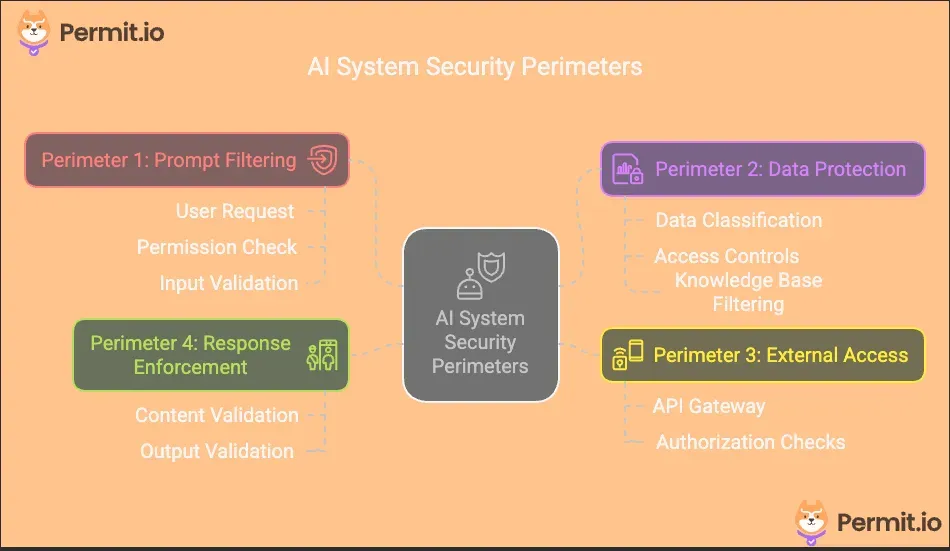
To establish a secure access control system for AI applications, we will implement the Four-Perimeter Framework, a structured approach to securing AI agents at multiple levels:
- Prompt Filtering – Ensures only authorized inputs reach the AI agent, blocking malicious or unauthorized queries.
- Data Protection – Restricts access to sensitive knowledge bases and prevents unauthorized data exposure.
- Secure External Access – Controls how AI agents interact with external APIs and third-party systems.
- Response Enforcement – Ensures AI-generated responses comply with regulations and security policies before reaching users.
Each of these perimeters will be implemented using Permit.io for access control and PydanticAI for structured validation, ensuring an efficient, scalable security model.
Prerequisites and Tech Stack
For you to be able to follow along with the tutorial, you should have:
- Some Python Experience
- A Permit.io account
- Access to an LLM API (OpenAI, Anthropic, etc.)
- Local PDP deployment
For the tech stack, we have:
You can access the code in this GitHub repo.
Step-by-Step Implementation
Before diving into the implementation, let's outline the key steps we'll follow to secure our AI agent using the Four-Perimeter Framework:
- Setting Up Attribute-Based Policies – We’ll define access control rules using an ABAC model in Permit.io’s no-code UI to manage permissions for financial advice, document access, and investment operations.
- Implement Prompt Filtering – We’ll use PydanticAI to validate and structure user inputs, ensuring only authorized queries reach the AI agent.
- Enforce Data Protection – We’ll restrict AI access to sensitive knowledge bases based on user permissions, utilizing Permit.io for fine-grained control and PydanticAI for structured data validation.
- Secure External Access – We’ll manage how the AI agent interacts with external APIs, leveraging Permit.io to enforce permissions and Docker to maintain a controlled execution environment.
- Validate AI Responses – Before delivering AI-generated content, we’ll use PydanticAI to ensure compliance, prevent sensitive data leaks, and enforce regulatory adherence.
Step 1: Setting Up Attribute-Based Policies
Before implementing our security perimeters, we need to configure the right permission policies in Permit.io. Our financial advisor requires an ABAC (Attribute-Based Access Control) model to handle permissions.
Run the Permit PDP Server
First, let’s run our PDP server. To do this, first run the following commands to pull and start the Permit PDP container.
ocker pull permitio/pdp-v2:latest
docker run -it \\
    -p 7766:7000 \\
    --env PDP_API_KEY=<YOUR_API_KEY> \\
    --env PDP_DEBUG=True \\
    permitio/pdp-v2:latest
To get your PERMIT_API_KEY env, navigate to the Permit dashboard, click on Projects in the sidebar, then click on the three dots at the top-right of the Development card and select Copy API KEY.
Define Resources:
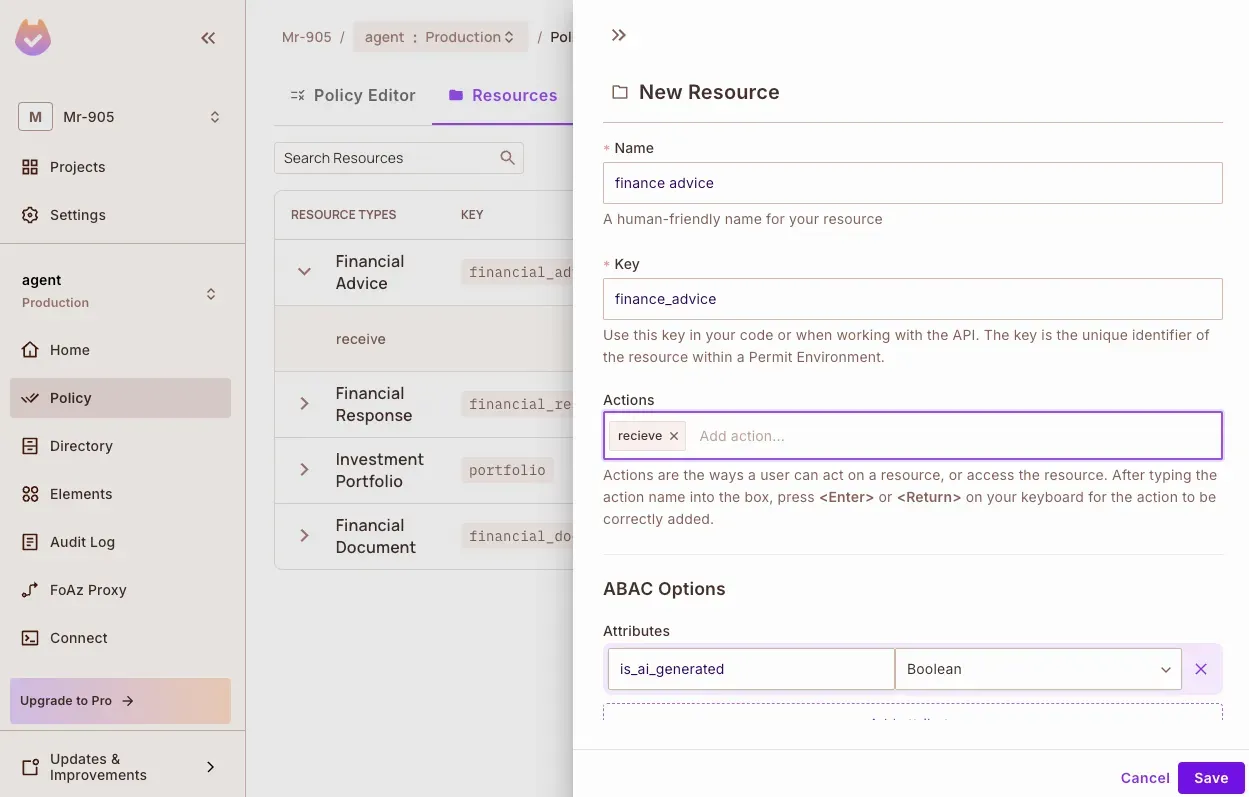
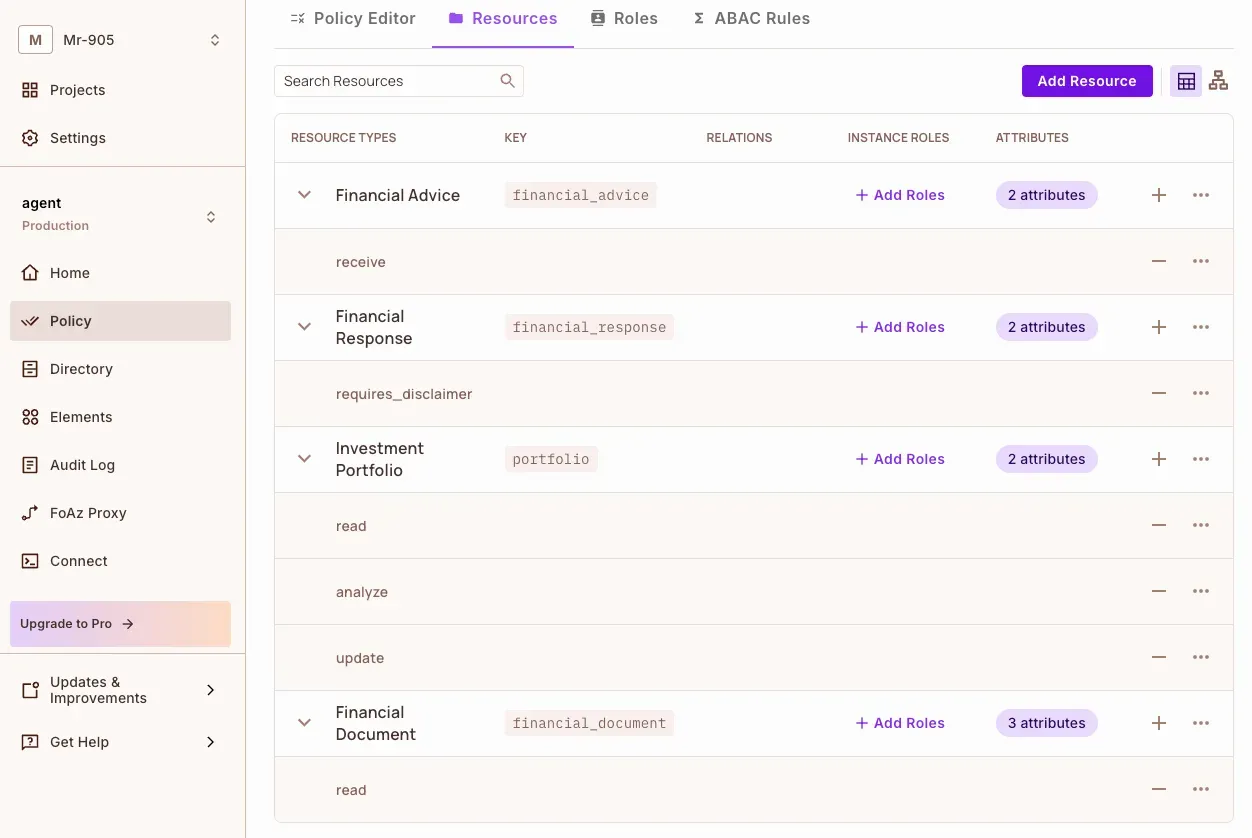
First, we’ll create resources for:
- Financial Advice: Controls access to AI-generated financial recommendations.
- Financial Documents: Manages access to sensitive financial knowledge
- Financial Responses: Handles AI-generated content validation
- Investment Portfolios: Controls access to user portfolio operations.
In the Resources tab, click Create a Resource to add a resource.
Here are all the resources created:
Then we’ll set up user attributes to track:
- Clearance levels for accessing sensitive documents
- AI advice opt-in status
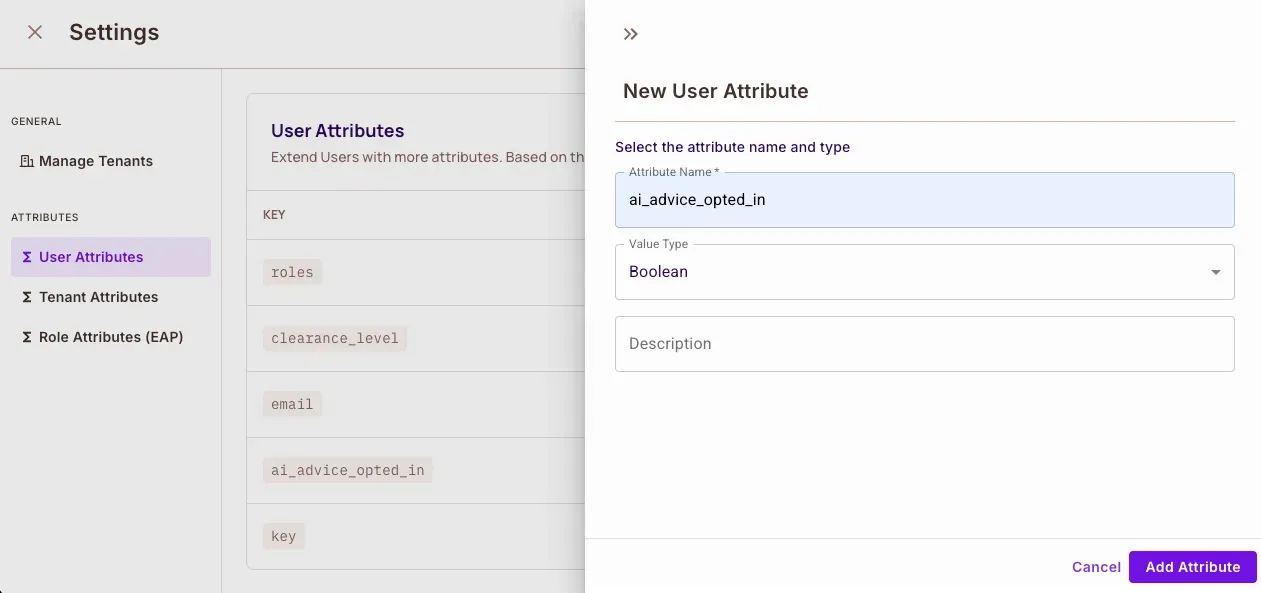
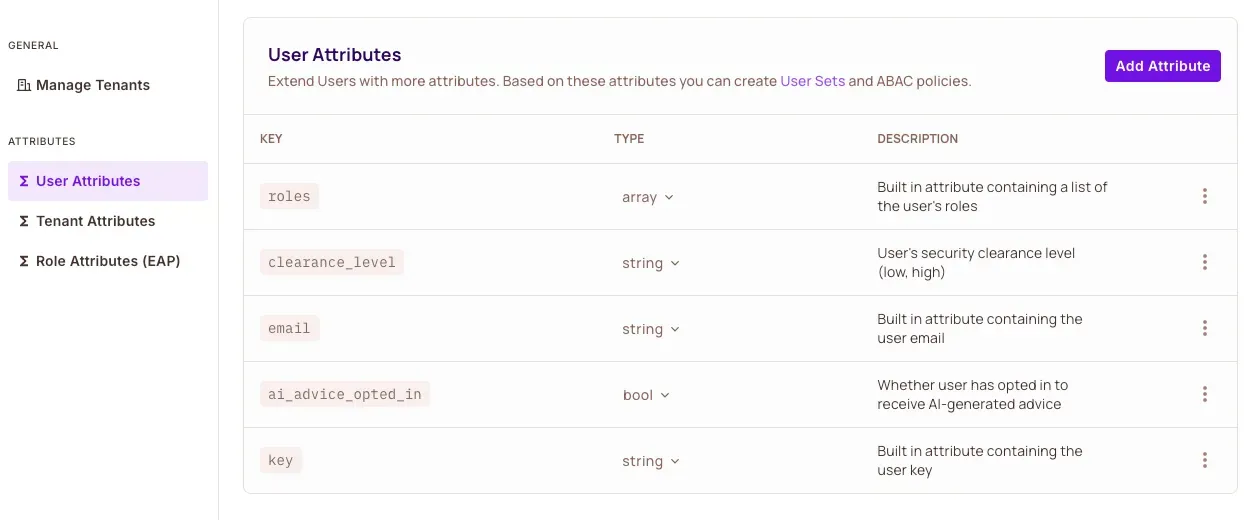
Next, we’ll create user sets and resource sets to implement our ABAC policies.
Create User and Resource Sets
User Sets:
- Opted-in users who can receive AI advice
- High-clearance users for accessing
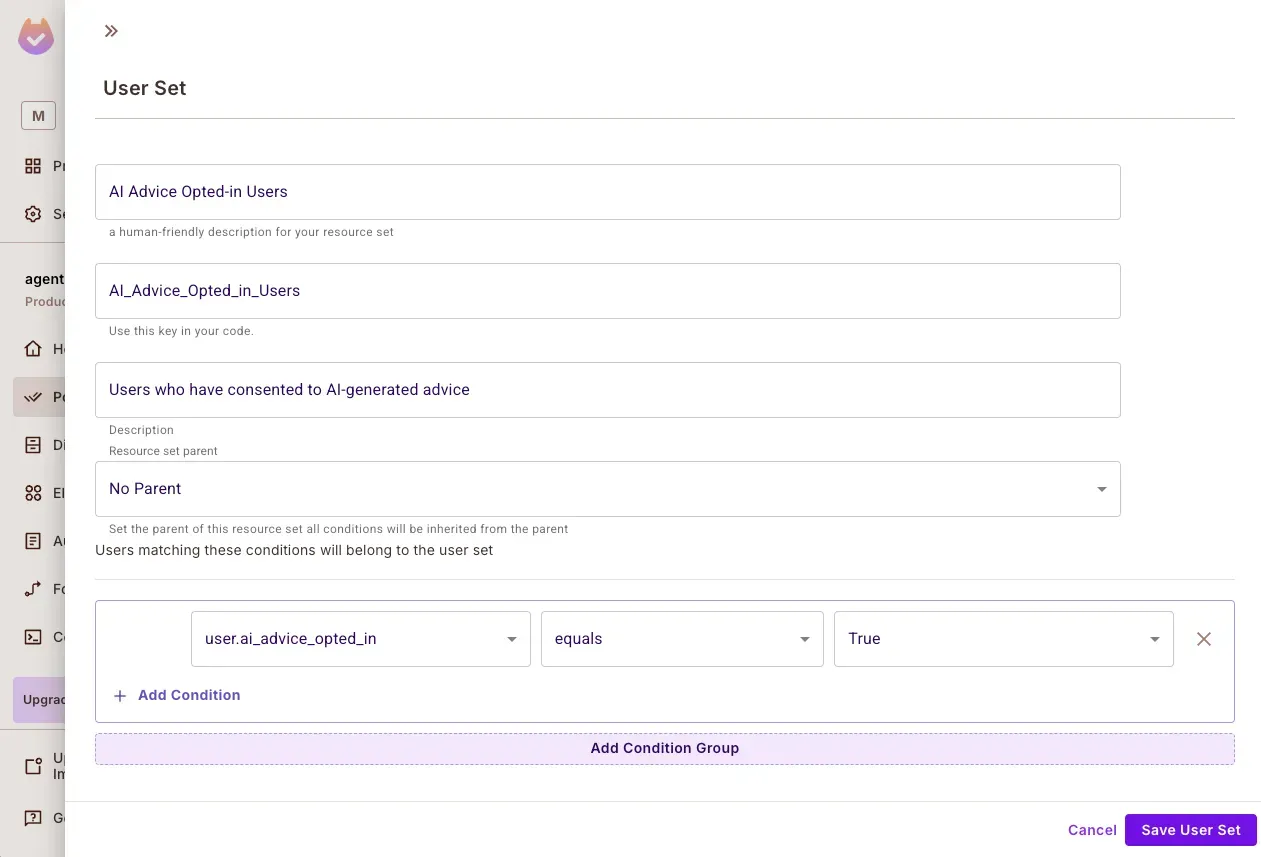
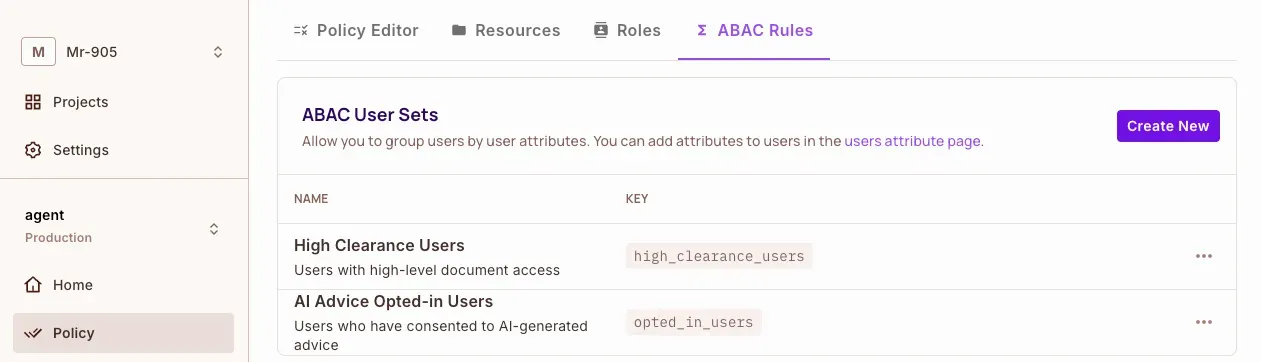
Resource Sets
- Confidential document classifications
- AI-generated advice content
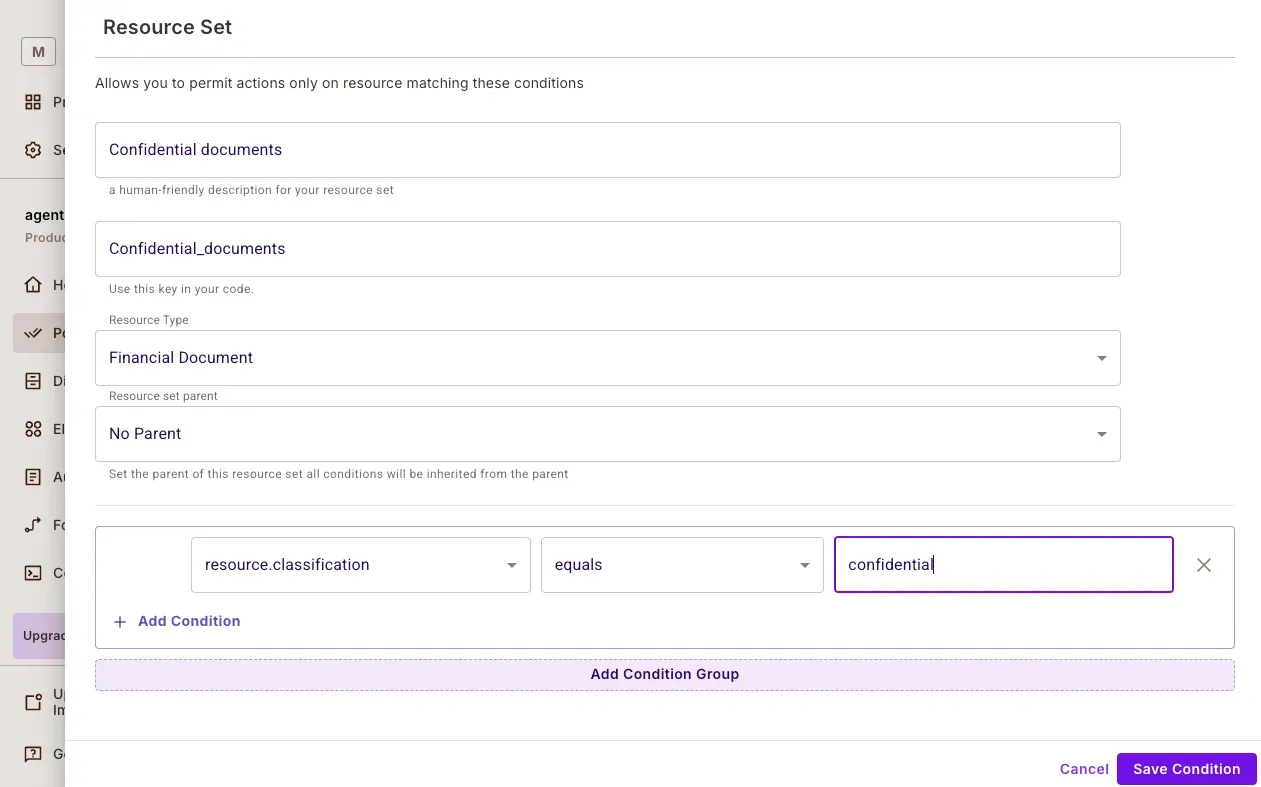
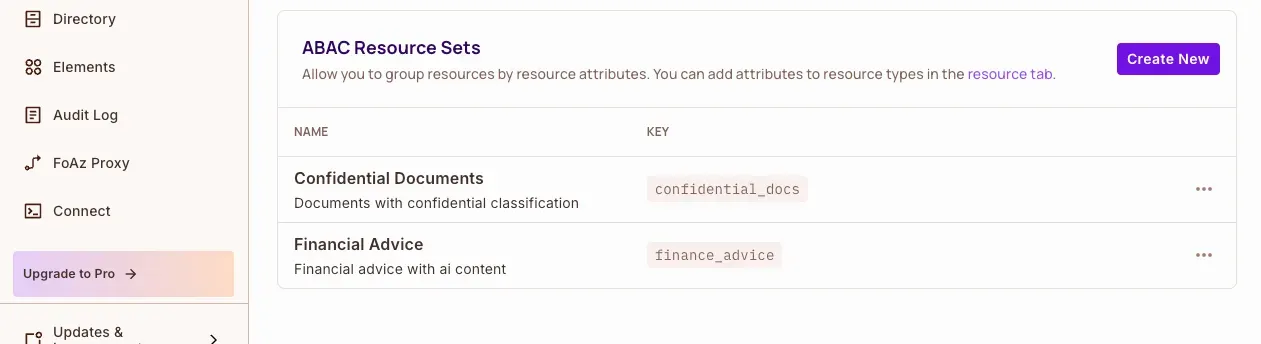
Here is what our Permit.io policy configuration dashboard looks like:
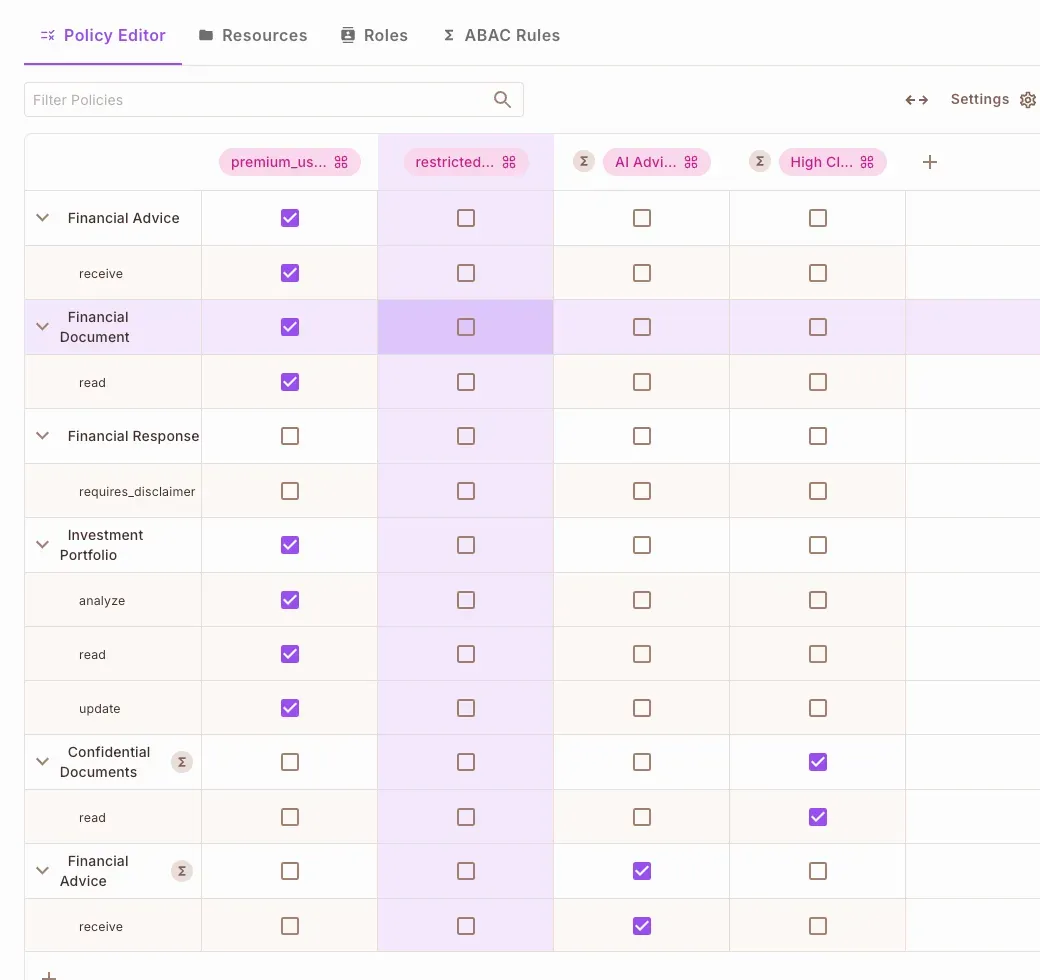
We can also set up the configuration by running the config.py file in the project repo:
python config.py
Step 2: Implement Prompt Filtering
Before an AI agent processes a request, it must first determine if the input is safe and authorized. This is where Prompt Filtering comes into play.
Prompt filtering acts as a gatekeeper for your AI agent, ensuring only authorized requests are processed.
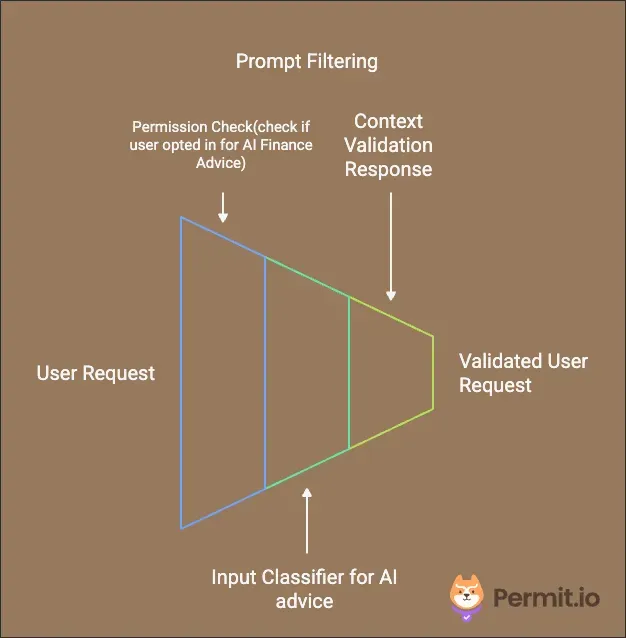
In this step, we will integrate Permit.io and PydanticAI to enforce fine-grained prompt validation.
How Prompt Filtering Works:
- Classifying User Intent – The system first determines whether a user is requesting financial advice.
- Permission Verification – Permit.io checks whether the user has opted in for AI-generated financial recommendations.
- Blocking Unauthorized Requests – If the user lacks the required permissions, the system rejects the request before it reaches the AI model.
Now, let’s implement this in our financial advisor AI agent.
Implementing Prompt Filtering in main.py
Create a main.py file and define the following function inside your AI agent:
@financial_agent.tool
async def validate_financial_query(
    ctx: RunContext[PermitDeps],
    query: FinancialQuery,
) -> bool:
    """SECURITY PERIMETER 1: Prompt Filtering
    Validates whether users have explicitly consented to receive AI-generated financial advice.
    """
    try:
        # Determine if the query is seeking financial advice
        is_seeking_advice = classify_prompt_for_advice(query.question)

        # Verify if the user has permission to receive AI-generated advice
        permitted = await ctx.deps.permit.check(
            {"key": ctx.deps.user_id},
            "receive",
            {
                "type": "financial_advice",
                "attributes": {"is_ai_generated": is_seeking_advice},
            },
        )

        # If permission is denied, return an appropriate response
        if not permitted:
            return (
                "User has not opted in to receive AI-generated financial advice"
                if is_seeking_advice else
                "User does not have permission to access this information"
            )

        return True

    except PermitApiError as e:
        raise SecurityError(f"Permission check failed: {str(e)}")
Key Implementation Details
Identifying Advice-Related Queries
Before verifying permissions, the system must classify the user’s intent. If a user is seeking financial advice, the system needs to validate whether they have opted in.
To achieve this, we use a simple keyword-based classifier:
    def classify_prompt_for_advice(question: str) -> bool:
       advice_keywords = [
           "should i", "recommend", "advice", "suggest",
           "help me", "what's best", "what is best", "better option",
       ]
       question_lower = question.lower()
       return any(keyword in question_lower for keyword in advice_keywords)
This function checks for common phrases that indicate a request for financial advice. If any of these keywords appear in the user query, the system marks it as a financial advice request.
🚨 Note: This is a simple implementation. In production, a more advanced NLP-based classifier may be needed to improve accuracy.
Permission Verification with Permit.io
Once a query is classified, the system verifies user permissions before passing it to the AI model. Permit.io checks if:
- The user has explicitly opted in to receive AI-generated financial advice.
- The user meets the necessary access requirements.
If the user lacks permission, the request is blocked immediately, preventing unauthorized interactions.
Step 3: Enforce Data Protection
Once an AI agent has determined that a request is authorized, the next security layer ensures that it only accesses permitted data sources.
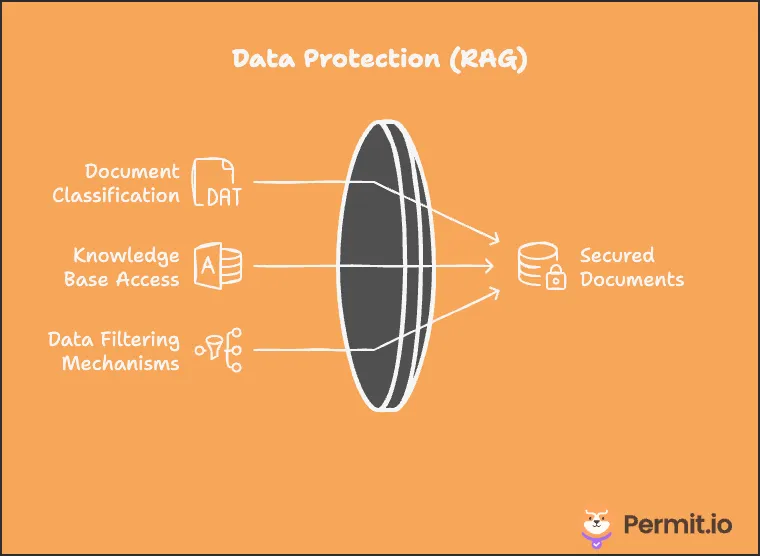
How Data Protection Works:
- Classifying Resources – Documents, financial reports, and other AI-accessible resources are categorized based on sensitivity.
- User Authorization Check – Permit.io verifies if the user has the necessary clearance level to access a requested resource.
- Filtering Unauthorized Data – If the user lacks permission, restricted resources are filtered out before reaching the AI model.
Now, let’s implement this in our financial advisor AI agent.
Implementing Data Protection in main.py
Inside your main.py file, define the following function to control access to financial knowledge:
@financial_agent.tool
async def access_financial_knowledge(
    ctx: RunContext[PermitDeps],
    usr: UserContext,
    documents: list[FinancialDocument]
) -> List[FinancialDocument]:
    """SECURITY PERIMETER 2: Data Protection
    Controls access to financial knowledge base and documentation based on user permissions
    and document classification levels.
    """
    try:
        # Prepare a list of resources for permission verification
        resources = [
            {
                "id": doc.id,
                "type": "financial_document",
                "attributes": {
                    "doc_type": doc.type,
                    "classification": doc.classification,
                },
            }
            for doc in documents
        ]

        # Use Permit.io to filter documents based on user permissions
        allowed_docs = await ctx.deps.permit.filter_objects(
            ctx.deps.user_id, "read", {}, resources
        )

        # Return only the documents the user is allowed to access
        allowed_ids = {doc["id"] for doc in allowed_docs}
        return [doc for doc in documents if doc.id in allowed_ids]

    except PermitApiError as e:
        raise SecurityError(f"Failed to filter documents: {str(e)}")
Key Implementation Details
Classifying Resources
Each financial document is assigned classification levels to determine who can access it.
To standardize classification, we define a FinancialDocument model:
class FinancialDocument(BaseModel):
   id: str
   type: str
   content: str
   classification: str  # public, restricted, confidential
Example Classification Levels:
- Public – General financial articles or educational content.
- Restricted – Internal reports or client-specific recommendations.
- Confidential – High-risk data, such as sensitive investment portfolios.
Filtering Unauthorized Data with Permit.io
Once documents are classified, Permit.io ensures that users only access resources they are authorized to view.
- The system collects all requested documents and their classification levels.
- Permit.io checks the user’s access level and filters out unauthorized content.
- The AI agent only receives data that meets the user’s permission criteria.
Step 4: Secure External Access
Now that we’ve controlled user input and restricted data access, we need to secure how the AI agent interacts with external systems and APIs.
How Secure External Access Works:
- Defining Sensitive Operations – Identify AI actions that require external API interactions, such as modifying investment portfolios.
- Permission Validation – Permit.io ensures users have the proper authorization before allowing an external request.
- Blocking Unauthorized API Calls – If the user lacks permission, the request is rejected before it reaches the external system.
Now, let’s implement this in our financial advisor AI agent.
Implementing Secure External Access in main.py
Inside your main.py file, define the following function to control sensitive external interactions:
@financial_agent.tool
async def check_action_permissions(
    ctx: RunContext[PermitDeps],
    action: str,
    context: UserContext,
    portfolio_id: str
) -> bool:
    """SECURITY PERIMETER 3: Secure External Access
    Controls permissions for sensitive financial operations, particularly portfolio
    modifications.
    """
    try:
        # Validate if the user has permission to modify their portfolio
        return await ctx.deps.permit.check(
            ctx.deps.user_id,
            "update",
            {
                "type": "portfolio",
            },
        )
    except PermitApiError as e:
        raise SecurityError(f"Failed to check portfolio update permission: {str(e)}")
Key Implementation Details
Defining Sensitive Operations
Certain AI-generated actions require external system interactions, such as:
- Modifying an investment portfolio
- Executing financial transactions
- Accessing third-party financial APIs
Since these actions directly impact user assets, we must validate permissions before executing them.
Permission Validation with Permit.io
Once a user attempts an action that involves external interaction, Permit.io verifies if they have the required authorization.
- The AI agent identifies the type of action being requested.
- Permit.io checks user permissions against defined access policies.
- If the user lacks permission, the action is blocked immediately.
Step 5: Enforce Response Validation
Even after ensuring that inputs are safe, data access is restricted, and external API calls are secured, there's still one more layer of security: validating AI-generated responses before they are delivered to the user.
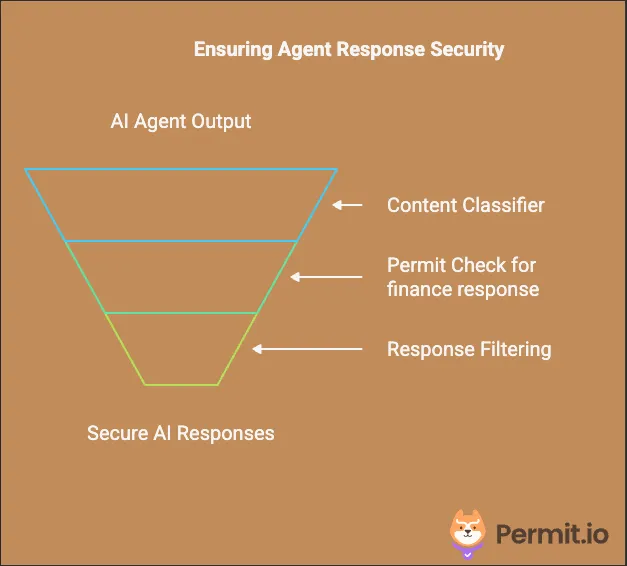
How Response Validation Works:
- Classifying the Response – The AI output is analyzed to determine whether it contains financial advice.
- Regulatory Compliance Check – Permit.io ensures that responses containing financial advice meet legal and ethical requirements.
- Adding Disclaimers – If required, a compliance disclaimer is automatically appended to the response before it is returned to the user.
Now, let’s implement this in our financial advisor AI agent:
Implementing Response Enforcement in main.py
Inside your main.py file, define the following function to validate AI-generated financial advice:
@financial_agent.tool
async def validate_financial_response(
    ctx: RunContext[PermitDeps],
    response: FinancialResponse
) -> FinancialResponse:
    """SECURITY PERIMETER 4: Response Enforcement
    Ensures all financial advice responses meet regulatory requirements and include
    necessary disclaimers.
    """
    try:
        # Check if the AI-generated response contains financial advice
        contains_advice = classify_response_for_advice(response.answer)

        # Verify if the response requires a disclaimer
        permitted = await ctx.deps.permit.check(
            ctx.deps.user_id,
            "requires_disclaimer",
            {
                "type": "financial_response",
                "attributes": {"contains_advice": str(contains_advice)},
            },
        )

        # Append a disclaimer if necessary
        if contains_advice and permitted:
            disclaimer = (
                "\\n\\nIMPORTANT DISCLAIMER: This is AI-generated financial advice. "
                "This information is for educational purposes only and should not be "
                "considered as professional financial advice. Always consult with a "
                "qualified financial advisor before making investment decisions."
            )
            response.answer += disclaimer
            response.disclaimer_added = True
            response.includes_advice = True

        return response

    except PermitApiError as e:
        raise SecurityError(f"Failed to check response content: {str(e)}")
Key Implementation Details
Classifying AI-Generated Responses
Before finalizing the AI output, we classify whether the response contains financial advice using a keyword-based approach:
def classify_response_for_advice(response_text: str) -> bool:
   advice_indicators = [
       "recommend", "should", "consider", "advise",
       "suggest", "better to", "optimal", "best option",
       "strategy", "allocation",
   ]
   response_lower = response_text.lower()
   return any(indicator in response_lower for indicator in advice_indicators)
If advice-related keywords are detected, the system flags the response for further validation.
🚨 Note: This is a simple implementation. In production, AI moderation tools or Natural Language Processing (NLP) models can improve response classification.
Adding Regulatory Compliance & Disclaimers
Once a response is classified, Permit.io checks whether the user’s permissions require a compliance disclaimer.
- If required, a disclaimer is appended to the AI response before it reaches the user.
- If not required, the response is returned unchanged.
This ensures that users receive proper legal disclaimers when necessary, reducing compliance risks.
Putting It All Together
Let’s see how all four perimeters work together in a complete request flow:
Here’s a complete example:
# Initialize the financial advisor agent with security focus
financial_agent = Agent(
    "anthropic:claude-3-5-sonnet-latest",
    deps_type=PermitDeps,
    result_type=FinancialResponse,
    system_prompt=(
        "You are a financial advisor. Follow these steps in order:\\n"
        "1. ALWAYS check user permissions first.\\n"
        "2. Only proceed with advice if the user has opted into AI advice.\\n"
        "3. Only attempt document access if the user has the required permissions."
    ),
)

# Example usage of the financial advisor AI agent
async def process_financial_query(user_id: str, query: str):
    """
    Processes a financial query while enforcing security checks.

    Args:
        user_id (str): The unique identifier of the user making the request.
        query (str): The financial question or request input by the user.

    Returns:
        Optional[str]: The AI-generated response if security checks pass, otherwise None.
    """
    permit = Permit(token=PERMIT_KEY, pdp=PDP_URL)
    deps = PermitDeps(permit=permit, user_id=user_id)

    try:
        result = await financial_agent.run(query, deps=deps)
        return result.data
    except SecurityError as e:
        print(f"Security check failed: {str(e)}")
        return None
Demo
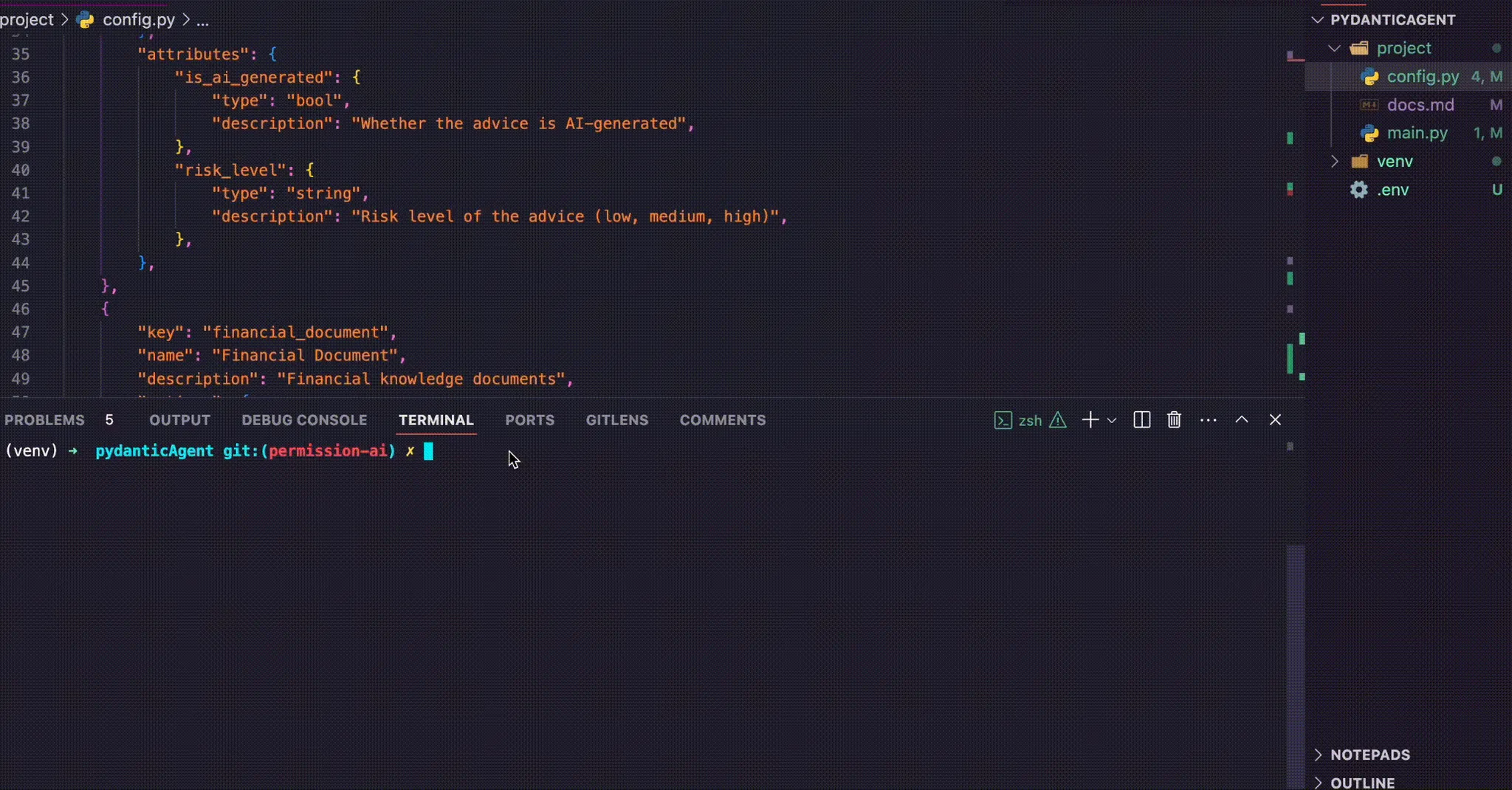
Here is a demonstration of our financial advisor AI Agent:
Final Notes -
As AI continues to reshape industries, integrating AI agents into applications must be accompanied by proper access control. Without structured security measures, AI agents remain vulnerable to unauthorized use, data breaches, and compliance violations.
By leveraging PydanticAI and Permit.io, we’ve demonstrated how to effectively implement fine-grained access control using the Four-Perimeter Framework. This approach ensures that:
- User input is validated before reaching the AI
- Sensitive data is protected at all times
- AI interactions with external systems remain secure
- Responses comply with industry regulations
As AI security is still an evolving field, we recognize that new challenges and solutions will emerge. The Four-Perimeter Framework is a starting point, and we’d love to hear your feedback on how this model can be further refined and optimized for real-world production deployments. Let us know your thoughts in our Slack community!